SLWF-01pro
Air conditioner Wi-Fi module for Midea, Idea, Neoclima, Electrolux, Beko and many more
Device setup
- Insert the USB port of the air conditioner
- Wait for the AC-wifi network to appear
- Connect to it with the password slwf01pro
- Go from the browser to the address http://192.168.4.1
- In the menu, select the home WiFi network
- Enter the password and connect.
- Home Assistant will see the device automatically and prompt you to add it
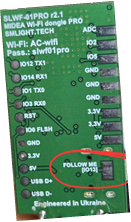
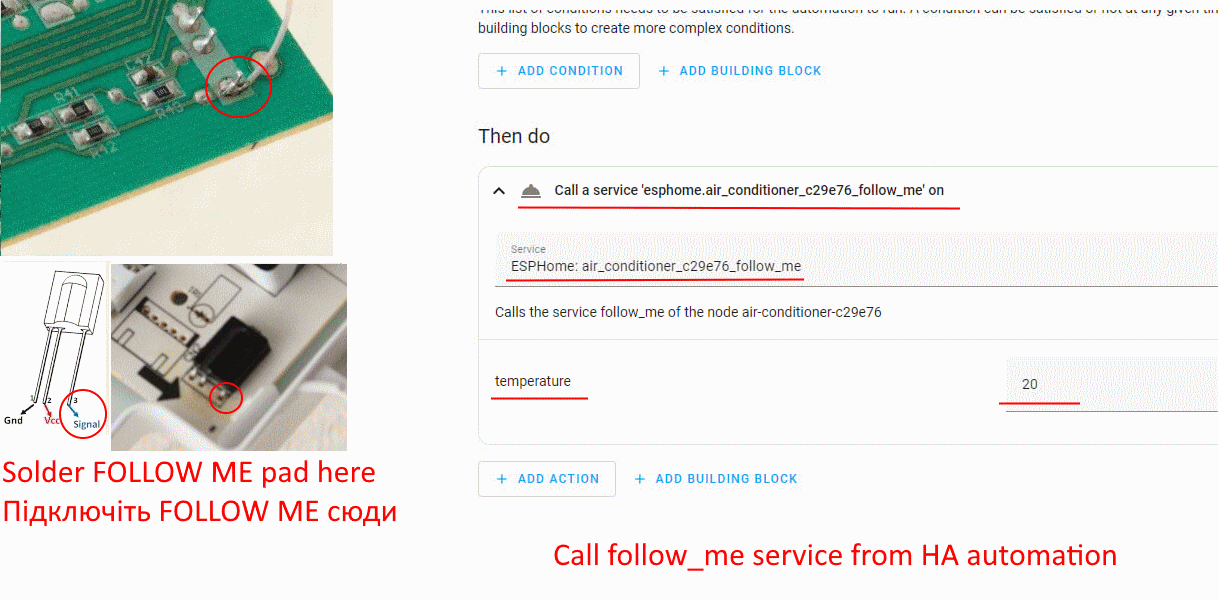
Optionally, you can solder a FOLLOW ME pad to use additional functionality that is only available via IR:
Don't forget to turn off the AC power before doing soldering!
FOLLOW ME pad location
Soldering location
Device update
Precompiled firmware
1. Install driver: https://learn.sparkfun.com/tutorials/how-to-install-ch340-drivers/all
2. Go to flasher tool https://smlight.tech/flasher/#slwf01proV2
3. Connect the device to the PC with the button pressed. Use a type-c connector!
4. After the flashing starts, you can release the button.
5. If the flashing has not started, repeat the first step.
Custom firmware
You can use custom firmware by compiling the ESPHome config yourself!
Download the config https://github.com/smlight-tech/slwf-01pro-esphome
Compile it using ESPHome https://esphome.io/guides/getting_started_hassio/
Flash device using ESPHome https://esphome.io/guides/getting_started_hassio/#updating-your-device