Zigbee Router mode
General information:
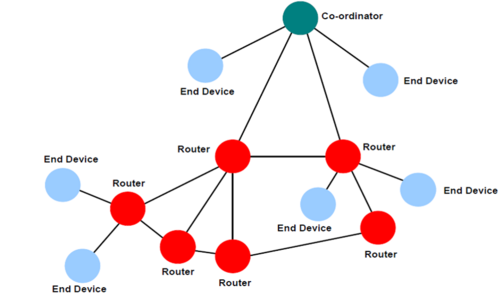
USB stick in Zigbee router mode expands your existing Zigbee network:
- amplifies the signal
- increases the maximum number of devices in the network by 32
Important: you need to pair the stick to your Zigbee network for it to start working as Zigbee router
Configuring device as Zigbee router
Flashing router firmware
- Go to https://smlight.tech/flasher/
- Select your model
- Press Update Firmware button
- Select dongle serial port
- Wait for connection
- Enable pairing in your Zigbee network
- Select firmware (Router)
- Flash firmware
- Immediately after the update, the device will start searching for the network, so it is important that the network is open at this moment.
Manuall pairing activation
If after flashing the device did not pair or you need to pair the device in another location, you can do this!
SLZB-07/MGx:
- Go to https://smlight.tech/flasher/
- Select your model
- Press Router reconnect button
- If that didn't work:
1. Download any serial terminal (e.g. terra term)
2. Connect the dongle to the PC
3. Open the dongle COM in the terminal at 115200 baurate
4. Send network leave
SLZB-07Px:
- Go to https://smlight.tech/flasher/
- Select your model
- Press Router reconnect button
- If that didn't work: repeat step "Flashing router firmware"
Troubleshooting
Сoordinator does not detect the dongle
- Make sure your ZigBee network is open
- Make sure the dongle is within range of your ZigBee network
- Activate pairing on the dongle manually
The dongle appears offline after a while
This may not be true. Z2M marks ZigBee devices as offline if they do not report anything for a long time, but the router firmware has nothing to report (the device does not have any sensors) so the system may mark it as offline.
If the device is truly offline, all devices that were connected through it will become unavailable.
If the device offline then the most likely reason is that it is outside the coverage area of your Zigbee network.