Zigbee Hub mode users (**Does not apply to you if you are using ZHA or Zigbee2MQTT**)
USB to Ethernet passthrough mode
Berry: HTTP and ZB modules
### Zigbee Hub mode breaking changesApplies only to those using [Zigbee Hub mode](https://smlight.tech/support/manuals/books/slzb-os/chapter/zigbee-hub)
#### What happened? In some cases, the ZigBee network key was written to the radio module incorrectly. We fixed this and now it will always written correctly. #### Impact There is a possibility that after the update your zigbee network will break because the network key will now be written correctly (not shifted) and it will not match what is your zigbee network already use. #### MigrationAll Zigbee Hub backups made before this update will become incompatible! Please delete old backups and create a new one after update to prevent conflicts!
In most cases, the migration should go smoothly. If you see the message: [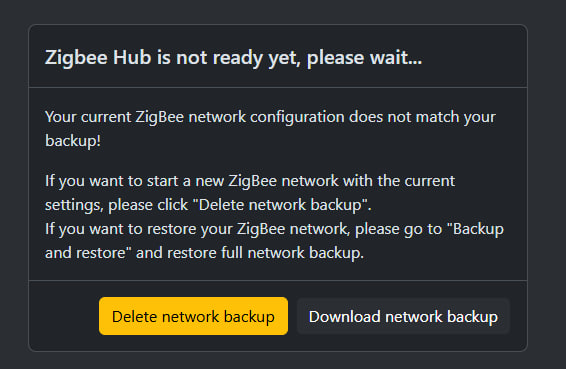](https://smlight.tech/support/manuals/uploads/images/gallery/2026-07/image.png) Click on "Delete network backup" and restart your device. You will probably have to re-pair your devices after this. ### USB to Ethernet passthrough mode #### What happened? We are completely switching to a new USB host driver. Why are we doing this? The old driver does not provide enough stability for our users, the device can often crash or not start at all when a USB device is connected. There is also a degradation in performance over time. Therefore, we are switching to a new improved driver that solves all these problems! #### Impact The old driver looked for the first available serial interface and used it automatically. The new driver allows you to choose which interface to use (some USB devices provide more than one interface) so you will now need to choose which interface you want to use. #### Migration [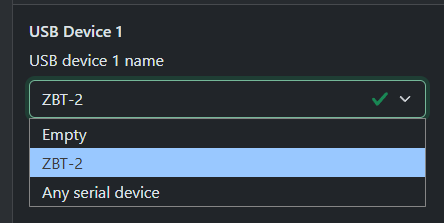](https://smlight.tech/support/manuals/uploads/images/gallery/2026-07/Pmbimage.png) Make sure your USB device is selected [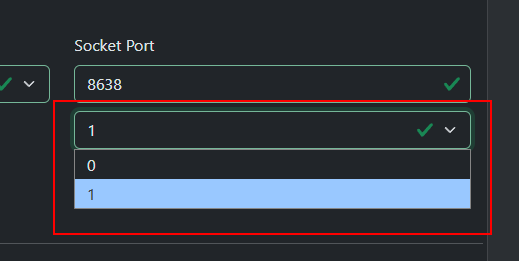](https://smlight.tech/support/manuals/uploads/images/gallery/2026-07/DDJimage.png) From the drop-down list under Port, select the interface you want to use. Save the settings and restart the device. If there are several interfaces and you don't know which one you need, try them all in turn or ask the manufacturer of this USB device which interface to choose.For ZWA-2 and ZBT-2 you need to select interface 1
### Berry: HTTP #### What happened? Stream mode APIs has been changed because the old one did not allow stream POST requests. #### ImpactIf you don't use HTTP stream mode, nothing impact for you.
`HTTP.open()` now requires explicit specification of whether stream mode is used (last parameter, optional). If not specified, stream mode is disabled. For stream mode: `HTTP.setHeader()` should be called after `HTTP.open()` but before `HTTP.completeStreamConfig()`The buffer size in `HTTP.open()` for stream mode now means how much data you are going to send in a POST. Required `HTTP.completeStreamConfig()` call to complete configuration. #### Migration Update your script according to this example [https://github.com/smlight-tech/slzb-os-scripts/blob/v3.3.5.dev0/docs/modules/http.md#quick-example-1](https://github.com/smlight-tech/slzb-os-scripts/blob/v3.3.5.dev0/docs/modules/http.md#quick-example-1) ### Berry: ZB #### What happened? The ZB module had a significant limitation from the very beginning - it could only work with Radio1 while MR coordinators had 2 radio and Ultima3 can have 3. Therefore, the ZB module was updated to support work with any number of radio modules. #### Impact **Now each ZB function requires specifying the number of the radio module to which it will be applied!** #### Migration Update your script according to this example: [https://github.com/smlight-tech/slzb-os-scripts/blob/v3.3.5.dev0/examples/basic/zb\_reboot\_on\_drop.be](https://github.com/smlight-tech/slzb-os-scripts/blob/v3.3.5.dev0/examples/basic/zb_reboot_on_drop.be) New API description: [https://github.com/smlight-tech/slzb-os-scripts/blob/v3.3.5.dev0/docs/modules/zb.md](https://github.com/smlight-tech/slzb-os-scripts/blob/v3.3.5.dev0/docs/modules/zb.md)