Known issues
We know this exists and are working on a fix
v3.3.8.dev1 (non-U devices)
OTA updates not working
What happened?
Starting with v3.3.8.dev1, OTA updates do not work on non-U devices.
Due to a bug, native OTBR support was enabled for non-U devices, which resulted in low available RAM values. Due to the low amount of available RAM, the device can no longer perform HTTPS requests, so OTA updates via our update server no longer work.
Solution
You need to update your device locally.
- Download the update file from this link https://updates.smlight.tech/firmware/slzb06x/core/slzb-os-v3.3.8.dev5-ota.bin
- Go to the menu "Settings and Tools" -> "Firmware update"
- Select "Flash the custom firmware" for "SLZB-OS Update"
- Select downloaded update file and press "Update firmware"
- Wait for the update to finish
All OS versions
Authentication does not work through a proxy
Solution
Add proxy to config:
error_page 403 https://domain;
error_page 404 https://domain;

location ~ ^/ {
proxy_pass http://192.168.xxx.xxx:80;
proxy_http_version 1.1;
proxy_set_header Host 192.168.xxx.xxx;
proxy_set_header Authorization $http_authorization;
proxy_set_header X-Forwarded-Proto $scheme;
proxy_set_header X-Real-IP $remote_addr;
proxy_set_header X-Forwarded-For $proxy_add_x_forwarded_for;
proxy_set_header Upgrade $http_upgrade;
proxy_set_header Connection $http_connection;
proxy_buffering off;
proxy_cache off;
proxy_read_timeout 3600s;
}
CC26XX radio modules (Texas instruments) freeze / hang / crash
Known problem for a long time
What happened?
CC2652P, CC2652P7, and CC2674P10 have a critical bug in the SDK and may hang, especially under high load.
Main symptom: "Error: SRSP - SYS - ping after 6000ms" error, i.e. the radio module is no longer sending any traffic.
In this state, the radio module may also not respond to RST pin, so sometimes this requires a physical power cycle.
Solution
Partial solution: limit traffic in the ZigBee network, remove spamming ZigBee devices. This will postpone the problem but will not solve it completely.
Complete solution: no complete solutions have been found yet.
Spontaneous device reboots: TASK_WDT
What happened?
The device reboots from time to time with the reboot reason TASK_WDT.
Solution
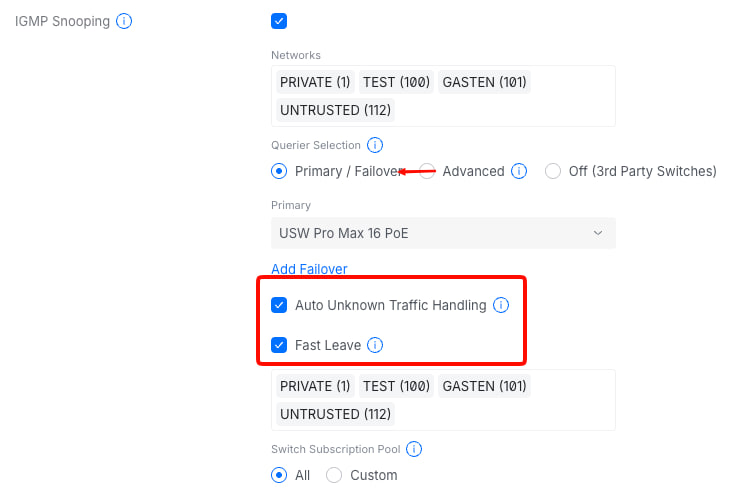
Usually the cause is spam mDNS traffic on your network.
The device can handle traffic of up to about 1000 multicast packets per second, if the flow is higher the device will reboot after a while.
To resolve this you need to do one of the following:
Disabling mDNS
Completely disable mDNS traffic at the router level or on the "Network" page in the coordinator settings.
Will work if you are not using mDNS and are not using Thread.
Finding the source of multicast traffic
Yes, you need to analyze and find the device that is spamming the network. What to do with this device is up to you. Usually, the device that generates such traffic have a bug in its firmware.
Additional router settings
IGMP Snooping in combination with the settings in the card below can help