Zigbee Hub
Build your local ZigBee network without Z2M/ZHA
About Zigbee Hub mode
4. About Zigbee Hub mode
It is highly recommended to use U series coordinators for this mode (SLZB-06xU / MRxU / Ultima)
Limitations:
- no support for ZigBee devices that require a manufacturer code
- no support for ZGP
- no OTA updates for ZigBee devices
- limited support for ZigBee devices that use non-standard clusters (requires special converters)
- limited number of devices that can be paired:
U series coordinators - up to 100 devices.
non-U series - up to 20 devices.
It is not recommended to use more than this limit (although technically possible)
4.1 What is Zigbee Hub in SLZB-OS?
The Zigbee Hub feature allows the SLZB device to run its Zigbee network directly on the device — without needing an external computer, Raspberry Pi, or NAS to host the Zigbee stack.
In Zigbee Hub mode, SLZB-OS launches an integrated Zigbee stack service that can connect directly to your smart home platform over MQTT.
This mode is ideal for:
-
Self-contained setups where the device acts as both the coordinator and the host.
-
Reducing complexity by eliminating extra hardware.
-
PoE/Ethernet-based installations for maximum stability.
When Zigbee Hub is active, a dedicated Zigbee Hub menu appears in the SLZB-OS interface, containing the following pages:
-
Dashboard – Live overview of Zigbee network status.
-
Devices – List and manage all paired Zigbee devices.
-
MQTT – Configure the MQTT broker connection.
-
Settings – Advanced Zigbee network and coordinator options.
4.2 Zigbee Hub → Dashboard
The Dashboard is the central monitoring page for your Zigbee network.
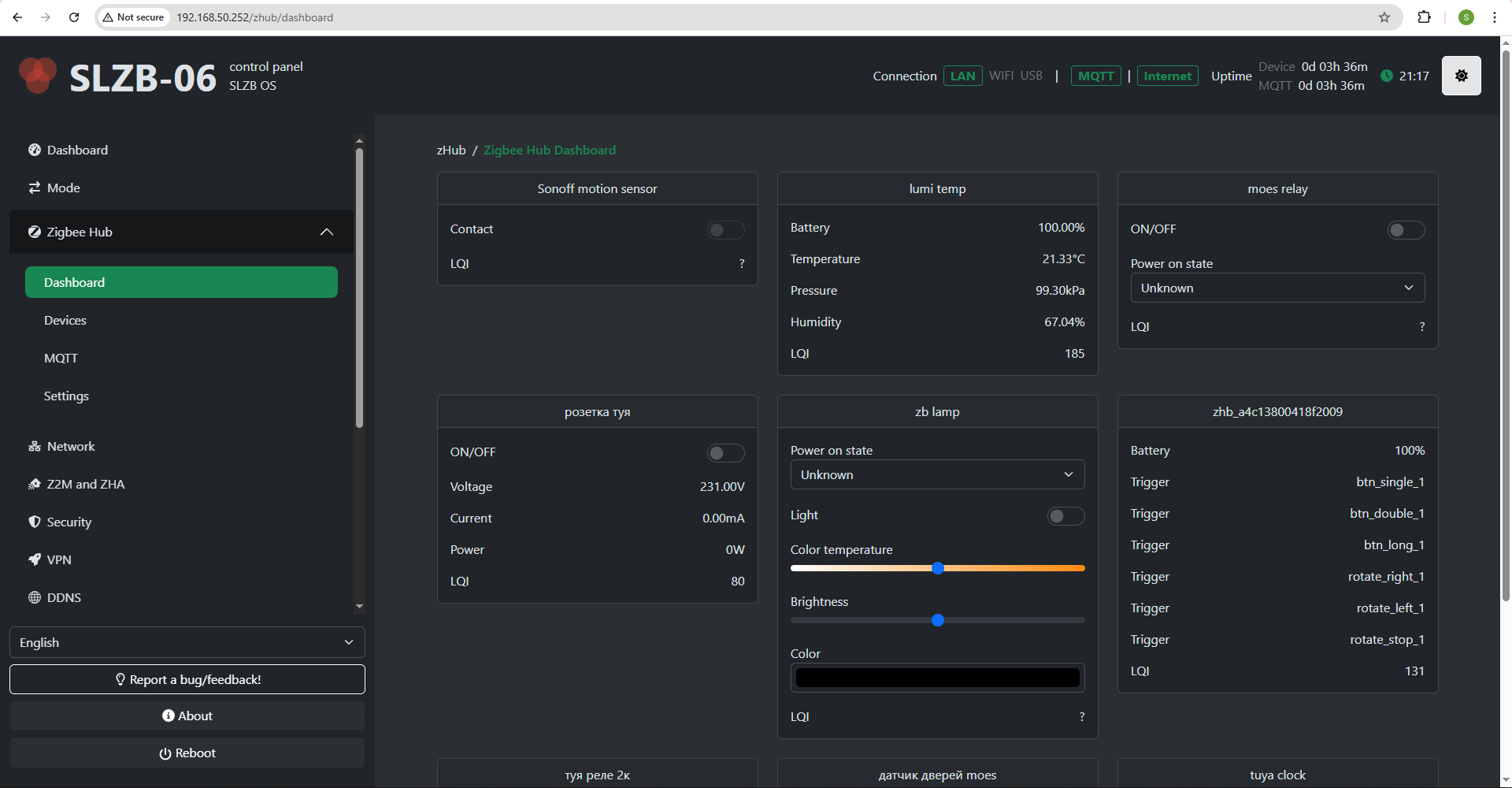
The dashboard contains cards of your ZigBee devices with the data they provide and controls.
The dashboard is updated in real time via SSE.
4.3 Zigbee Hub → Devices
The Devices page lists every Zigbee device paired to your coordinator.
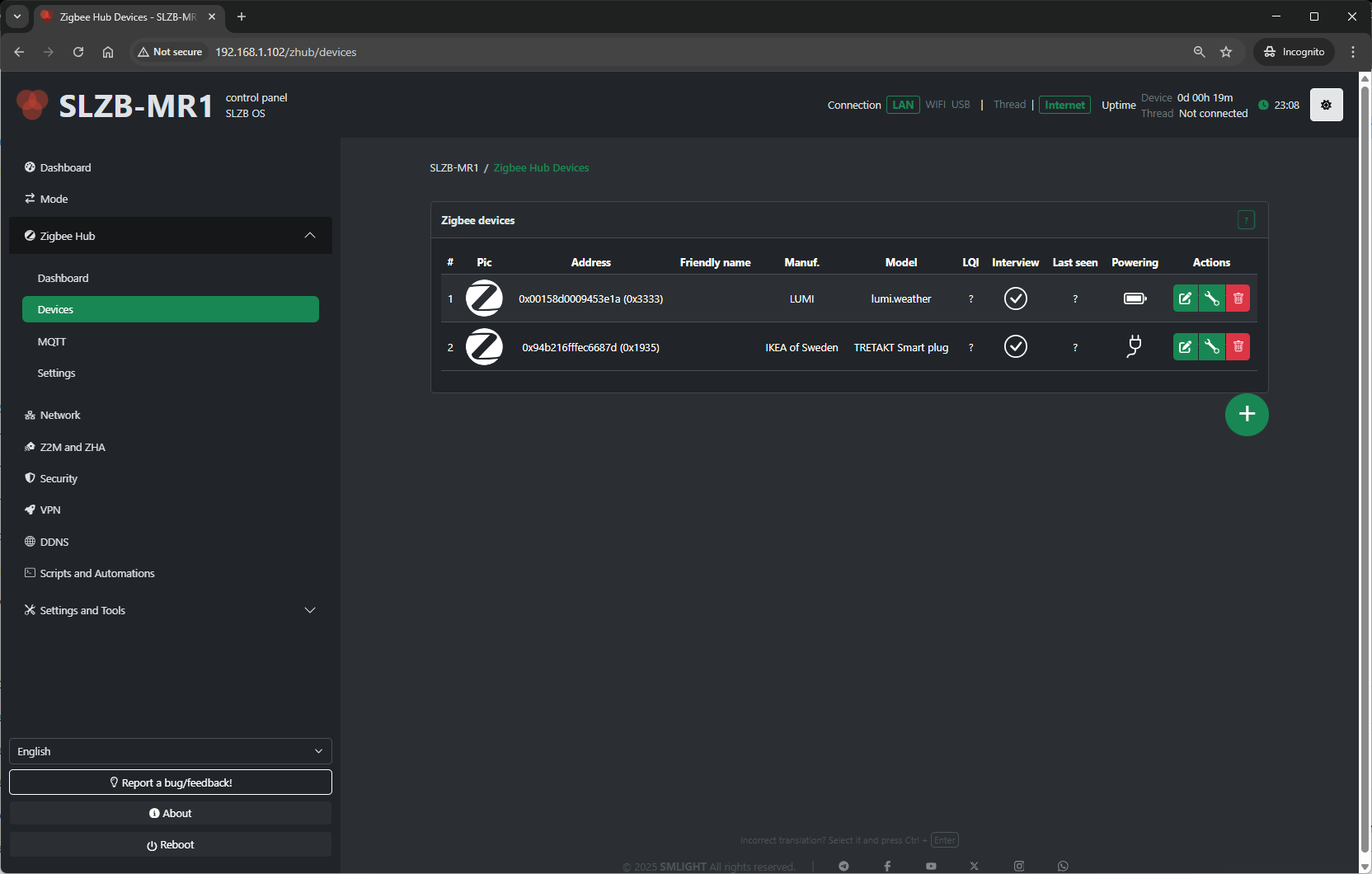
Pairing control:
- Permit Join (+ button on the bottom right side of the device table) – Allow or deny new devices joining the network.
For each device, you’ll see:
-
Name / Friendly Name – Human-readable identifier.
-
IEEE Address – Unique device ID.
-
Network Address – Short Zigbee address assigned by the coordinator.
-
Last Seen – Timestamp of the last communication.
- Powering – Device power source (AC/battery) or ? if the device does not provide information.
-
Link Quality (LQI) – Signal strength indicator.
-
Actions:
-
Rename device
-
Remove/unpair device
-
View device details (clusters, endpoints, bindings)
-
Bind/unbind devices (if supported)
-
Typical uses:
-
Verify devices are online and responsive.
-
Rename devices for easier identification in automations.
-
Remove devices no longer in use.
Device config
How to rename device
Select the pencil icon 
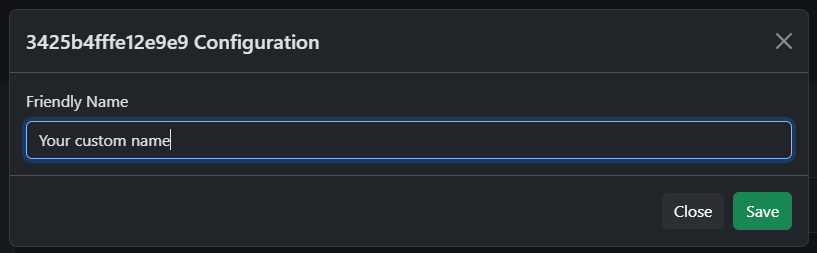
Enter new name and press "Save". Maximum length - 50 characters.
Device config
Click on the wrench
Binding
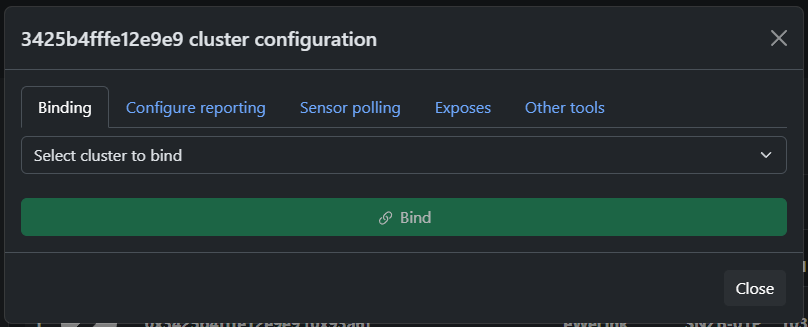
Configure reporting
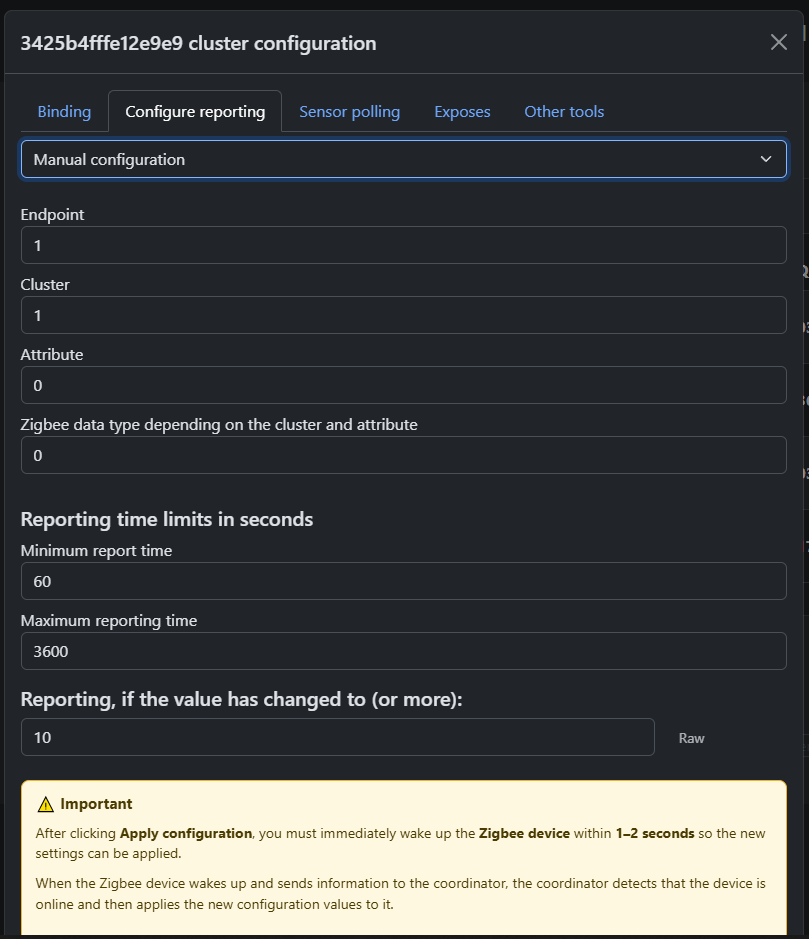
Polling
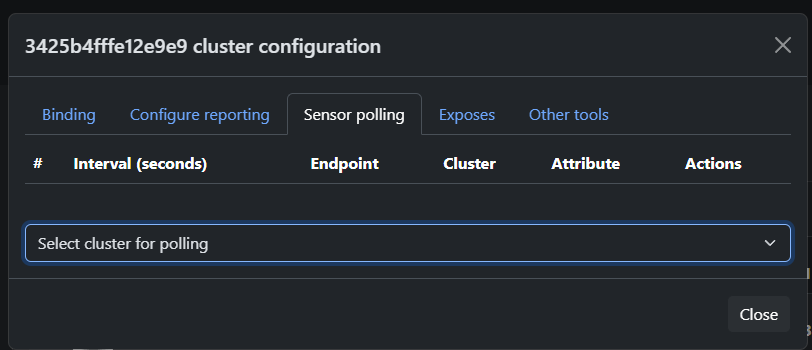
Allows you to configure polling of the selected attribute after a certain time interval
Exposes
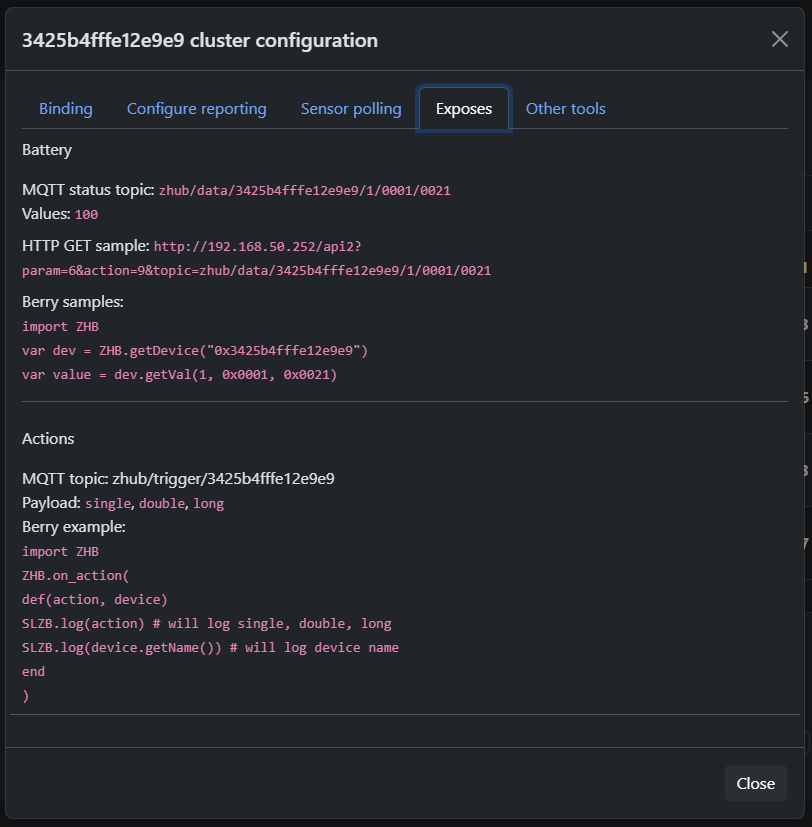
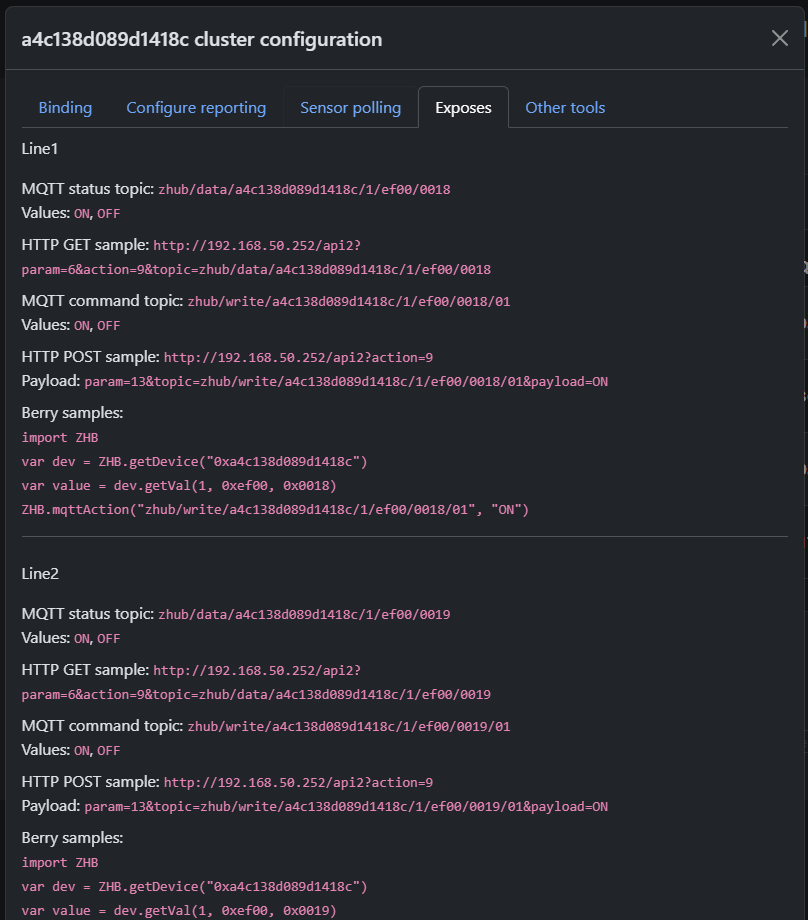
Provides information about expected data from the device and examples of using MQTT, HTTP, and Berry API to get or set device state.
IMPORTANT!
This section provides information about EXPECTED data from the device, based on information about the device clusters or converter (if it exists).
This information may not match the actual behavior of the device if it uses non-standard clusters!
If this is a Tuya DP device, then information will be displayed here only if a converter exists for the device!
Other tools
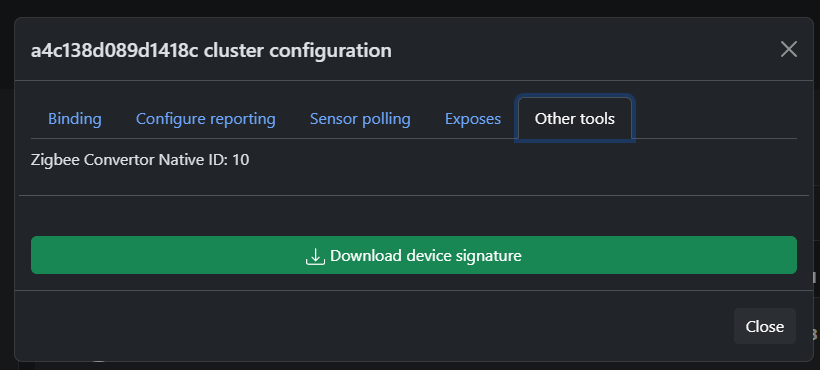
Here you can find the ZCN converter number (if used) and download device information
4.4 Zigbee Hub → MQTT
This page configures the MQTT connection that Zigbee2MQTT (running on SLZB-OS) uses to communicate with your smart home platform.
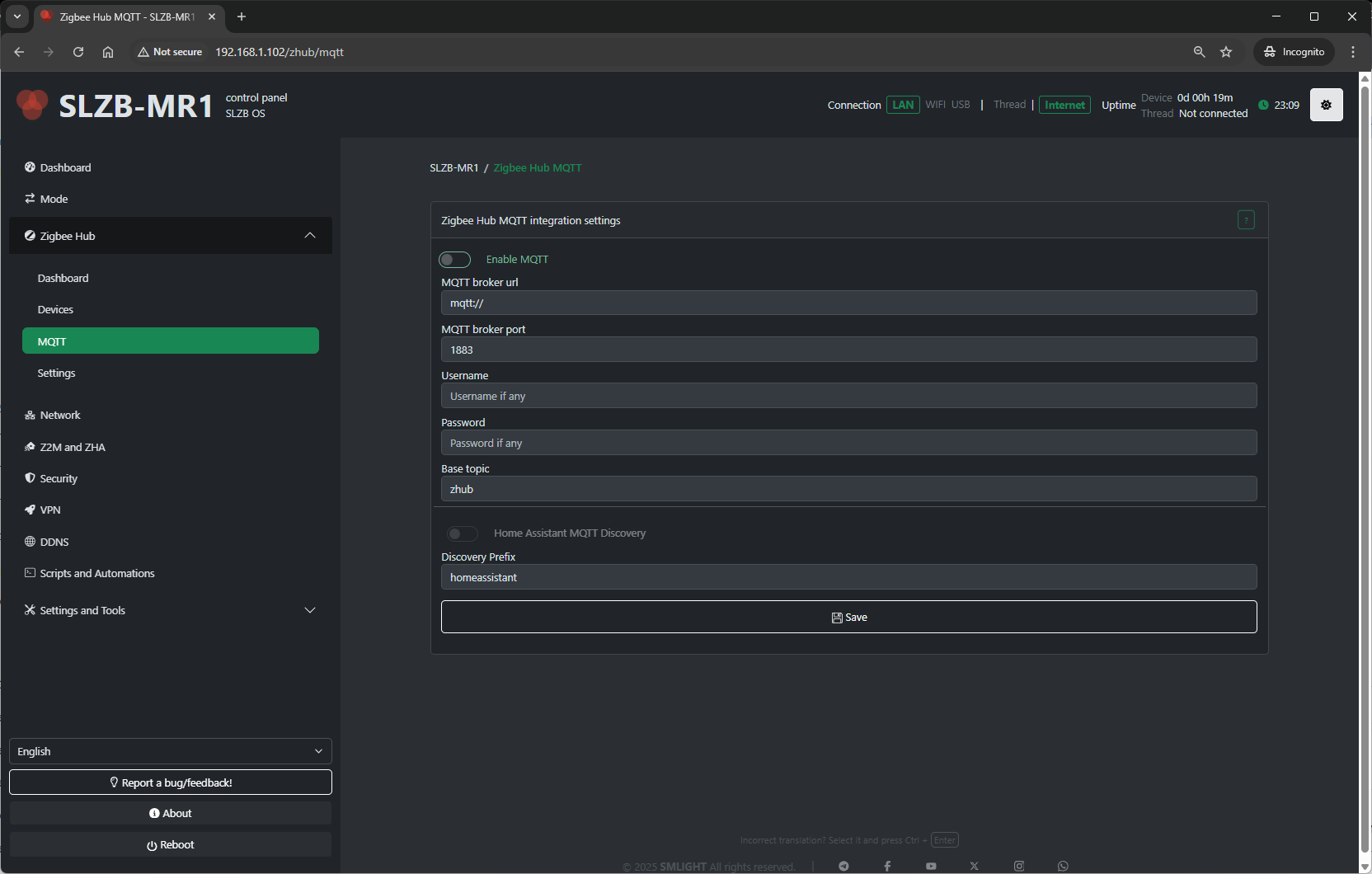
Configuration fields include:
-
MQTT Server Address – IP or hostname of your broker (e.g.,
mqtt://192.168.1.100). -
Port – Default 1883 for MQTT, 8883 for MQTT over TLS.
-
Username / Password – Broker authentication (if required).
-
Base Topic – Topic prefix for Zigbee messages (default:
zigbee2mqtt). - Discovery Prefix - Home assistant main topic name.
Tips:
-
For Home Assistant with Mosquitto add-on, use the HA IP and port
1883. -
Always use a unique base topic if you run multiple Zigbee networks.
-
Save and restart Zigbee Hub after making MQTT changes.
4.5 Zigbee Hub → Settings
The Settings page contains deeper configuration for the Zigbee coordinator and Zigbee2MQTT service.
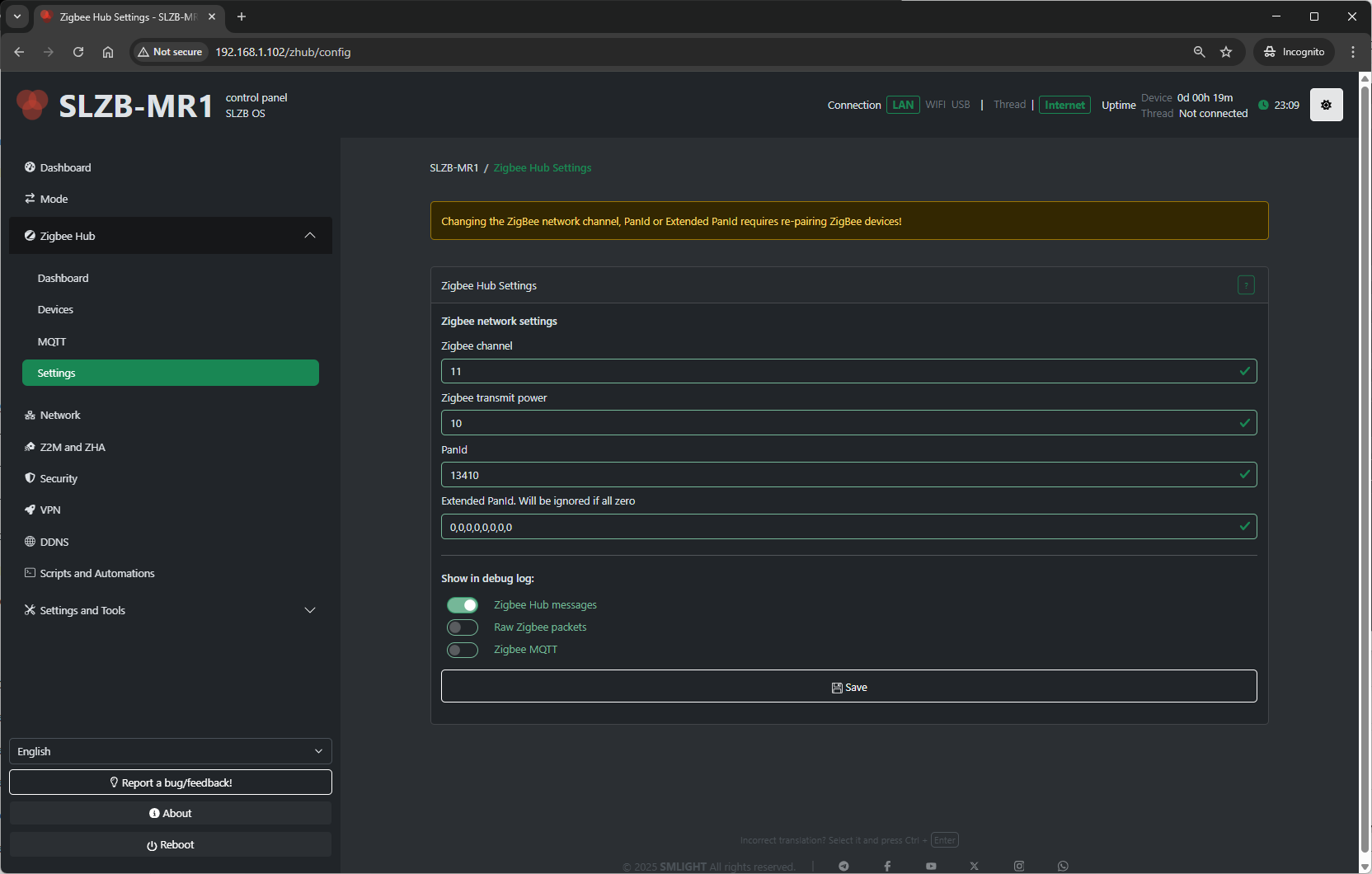
Typical settings available:
-
Network Parameters:
-
PAN ID – Zigbee network identifier.
-
Channel – RF channel (11–26; avoid Wi-Fi overlap if possible).
-
Extended PAN ID – Long network identifier.
-
-
Transmit Power – Radio TX power in dBm (higher = longer range, more power draw).
- Show in debug log - Select which categories of Zigbee-related information are recorded in the Log & Debug page.
-
Zigbee Hub messages – Logs high-level events from the Zigbee Hub service (e.g., device joins, status updates).
-
Raw Zigbee packets – Logs low-level Zigbee frame data; useful for deep protocol debugging.
-
Zigbee MQTT – Logs MQTT messages related to Zigbee communication, including publishes and subscriptions.
-
Best practices:
-
Change the Zigbee channel only on a fresh network (re-pair required after change).
-
Keep
Permit Joindisabled most of the time for security. -
Adjust transmit power to match your coverage needs and regulatory limits.
4.6 Troubleshooting
Problems when starting a Zigbee network
OS v3.0.9 update is breaking. If you updated OS to v3.0.9 and started getting this error then follow the instructions below
- turn off coordinator
- turn off ALL Zigbee routers that were connected to Zigbee Hub. This is important, it will not work without this
- turn on coordinator. Zigbee Hub should start now but zigbee devices will be unavailable
- remove all devices (click on the red trash can)
- download and run berry script below, this script will keep permit join enabled as long as it is running
#META {"start":0}
#Insert your code below
import ZHB

ZHB.waitForStart(0xFF)

while 1
  ZHB.permitJoin(254)
  SLZB.delay(255 * 1000)
end
- repair all devices
- after devices repaired you can stop and delete script
- move the coordinator away from the wifi router
- make sure there is no other coordinator nearby with the same zigbee network settings
MQTT API
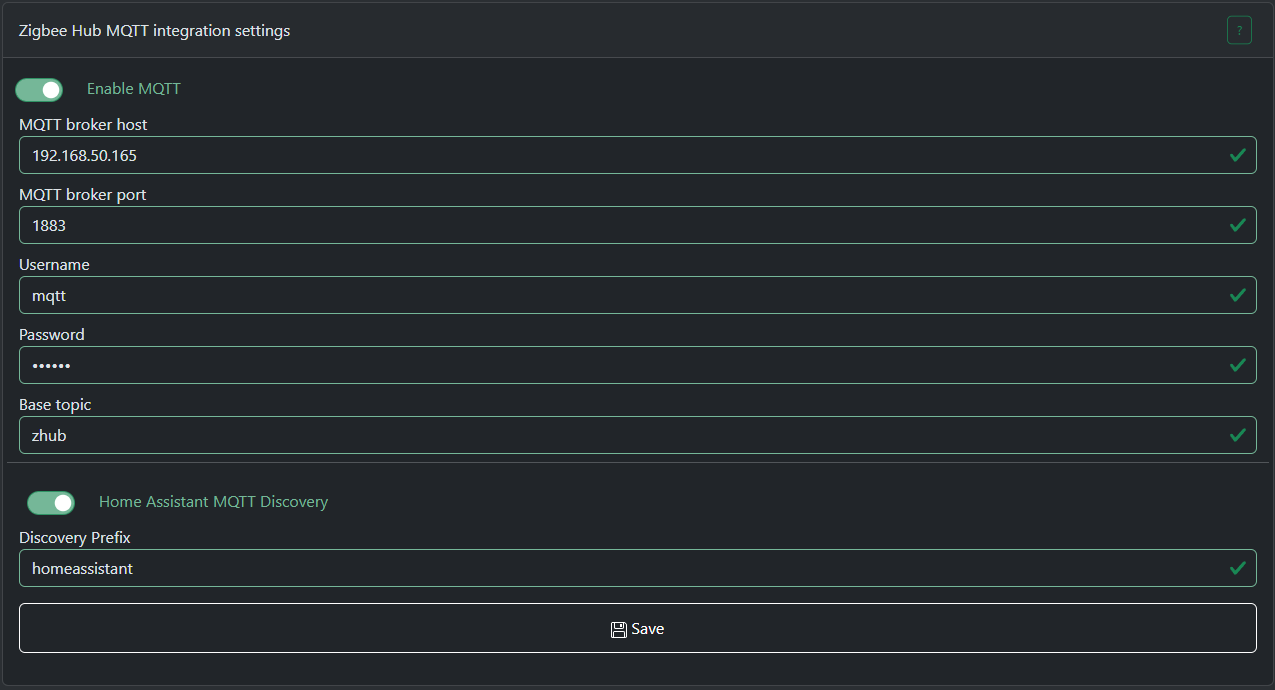
Zigbee Hub mode has the ability to connect to local or remote MQTT brokers. Currently only TCP connections are supported.
This document describes MQTT API for SLZB-OS 3.0.9 or higher
Topics are divided into IN and OUT.
IN - you can send messages to these topics.
OUT - Zigbee Hub sends messages to these topics.
zHub topics format
Data topic (OUT)
General data topic format below:base topic / data / zigbee device ieee / zigbee endpoint / zigbee cluster / zigbee attribute
base topic - global prefix, so you can have few Zigbee Hubs connected to one broker, you just have to set different base topics.data - static text (topic type)zigbee device ieee - sender IEEE address in HEX format.zigbee endpoint - zigbee endpoint from which this message is coming, DEC format.zigbee cluster - zigbee cluster from which this message is coming, HEX format.zigbee attribute - zigbee attribute from which this message is coming, HEX format.
Data topic example: zhub/data/a4c1383439bf5cc9/1/0000/0001
Read topic (IN) (available from v3.3.0)
This topic accepts requests to read attributes of ZigBee devices.
When you send a message to this topic, the coordinator generates and sends a request for the specified attribute to the target ZigBee device. The device must be online to accept the request, so this is usually used for AC-powered devices.
Topic format: base topic / read / zigbee device ieee / zigbee endpoint / zigbee cluster / zigbee attribute
base topic - global prefix, so you can have few Zigbee Hubs connected to one broker, you just have to set different base topics.read - static text (topic type)zigbee device ieee - sender IEEE address in HEX format.zigbee endpoint - zigbee endpoint from which this message is coming, DEC format.zigbee cluster - zigbee cluster from which this message is coming, HEX format.zigbee attribute - zigbee attribute from which this message is coming, HEX format.
Read topic example: zhub/read/a4c1383439bf5cc9/1/0006/0000
payload: any text
Attribute update will be sent to data topic!
PLEASE NOTE!
You must add any text content to the payload!
Do not send an empty payload to this topic!
An empty payload will only delete this topic (if it exists). The coordinator will not respond to empty payloads.
Command topic (IN)
This topic is intended for sending ZCL commands to a Zigbee device.
General cmd topic format below:base topic / cmd / zigbee device ieee / zigbee endpoint / zigbee cluster / zigbee command
base topic - global prefix, so you can have few Zigbee Hubs connected to one broker, you just have to set different base topics.cmd - static text (topic type)zigbee device ieee - target zigbee device IEEE address in HEX format.zigbee endpoint - target zigbee device endpoint to which this message is coming, DEC format.zigbee cluster - target zigbee device cluster to which this message is coming, HEX format.zigbee command - zigbee command to send, HEX format.
Some clusters have special handlers for input commands, such as the ON/OFF or Light cluster. You can find their formats below:
ON/OFF cluster payload format for command topic
ON - send ON commandOFF - send OFF command
Example: zhub/cmd/a4c1383439bf5cc9/1/0006 payload: ON
Will send command to enable relay or light device.
Level control for Light cluster payload format
0000 command payload is a number in DEC from 1 to 254, the larger the number, the brighter the lamp will be.
Color control cluster payload format
0007 command payload is a color in HEX or RGB format. For example: 255,29,0 or #FFFFFF000a command payload is a light temperature in mired. For example: 200
Other clusters
If no built-in clusters or ZCN converters has overridden the processing of this command, if the command contains a payload, it must be a HEX string of the following format:
- Bytes without spaces, uppercase, multiple of two. Example: 010203FF
- Bytes with spaces, uppercase, grouped by two. Example: 01 02 03 FF
Write topic (IN)
This topic is intended for writing ZigBee device ZCL attributes.
General write topic format below:base topic / write / zigbee device ieee / zigbee endpoint / zigbee cluster / zigbee attribute
base topic - global prefix, so you can have few Zigbee Hubs connected to one broker, you just have to set different base topics.write - static text (topic type)zigbee device ieee - target zigbee device IEEE address in HEX format.zigbee endpoint - target zigbee device endpoint to which this message is coming, DEC format.zigbee cluster - target zigbee device cluster to which this message is coming, HEX format.zigbee attribute - target zigbee device attribute to which this message is coming, HEX format.
Cluster 0006, attribute 4003 payload format
Last state - device will remember its stateON - device will be on after power lossOFF - device will be off after power lossCluster EF00 (Tuya DP) payload format
Please note that the write topic format for Tuya is different!
base topic / write / zigbee device ieee / 1 / ef00 / data point / data type
data point - Tuya data point id. You can read more about it here: https://www.zigbee2mqtt.io/advanced/support-new-devices/03_find_tuya_data_points.htmldata type - a number that represents the type of data being sent.
0 - RAW, 1 - BOOL, 2 - INT, 3 - STRING, 4 - ENUM, 5 - BITMAP
Examples:
topic: zhub/write/a4c138d089d1418c/1/ef00/0018/1
payload: 1
Any other clusters/attributes payload format
Payload should contain JSON: {"type": <zigbee data type>, "data":<data to be sent>}type - a number that represents the type of data being sent.
Zigbee Data Types and Data Type IDs
|
Data Class |
Data Type |
Data Type ID |
|---|---|---|
|
Null |
No data |
0x00 |
|
General Data |
8-bit data |
0x08 |
|
Logical |
Boolean |
0x10 |
|
Bitmap |
8-bit data |
0x18 |
|
Unsigned integer |
Unsigned 8-bit integer |
0x20 |
|
Signed integer |
Signed 8-bit integer |
0x28 |
|
Enumeration |
8-bit enumeration |
0x30 |
|
Floating point |
Semi-precision |
0x38 |
|
String |
Reserved |
0x40 |
|
Ordered sequence |
Array |
0x48 |
|
Collection |
Set |
0x50 |
|
Reserved |
- |
0x58—0xdf |
|
Time |
Time of day |
0xe0 |
|
Identifier |
Cluster ID |
0xe8 |
|
Miscellaneous |
IEEE Address |
0xf0 |
|
Unknown |
Unknown |
0xff |
data - a HEX string of the following format:
- Bytes without spaces, uppercase, multiple of two. Example: 010203FF
- Bytes with spaces, uppercase, grouped by two. Example: 01 02 03 FF
Please note that the number of bytes in the payload strictly depends on the data type!
For example, if you send data with type 16-bit integer, the number of bytes in the payload should be 2.
Example: {"type": 33, "data":"0000"}
33 - is 0x21 converted to DEC
System control topic (IN) (available from v3.3.0)
This topic allows you to control main functions of the Zigbee Hub.
Topic format: base topic / system_control
Payload format: {"action": "<system control actions>", <additional parameters>}
Permit join action
Allows you to open a ZigBee network to add new devices.
Payload format: {"action": "permit_join", "time": <time to open the network in seconds, from 1 to 254>, "addr": <network address of the device on which to open the network. Can be omitted if the network needs to be opened on all devices>}
Examples:{"action": "permit_join", "time": 60} - open the entire network for 60 seconds{"action": "permit_join", "time": 0} - close network{"action": "permit_join", "time": 60, "addr": 64580} - open the network for 60 seconds only on device with network address 64580 (DEC number, not HEX)
Configure reporting action
Configures reporting for the selected device. If the device is battery-powered, it must be woken up to accept this command.
Payload format: {"action": "configure_reporting", "ieee": <IEEE address of the target device, HEX string>, "ep": <target endpoint, DEC>, "cl": <target cluster, DEC>, "attr": <target attribute, DEC>, "minRep": <minimum time for reporting in seconds, DEC>, "maxRep": <max time for reporting in seconds, DEC>, "dType": <zigbee reporting data type for this attribute, DEC>, "change": <how much the attribute value must change for reporting to occur. Should be omitted for discrete attributes>}
Examples:{"action": "configure_reporting", "ieee": "3425b4fffe12e9e9", "ep": 1, "cl": 6, "attr": 0, "minRep": 1, "maxRep": 3600, "dType": 0} - configure ON/OFF attribute repotring to minimum 1s and max 3600s report time. "change" field is omitted because it is a discrete attribute.{"action": "configure_reporting", "ieee": "3425b4fffe12e9e9", "ep": 1, "cl": 2820, "attr": 1285, "minRep": 30, "maxRep": 3600, "dType": 33, "change": 200} - configure RMS Voltage attribute repotring to minimum 1s and max 3600s report time. Reporting will occur no earlier than 30s if the value has changed by 200 or more (2v) or after a 3600s timeout if value does not changed.
Binding action
Binds the target device to the coordinator or to another device.
If one device bound to another, the coordinator will stop receiving reports from the bound device cluster.
Payload format: {"action": "binding", "mode": "<binding mode>", "scrIeee": "<IEEE of the device to which the binding request will be sent, HEX string>", ""scrEp": <endpoint number that needs to be bound, DEC number>, "scrCl": <cluster number that needs to be bound, DEC number>, <additional parameters>}
To device mode
Binds one device to another.
Payload format: {"action": "binding", "mode": "to_device", "scrIeee": "<IEEE of the device to which the binding request will be sent, HEX string>", ""scrEp": <endpoint number that needs to be bound, DEC number>, "scrCl": <cluster number that needs to be bound, DEC number>, "dstEp": <endpoint number to which the binding will be done, DEC number>, "dstIeee": "<IEEE device to which binding will be performed, HEX string>"}
Example: {"action": "binding", "mode": "to_device", "scrIeee": "3425b4fffe12e9e9", ""scrEp": 1, "scrCl": 6, "dstEp": 1, "dstIeee": "a4c1389ffb198304"} - binding a Zigbee button (ON/OFF cluster) to a Zigbee relay.
To coordinator mode
Binds to the coordinator so that it can receive reports from this cluster.
Zigbee Hub will attempt to bind automatically when interviewing a device, but this does not always work perfectly.
Payload format: {"action": "binding", "mode": "to_device", "scrIeee": "<IEEE of the device to which the binding request will be sent, HEX string>", ""scrEp": <endpoint number that needs to be bound, DEC number>, "scrCl": <cluster number that needs to be bound, DEC number>}
Example: {"action": "binding", "mode": "to_coordinator", "scrIeee": "3425b4fffe12e9e9", ""scrEp": 1, "scrCl": 6} - binding a Zigbee button (ON/OFF cluster) to the coordinator.
Berry ZCN system manual
Everything here requires the device to run in Zigbee Hub mode and SLZB-OS v3.3.8.dev0 or higher.
This document describes the Berry side of the ZCN converter system: writing device-specific Zigbee Hub converters as Berry scripts, without rebuilding the firmware.
The concept of ZCN primarily refers to native C++ converters, but we decided to keep this name for Berry converters for simplicity. Actually Berry converters are not native, they are a scripting interface.
1. What Berry ZCN is and when to use it
A Berry ZCN converter is the runtime-scriptable twin of a native zcn_converter_t: a description of how a specific Zigbee device deviates from standard ZCL handling — extra/proprietary attributes, remapped clusters, custom value normalization, custom MQTT/Home Assistant discovery — plus Berry callback functions that the hub invokes at the same points where native converters invoke C function pointers.
Use Berry ZCN when you want to:
- Prototype a converter for a new device without a firmware rebuild — iterate directly in the on-device script editor, then port the result to a native converter for shipping.
- Support a device locally that the stock firmware does not have a converter for.
- Experiment with normalization/serialization/discovery logic against a live device.
2. Architecture and lifecycle
2.1 Slots
There are (currently 2) slots for Berry converters. Each registered converter occupies one slot. Registration fails with "no free slots for ZCN" when all slots are taken.
2.2 VM binding and garbage collection
- A converter belongs to the VM that registered it.
- All callback functions passed into the structure are GC-pinned while the converter exists, and unpinned on delete — you can use closures/anonymous
defblocks safely. - When a script's VM stops, all its converters are automatically deleted. Restarting the script re-registers them.
2.3 Attachment is NOT persisted — attach on every boot
This is the most important lifecycle difference from native ZCN:
- The native converter index is saved in the device database and restored on boot.
- The Berry converter index is runtime-only. It resets every boot and is set only by:
- Interview matching — during a device interview.
- Explicit
ZCN.attach(slot, ieee)from your script.
Since interviews only run at pairing, a converter script must call ZCN.attach() for its devices every time it starts. The standard pattern:
var slot = ZCN.register(my_converter)
ZCN.attach(slot, "0x3425b4fffe12e9e9") # repeat for each device
Optional, run the script with autostart (#META {"start":1}) so the converter is registered and attached right after boot.
2.4 Priority over native converters
Berry converters take priority everywhere:
- Interview matching: all Berry slots are checked first; if one matches, is set and native matching is skipped.
- Runtime dispatch: every hook site checks
ZCN_CHECK_BE(dev)before the nativeZCN_CHECK(dev)— data handling, on_cmd, MQTT write/cmd, HA discovery, trigger discovery. A device can technically have bothzcnandzcn_beset; the Berry one is consulted first wherever it provides an override.
2.5 Matching logic
- If the converter has a
matcherfunction — it is called asdef (dev)with aZigbeeDeviceinstance and must returntrue/false.model/manufstrings are ignored. - Otherwise — exact string compare of both
manuf(Basic attr 0x0004) andmodel(Basic attr 0x0005) against the interviewed values.
3. Quick start
The easiest way to produce a converter is the ZCN Builder page in the web UI (Zigbee Hub → ZCN Builder): assemble the structure in the form, pick callback presets, and copy the generated Berry code.
ZCN.register() validates the map, finds a free slot, and feeds the structure into the native slot. It returns the slot number (needed for ZCN.attach) and raises a descriptive error on failure (the partially built slot is deleted automatically).
4. Converter map reference
The converter is a plain Berry map. Missing keys get defaults: int → 0, string → "", bool → false, function → nil (exceptions noted below). Extra/unknown keys are ignored.
4.1 Top level
| Key | Type | Required | Meaning |
|---|---|---|---|
signature |
map | yes (raises otherwise) | Device matching, see below |
on_annonce |
function | no | Called when the device announces itself (power-on / rejoin) |
on_intw_stage |
function | no | Called before interview stages; see §5.2 |
overrides_count |
int | yes, if overrides present |
Must equal overrides.size() — it is not derived automatically |
overrides |
list of maps | no | Endpoint overrides |
4.2 signature
The signature tells SLZB-OS whether this converter is suitable for the device for which the interview is currently being performed.
| Key | Type | Meaning |
|---|---|---|
matcher |
function | If present, used instead of model/manuf. Must be a function |
model |
string | Zigbee model identifier (exact match via strcmp()) |
manuf |
string | Manufacturer name (exact match) |
4.3 Endpoint override (element of overrides)
| Key | Type | Meaning |
|---|---|---|
endpoint |
int | Zigbee endpoint number this override applies to |
clusterCount |
int | Number of clusters in clusters |
clusters |
list of maps | Cluster object array |
4.4 Cluster override (element of clusters)
| Key | Type | Default | Meaning |
|---|---|---|---|
id |
int | 0 | ZCL cluster id (e.g. 0x0402) |
addMode |
int | 0 | 0 = ADD (merge with the standard cluster: your attrs are used where ids collide, standard attrs fill the rest),1 = OVERRIDE (standard cluster fully ignored; only your definition used) |
bind |
bool | false | Bind this cluster to the hub during interview |
attrCount |
int | 0 | Number of attributes in attrs |
attrs |
list of maps | — | Attribute objects array |
cmd_config |
map | — | Cluster command handling (buttons/actions), see below |
on_mqtt_cmd |
function | nil | Used for cmd_config.Handles MQTT messages on the {base}/cmd/... topic for this cluster. Return true = handled (standard handling skipped) |
4.5 cmd_config
Tells SLZB-OS what actions(triggers) this cluster provides. Typically used for Zigbee buttons and scene remotes.
| Key | Type | Meaning |
|---|---|---|
on_cmd |
function |
Converts the received command record into an action string (e.g. Must return a string to publish it as an action. |
exposes |
string | "|"-separated list of all possible action strings — used to generate device-trigger discovery |
exposesOverride |
function | Dynamic alternative to exposes: return the "|"-separated list at discovery time; empty-string return skips triggers for this cluster |
Note: the command path is only taken when the cluster has on_cmd and at least one of exposes / exposesOverride.
4.6 Attribute override (element of attrs)
| Key | Type | Default | Meaning |
|---|---|---|---|
id |
int | 0 | ZCL attribute id |
name |
string | "" | Human-readable name (shown in web UI) |
mqttClass |
int | 0 | MQTT entity type, see table below |
mqttSubClass |
string | "" | MQTT entity device_class (e.g. "temperature", "moisture") |
unit |
string | "" | Unit of measurement (e.g. "°C") |
dataType |
int | 0 |
ZCL data type. Required for configuring reporting and if this attribute is writable. Can be omitted if the attribute is not writable and not reported. |
ram |
bool | false | If True, ZHB will create a special container (record) for this attribute in RAM at startup. The received value will be cached in this container, only the last value is stored. |
rp |
bool | false | Configure attribute reporting during interview. Also adds this attribute to web UI "configure reporting" dialog. |
minReport |
int | 1 | Reporting: minimum interval, s. Can be omitted if rp is false |
maxReport |
int | 3600 | Reporting: maximum interval, s. Can be omitted if rp is false |
change |
int | 1 | Reporting: reportable change threshold. Can be omitted if rp is false |
rpChangeMult |
real | 0 |
Multiplier for the web UI "configure reporting" dialog: raw ZCL reportable change = human value × |
query |
bool | false | If True, the coordinator will send a request to read this attribute when the hub starts. |
on_normalize |
function | nil | Tells ZHB how to convert raw Zigbee data into usable data, see §5.4 |
on_serialization |
function | nil | Tells ZHB how to convert data in a container (record) into a text representation, see §5.5 |
on_discovery |
function | nil | Allow you to customize/veto discovery for this attribute, see §5.6 |
on_mqtt_write |
function | nil | Tells ZHB how to handle {base}/write/... MQTT messages, see §5.7 |
mqttClass values:
| Value | Class |
|---|---|
| 0 | NONE (not exposed to WEB/MQTT) |
| 1 | BINARY_SENSOR |
| 2 | BUTTON |
| 3 | TRIGGER |
| 4 | |
| 5 | |
| 6 | LIGHT |
| 7 | NUMBER |
| 8 | SELECT |
| 9 | SENSOR |
| 10 | SWITCH |
| 11 | |
| 12 |
5. Callback reference
All callbacks run inside your script's VM, scheduled through the Berry event system. The hub task waits up to ~20 ms for the VM to become available; if the VM is busy longer (e.g. a blocked loop in your script), the event is dropped — keep both the callbacks and the rest of the script non-blocking.
dev arguments are ZigbeeDevice instances, record arguments are ZclAttrRecord instances (§6). doc/data are JSON proxy objects supporting obj["key"] = value style access.
5.1 on_annonce
Called when an attached device sends a device announce (typically power-on or rejoin). Return value ignored.
5.2 on_intw_stage
Called before interview stages, identified by string tag. Return one of:
| Return | Meaning |
|---|---|
0 (DONE) |
Stage handled by the converter — hub skips its standard logic and go to next stage |
1 (WAIT) |
Converter started something async — hub waits, stage will be re-entered |
2 (ERR) |
Fail interview on this stage |
3 (ZCN_UNUSED) |
Converter does not care — hub runs standard logic (default choice) |
Caveat (same as native): on the first interview the converter is matched at the intw_zcn stage, so tags for stages ordered before it (req_ep, discover_ep) only fire on re-interview — unless the device was pre-attached with ZCN.attach().
5.3 cmd_config.on_cmd
Called when a ZCL command arrives on the cluster (record.isCmd() is true; record.getAttr() holds the command id). Return the action string to publish (must be one of the exposes values for HA to recognize it). Non-string return = not handled.
Important for Tuya commands: record.asInt() contains the ID of the Tuya command and record.getAttr() its data.
5.4 on_normalize
Called right after the raw ZCL value is parsed into the record, before it is stored and serialized.
Mutate the record in place:
"on_normalize": def (record, dev)
  record.setFloat(record.asInt() / 100.0)
end
You can also redirect a record to another cluster/attr (record.setCl(), record.setAttr(), record.setEp()) — e.g. unpacking a proprietary struct into standard records. The redirect target attr must exist (declare it with ram: true).
5.5 on_serialization
Called when the stored record is converted to JSON for MQTT / web dashboard.
Write into data:
"on_serialization": def (record, dev, data)
  data["type_sm"] = "report"
  data["val"] = record.asFloat()
end
Keys follow the native zcl_json convention: "type_sm" (usually "report") and "val". If absent, standard serialization for the data type applies.
5.6 on_discovery
Called when generating discovery payload for this attribute. doc is the discovery JSON (base payload already filled from mqttClass/mqttSubClass/name/unit); zhbBase is the MQTT base topic. Add or override keys, e.g. doc["state_class"] = "measurement". In most cases, you only use doc if you need to add something (like min, max and step for a slider).
Return true to publish, false to veto discovery of this attribute. Note: with no callback set the attribute is still discovered when mqttClass != 0; but if you do set a callback, you must return true for it to be published.
5.7 on_mqtt_write
Called for MQTT messages on the {base}/write/... topic targeting this attribute. data is the raw payload string. Convert and send to the device (dev.sendCmd, dev.sendTuyaData, etc.). Return true = handled (standard ZCL write skipped).
5.8 on_mqtt_cmd (cluster level)
Same idea for the {base}/cmd/... topic — cluster commands sent from MQTT (e.g. switch toggles). Return true = handled.
6. Objects available in callbacks
6.1 ZigbeeDevice - Berry Zigbee device proxy
| Method | Description |
|---|---|
matcher(manuf, model) -> bool |
Exact manuf+model compare |
getName() / getIeee() / getModel() / getManuf() / getNwk() |
Identity |
hasName() / setName(s) / setModel(s) / setManuf(s) |
Identity write access (e.g. normalizing Tuya _TZE200_... model strings in a matcher) |
getPS() / setPS(v) |
Power source (CONST_ZCL_PS.*) |
getBattery() / getLqi() / getLastSeen() |
Telemetry |
getIAS() / setIAS(v) |
IAS zone type (CONST_ZCL_IAS.*) |
isBattery() / isAc() / isTuya() / haveTuyaDP() / isInterviewing() / isZcnUsed() |
State predicates (isZcnUsed = a native converter is attached) |
haveEndpoint(ep) / addEp(ep) / removeEp(ep) |
Endpoint list management (addEp creates an empty endpoint — populate it with addInCluster/addOutCluster) |
hasInCluster(cl) / addInCluster(cl [, ep]) |
Input cluster list (ep 0 / omitted = first endpoint); duplicate-safe |
hasOutCluster(cl) / addOutCluster(cl [, ep]) |
Output cluster list, same semantics |
removeCluster(ep, cl) |
Remove a single input cluster from an endpoint ("ignore cluster X" quirks) |
getVal(ep, cl, attr) / setVal(ep, cl, attr, value) |
Read / update a stored record value (setVal accepts bool/int/real/string/bytes and only updates an existing record) |
addRecord(ep, cl, attr) / haveRecord(ep, cl, attr) / removeRecord(ep, cl, attr) / removeAllRecords() |
RAM record management |
queryAllRecords([pauseMs]) / queryMissingRecords([pauseMs]) |
Actively read all / value-less records from the device (warning: a non-zero pause blocks the script and the hub for pause × records ms — prefer 0) |
startPooling(intervalSec, ep, cl, attr) / stopPooling(ep, cl, attr) |
Periodic attribute polling driven by the hub task |
sendOnOff / sendBri / sendColor / sendColorTemp |
High-level actuator commands |
sendCmd(ep, cl, cmd [, bytes]) |
Raw ZCL cluster command |
sendTuyaData(dp, ztype, val) |
Tuya 0xEF00 datapoint write |
sendTuyaQuery() / sendTuyaMagic() |
Tuya: query all datapoints / send the "magic" init packet (typical in on_annonce) |
readAttr(ep, cl, attr...) |
ZCL Read Attributes request |
writeAttr(ep, cl, attr, dType, bytes) |
ZCL Write Attribute with a raw payload (for custom on_mqtt_write handlers) |
confReporting(ep, cl, attr, dType, minReport, maxReport, change) |
ZCL Configure Reporting (for custom on_intw_stage("conf_reporting") handling) |
nodeDescReq() / simpleDescReq(ep) / reqEndpoints() |
Low-level ZDO requests; responses are processed by the interview state machine, so these are mainly useful inside on_intw_stage |
bindToHub / bindToDevice / bindToGroup |
Binding operations |
(module-level) ZHB.await(seq [, timeoutMs]) -> bool / ZHB.lastStatus() / ZHB.on_response(seq, cb(ok, status) [, timeoutMs]) -> bool |
Wait for the device's response to a previous send (sync / async); the device is resolved from seq. ZHB.await() raises inside ZCN callbacks — they run on the ZHB task; use ZHB.on_response() there. See docs/slzb-os-scripts/docs/modules/zhb.md |
6.2 ZclAttrRecord - Zigbee data container
Getters: getEp(), getCl(), getAttr(), getStatus(), getZtype() (raw ZCL type), getSMtype() (internal storage type, compare against ZclAttrRecord.TYPE_* constants: TYPE_NONE/U32/I32/FLOAT/BUF/STR/BOOL/CMD/CMD_PAYLOAD).
Predicates: isCmd(), isCmdPayload(), isTuya() (cluster == 0xEF00), hasPayload() (type is not TYPE_NONE), matcher(cl, attr [, ep]) -> bool.
Value access: asInt(), asFloat(), asStr(), asBytes(), asLumiStruct([start]) — parses the Lumi/Aqara proprietary struct (Basic 0xFF01/0xFF02 buffer) into a {tag_id: int} map; getMSB16() / getLSB16() — high/low 16-bit halves of the raw 32-bit value (e.g. packed color X/Y).
Mutation: setInt(v), setUInt(v), setFloat(v), setBool(v), setStr(v), setBuf(bytes) (replaces the payload with a copy of a Berry bytes() buffer, 1–255 bytes), setCmd(cmdId [, tuyaCluster]), setMSB16(v) / setLSB16(v), setEp(v), setCl(v), setAttr(v).
7. ZCNP — native callback presets
The ZCNP module exposes ready-made preset functions used by built-in converters, so a Berry converter can reference them directly instead of re-implementing the logic:
import ZCNP
...
"on_normalize": ZCNP.zcn_norm_i16_divide_100, # the received zigbee value has data type int16 and needs to be divided by 100 to convert it to float
"on_serialization": ZCNP.zcn_ser_float, # the received value is converted to float, so we convert float to string
"on_discovery": ZCNP.zcn_dis_gen_basic_measurement, # add "measurement" class on discovery| Kind | Functions |
|---|---|
| normalize | zcn_norm_i16_divide_10/100/1000, zcn_norm_u16_divide_10/100/1000, zcn_norm_lumi_basic |
| serialization | zcn_ser_float, zcn_ser_raw_uint, zcn_ser_xy, zcn_tuya_ser_switch, zcn_ser_tuya_batt_enum, zcn_ser_lumi_basic |
| discovery | zcn_dis_gen_basic, zcn_dis_gen_basic_measurement, zcn_dis_tuya_batt_enum |
| mqtt write | zcn_write_tuya_int, zcn_write_tuya_float_int100, zcn_write_int16, tuya_switch_handler |
| cmd | zcn_cmd_onoff_action, tuya_ias_wd_cmd_action |
zcn_norm_i16_divide_10/100/1000 |
divides received two-byte signed int by 10/100/1000 and converts result to float. Typically used for temperature sensors, etc. |
zcn_norm_u16_divide_10/100/1000 |
divides received two-byte unsigned int by 10/100/1000 and converts result to float. Typically used for humidity or voltage sensors, etc |
zcn_norm_lumi_basic |
parses the battery value from the proprietary LUMI structure and sends it to the basic cluster |
zcn_dis_gen_basic |
generates the minimum possible discovery payload |
zcn_dis_gen_basic_measurement |
generates the minimum possible discovery payload and add: {"state_class": "measurement"}
|
zcn_dis_tuya_batt_enum |
battery enumeration: high, med, low |
zcn_cmd_onoff_action |
handles standard ZCL ON/OFF commands for cluster 0x0006 |
tuya_ias_wd_cmd_action |
|
zcn_write_tuya_int |
sends the received value as tuya int type |
zcn_write_tuya_float_int100 |
converts the received float value to int by multiplying by 100 and sends it as tuya int type |
zcn_write_int16 |
writes a ZCL attribute with int16 data type |
tuya_switch_handler |
converts the received text "ON"/"OFF" text to bool (1/0) and sends it as tuya bool type |
8. ZCN module API
Public functions:
| Function | Description |
|---|---|
ZCN.register(converter_map) -> int |
Register a converter from a Berry map (see §4). returns used slot number, raises a error on failure |
ZCN.attach(slot, ieee_str) -> bool |
Attach converter to a paired device (IEEE as hex string, e.g. Raises on: hub not started, bad slot, unknown IEEE. |
ZCN.delete(slot) |
Free the slot: unpins all callbacks, frees all allocations. Automatic when the VM stops |
9. Example — SNZB-01P custom button actions(triggers)
#META {"start":0}
#ZCN_BUILDER {"scriptVariableName":"snzb01p_zcn","autostartOnBoot":false,"signatureMode":"model","signatureModel":"SNZB-01P","signatureManufacturer":"eWeLink","matcherCallback":{"enabled":false,"presetReference":"","bodyText":""},"onAnnonce":{"enabled":false,"presetReference":"","bodyText":""},"onIntwStage":{"enabled":true,"presetReference":"","bodyText":"if (tag == \"intw_get_power_source\")\n  dev.setPS(3)  # battery\n  return 0\nend\nreturn 3  # ZCN unused - standard handling"},"attachEnabled":false,"attachIeeeAddress":"","endpointOverrides":[{"endpointNumber":1,"clusters":[{"clusterIdText":"0x0006","addMode":0,"bindCluster":false,"onMqttCmd":{"enabled":false,"presetReference":"","bodyText":""},"commandConfig":{"enabled":true,"exposesList":"btn_single|btn_double|btn_long","onCmd":{"enabled":true,"presetReference":"","bodyText":"# attr: 0 = long, 1 = double, 2 = single\nvar names = ['btn_long', 'btn_double', 'btn_single']\nvar id = record.getAttr()\nif (id < 3) return names[id] end\nreturn \"\""},"exposesOverride":{"enabled":false,"presetReference":"","bodyText":""}},"attributes":[]}]}]}
import ZCN

var snzb01p_zcn = {
  "signature": {
    "model": "SNZB-01P",
    "manuf": "eWeLink",
  },
  "on_intw_stage": def(dev, tag)
    if (tag == "intw_get_power_source")
      dev.setPS(3)  # battery
      return 0
    end
    return 3  # ZCN unused - standard handling
  end,
  "overrides_count": 1,
  "overrides": [
    {
      "endpoint": 1,
      "clusterCount": 1,
      "clusters": [
        {
          "id": 0x0006,
          "cmd_config": {
            "exposes": "btn_single|btn_double|btn_long",
            "on_cmd": def(dev, record)
              # attr: 0 = long, 1 = double, 2 = single
              var names = ['btn_long', 'btn_double', 'btn_single']
              var cmd_id = record.getAttr()
              if (cmd_id < 3)
                return names[id]
              end

              return ""
            end,
          },
        },
      ],
    },
  ],
}

var zcn_slot = ZCN.register(snzb01p_zcn)
ZCN.attach(zcn_slot, "0x00124b0012345678")  # attach to a device manually
10. Gotchas
- Counts are explicit.
overrides_count,clusterCount,attrCountare read from the map, not derived from list sizes. A count smaller than the list silently drops entries; a count larger than the list reads will crash device. - Attach every boot.
zcn_beis not saved to the device DB. NoZCN.attach()after reboot (and no fresh interview) = converter silently inactive. signatureis mandatory — registration raises without it.matchermust be a function if present.- Callbacks must be fast.
on_cmdneedsexposes. WithoutexposesorexposesOverrideon the same cluster, the command path is never taken.on_discoverymust returntruefor the attribute to be discovered — a forgotten return (nil) vetoes it.ram: truefor redirect targets and dashboard-only values — otherwise the record does not exist until the device first reports it (or ever, for synthetic attrs).- Slot exhaustion. Only
2Berry converters can exist at once, across all scripts. A crashed-then-restarted script frees and re-takes its slots automatically, but a script that registers in a loop will run out. ZCN.attachrequires a running hub and a paired device — it raises"enable zHub first"/"wrong device ieee"otherwise. If your script autostarts before the hub is up, wait viaZHB.waitForStart()first.- Multiple matching converters: Not recommended. Converters are meant to be unique.
- Berry converters are much slower than native ones! Berry ZCN intended for rapid prototyping, not for continuous use as it will slow down the system.