**Please note!** To use this functionality, you need to update your Home Assistant to **2026.8** or higher and update SLZB-OS to **v3.3.3.dev7** or higher.
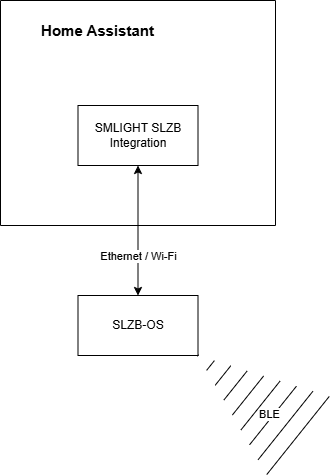
General information SLZB-OS supports receiving BLE advertisements for U series and Ultima devices (ESP32-S3 devices). **Active BLE connections are not supported. Only support passive/active scanning.** The system consists of two parts: \- SLZB-OS with "Proxy advertisements" enabled. Responsible for physically receiving BLE packets and sending them to HA. \- SMLIGHT SLZB Home Assistant integration. Manages scanning on the SLZB-OS side, receives raw BLE and forwards them to the HA core.BLE proxy uses port **5050** so please make sure it is not blocked on your network!
SLZB-OS supports proxying BLE packets to Home Assistant using optimized UDP protocol. To use BLE proxy you need: 1. Have SLZB-OS **v3.3.3.dev7** or later 2. Have Home Assistant **2026.8** or later 3. Have active [SMLIGHT SLZB integration](https://www.home-assistant.io/integrations/smlight) 4. Have "**BLE**" and "**Proxy advertisements**" enabled in SLZB-OS [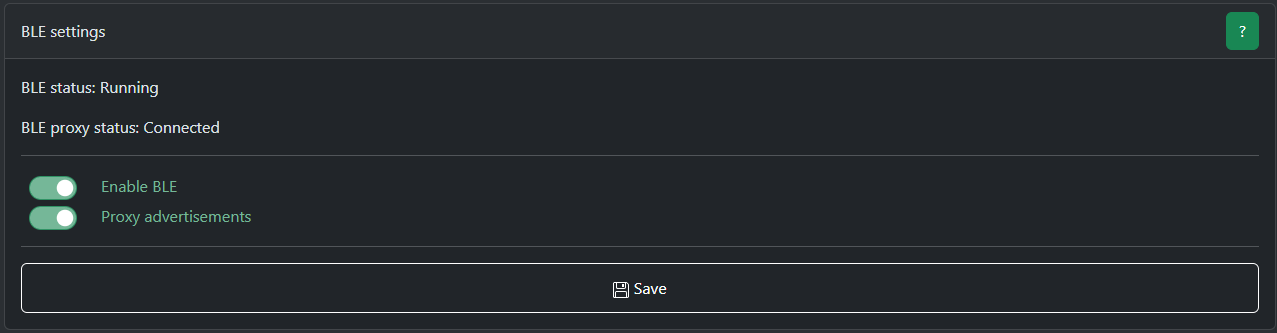](https://smlight.tech/support/manuals/uploads/images/gallery/2026-06/image.png)