Mode
3. Mode
The Mode page lets you choose how the coordinator is exposed to your smart‑home stack.
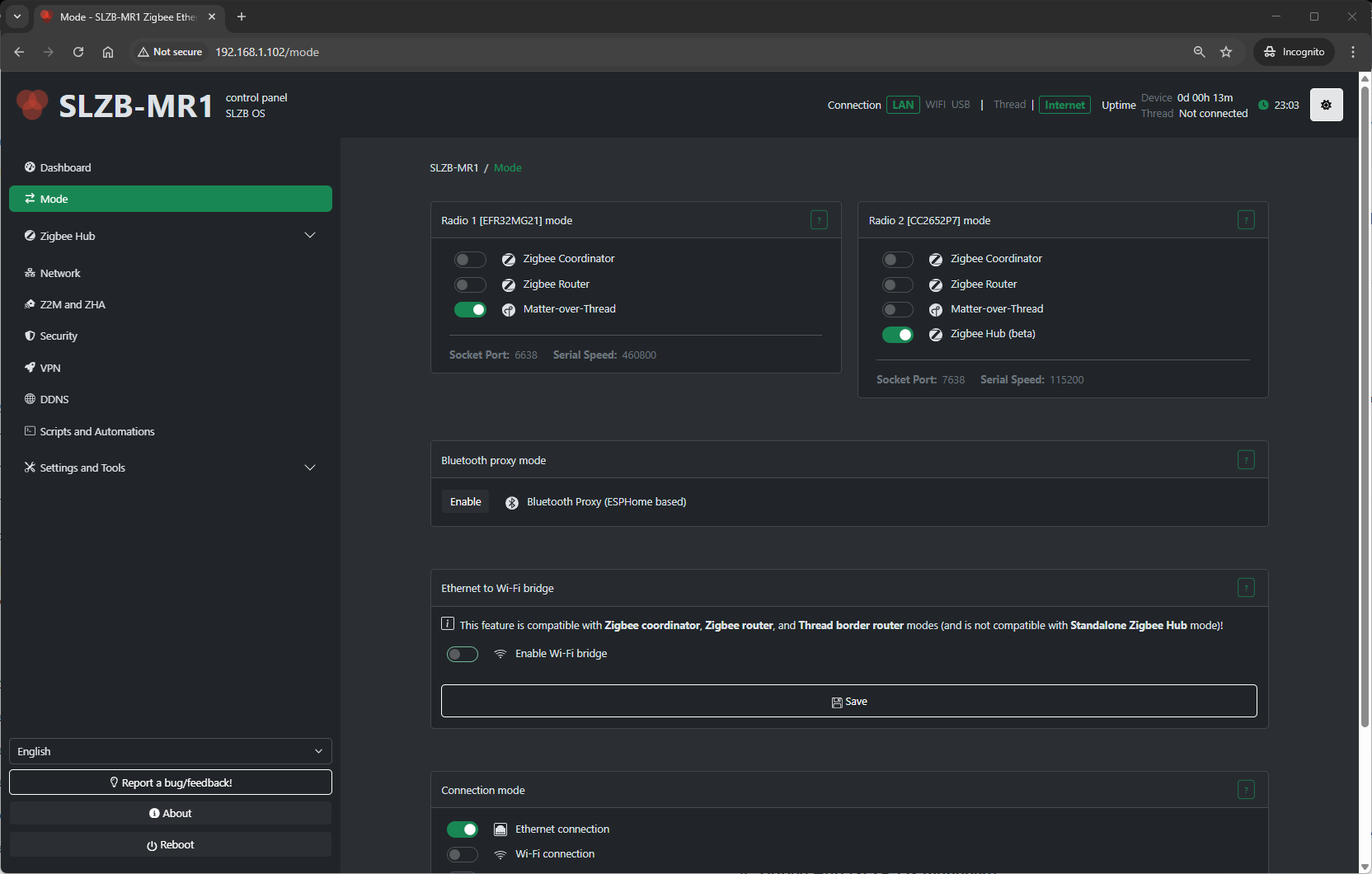
3.1 Radio SoC Modes
Your SLZB device’s primary radio SoC can operate in different roles depending on your smart home network design:
1. Zigbee Coordinator
-
Creates and manages a Zigbee network.
-
Required if this device is the main Zigbee hub in your setup.
-
Works with Zigbee2MQTT, ZHA, and other Zigbee controllers.
-
Allows pairing new devices and maintaining the full network routing table.
2. Zigbee Router
-
Extends an existing Zigbee network by relaying messages between devices.
-
Improves coverage and reliability in large or signal-challenged areas.
-
Cannot create a network; must join an existing one.
-
Useful for eliminating “dead zones” without replacing your main coordinator.
3. OpenThread Border Router (OTBR)
-
Allows Thread devices (e.g., Matter over Thread) to join your home network.
-
Bridges Thread to IP networks for integration into Matter-compatible platforms.
-
Typically used alongside Matter controllers like Home Assistant, Google Home, or Apple HomeKit.
4. Zigbee Hub (SLZB-OS managed)
-
Runs the Zigbee stack directly on the device under SLZB-OS control.
-
No need for a PC/NAS to host Zigbee2MQTT or ZHA.
-
Integrates easily via MQTT or native ZHA API.
-
Managed through Zigbee Hub menu pages (Dashboard, Devices, Settings, MQTT).
3.2 Connection Modes
Once the radio role is selected, choose how the coordinator/router connects to your automation system:
A) Ethernet (Serial over TCP)
-
Coordinator serial interface exposed as a TCP server.
-
Ideal for stable wired installations (PoE optional).
-
Use in remote Docker/VM/NAS setups where the Zigbee stack runs off-device.
-
Access via:
B) USB (Direct Serial)
-
Device acts as a USB dongle with a standard serial interface.
-
Requires physical connection to the host running Z2M/ZHA.
-
Best for small servers or Raspberry Pi deployments.
C) Wi-Fi
-
Coordinator available over Wi-Fi instead of Ethernet.
-
Useful when wired connection isn’t possible.
-
Expect slightly higher latency compared to Ethernet.
3.3 Additional Features
These optional modes and functions can be enabled separately to expand device capabilities:
Wi-Fi Bridge (Ethernet ↔ Wi-Fi)
-
Two types:
-
Transparent (802.1D) – Makes connected Wi-Fi devices visible on the Ethernet network.
-
NAT/Proxy – Routes traffic from Wi-Fi clients via the device’s Ethernet uplink.
-
-
Handy for extending Wi-Fi coverage to IoT devices in Ethernet-only zones.
Bluetooth Proxy (ESPHome mode)
-
Turns the device into a Bluetooth LE proxy for Home Assistant.
-
Ideal for extending coverage of BLE sensors like Xiaomi/Mijia, Aqara, etc.
-
Uses ESPHome firmware module within SLZB-OS.
3.4 How to Apply Changes
-
Go to Mode in the SLZB-OS menu.
-
Select Radio SoC mode (Coordinator / Router / OTBR / Zigbee Hub).
-
Choose Connection mode (Ethernet / USB / Wi-Fi).
-
Enable any Additional Features (Wi-Fi Bridge, BLE Proxy) if needed.
-
Click Save/Apply.
-
Restart the service or device if prompted.
-
Confirm status in Dashboard and, for Zigbee Hub, under Zigbee Hub → Dashboard.