Security
8. Security
This page controls access to the SLZB‑OS web interface and the TCP “socket” that exposes the Zigbee coordinator to Z2M/ZHA. The options below are listed exactly as they appear.
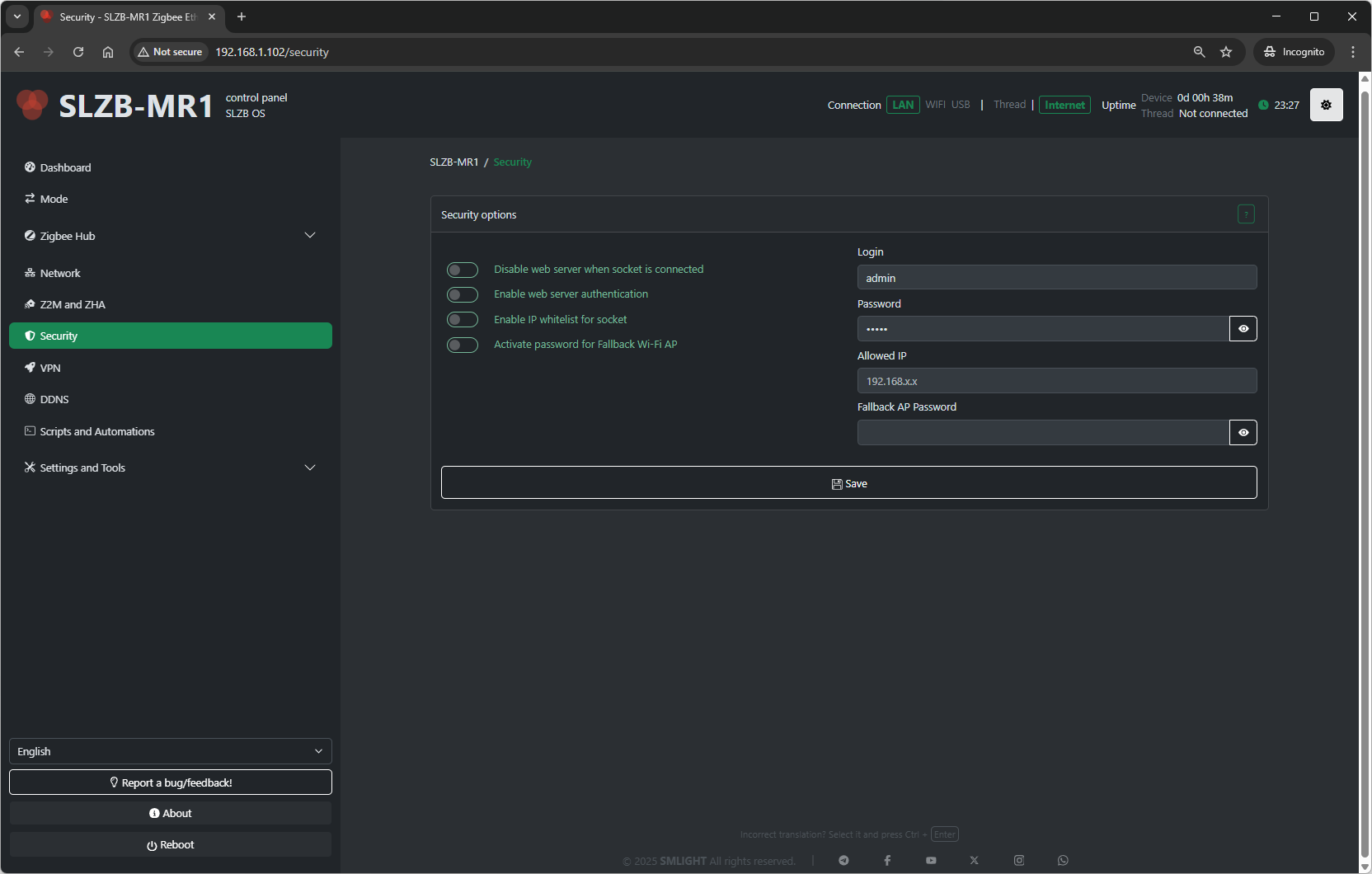
8.1 Web‑server when socket is connected
What it does: Controls whether the SLZB‑OS web UI remains available while the coordinator’s TCP socket is actively in use by Zigbee2MQTT or ZHA.
-
Enable – The web server stays accessible even when the socket is already connected (e.g., your Z2M/ZHA is using the coordinator). Useful when you want to keep configuring the device during active operation.
-
Disable – The web server is turned off whenever the socket is connected. This adds security by preventing web access while Z2M/ZHA is using the coordinator.
Recommendation:
For maximum security on production systems, choose Disable. Use Enable while commissioning or troubleshooting.
8.2 Web server authentication
What it does: Enables login protection for the SLZB‑OS web interface.
-
Enable web server authentication – Requires credentials to access the web UI.
-
Fields (shown when enabled):
-
Login – Username for web access
-
Password – Password for web access
-
Recommendation:
Keep this enabled and use a strong password.
8.3 IP whitelist for socket
What it does: Restricts which client can connect to the Zigbee TCP socket (the bridge used by Z2M/ZHA).
-
Enable IP whitelist for socket – Only the specified address can connect to the Zigbee socket.
-
Field:
-
Allowed IP – A single IP address permitted to access the socket. All other addresses are blocked.
-
-
Disable – Any device on the network can attempt to access the socket (less secure).
Recommendation:
Enable this and set Allowed IP to the host that runs Z2M/ZHA (e.g., your Home Assistant server).
8.4 Fallback Wi‑Fi AP password
What it does: Protects the fallback Wi‑Fi access point (brought up by the device in recovery/initial setup scenarios).
-
Activate password for Fallback Wi‑Fi AP – Requires a password to join the fallback AP.
Recommendation:
Enable this to prevent unauthorized local access during recovery.
8.5 Save & Operational Notes
-
After changing security options, Save/Apply and reconnect if prompted.
-
If you Disable web server when socket is connected, you may temporarily lose UI access when Z2M/ZHA is connected; disconnect the client or stop the service to regain the UI.
-
When IP whitelist for socket is enabled with a wrong IP, Z2M/ZHA will fail to connect—double‑check the Allowed IP value.