Zigbee2MQTT / ZHA Settings
6. Zigbee2MQTT and ZHA Configuration
The Z2M and ZHA page in SLZB-OS provides configuration tools for connecting your device’s Zigbee coordinator to an external server running either Zigbee2MQTT (Z2M) or Zigbee Home Automation (ZHA).
It also contains advanced options for connection methods and device identity.
Note:
On single-radio devices (e.g., SLZB-06x and SLZB-06xU series), these settings apply to that one radio.
On dual-radio devices (e.g., SLZB-MRx and SLZB-MRxU series), settings will appear for both radios, and each must be configured separately.
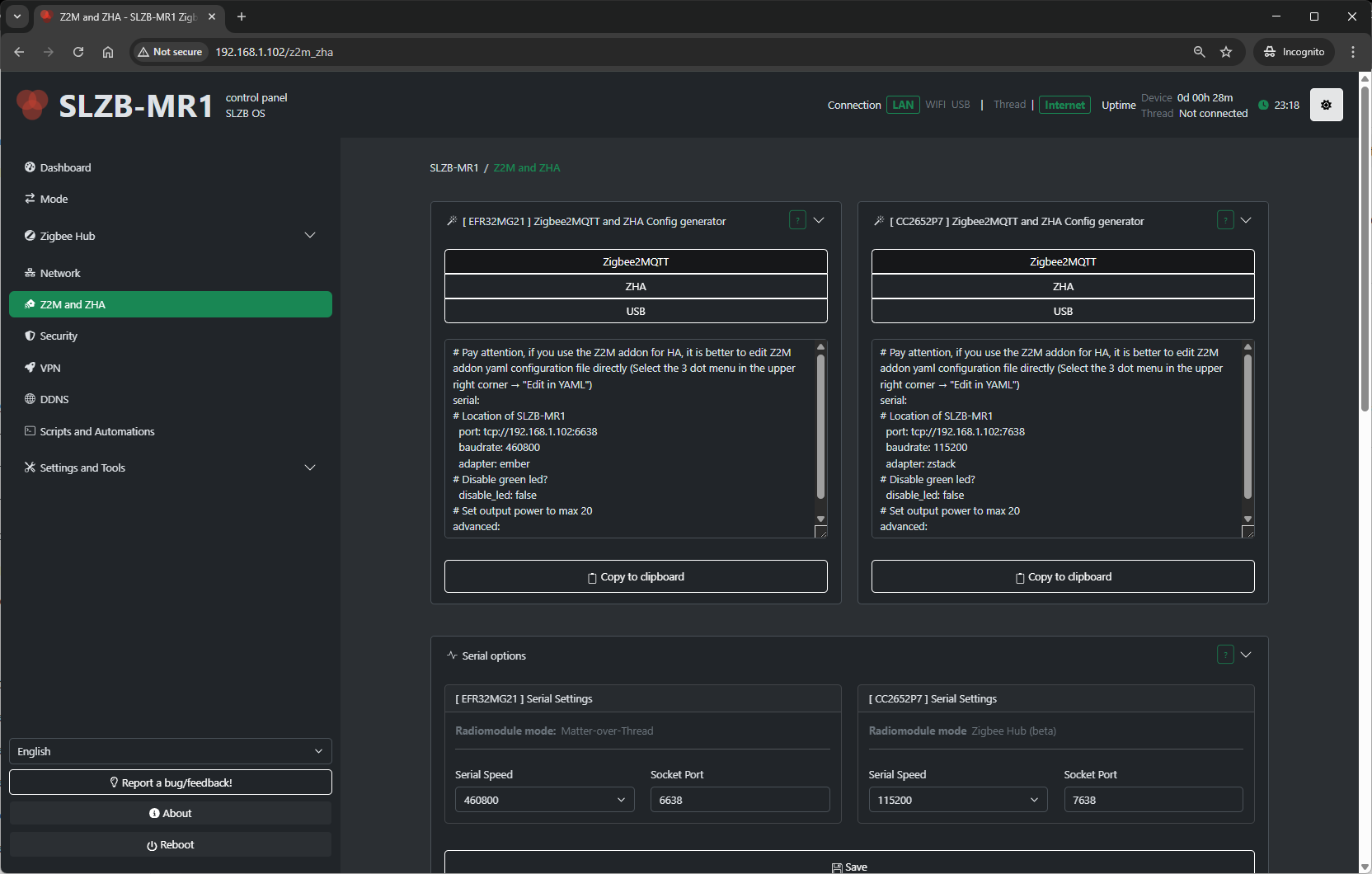
7.1 Configuration Generator – Purpose and Output
This section provides ready-to-use parameters for integrating your coordinator with an external Zigbee2MQTT or ZHA setup via Ethernet.
What it does:
-
Reads the current radio configuration.
-
Generates adapter type, connection interface, baud rate, and socket settings.
-
Reduces manual input errors when configuring your external Z2M/ZHA installation.
What it provides:
-
Adapter type (e.g., CC2652P7 = ZNP, EFR32MG21 = EZSP).
-
Serial settings (port, baud rate).
-
Socket details (IP, port) if using Ethernet bridge mode.
You simply copy these values into your external Z2M configuration.yaml or ZHA connection string.
7.2 Serial Options
If you use USB or direct serial mode, the Serial Settings section appears.
Available fields:
- Serial port - socket port to which the external server has to connect. Default is
6638 -
Serial Speed – Choose from:
- 115200 (default for most Zigbee firmwares)
- 460800 (default for most Thread firmwares)
Select the baud rate supported by your firmware and integration.
-
Save – Apply changes.
7.3 Advanced Socket Connection Options
The ADVANCED: Socket options – helper section controls how the coordinator’s serial data is forwarded over TCP.
Available options:
-
Enable Zigbee Socket packet processing
-
Instead of forwarding raw bytes, SLZB-OS assembles complete EZSP/ZNP frames before sending them.
-
Only valid Zigbee frames are forwarded — other traffic is ignored.
-
-
Allow multi-threaded socket connection
-
Up to 5 clients can connect to the socket at once.
-
Important: Only one client can actively communicate with the Zigbee chip at a time. If multiple clients send data simultaneously, the connection will not function correctly.
-
-
Multi-Radio Queue Control (only shown on dual-radio devices)
-
Balances socket traffic between radios.
-
7.4 IEEE Address Change
The ADVANCED: Adapter IEEE address change section allows you to read or modify the coordinator’s IEEE (extended) address.
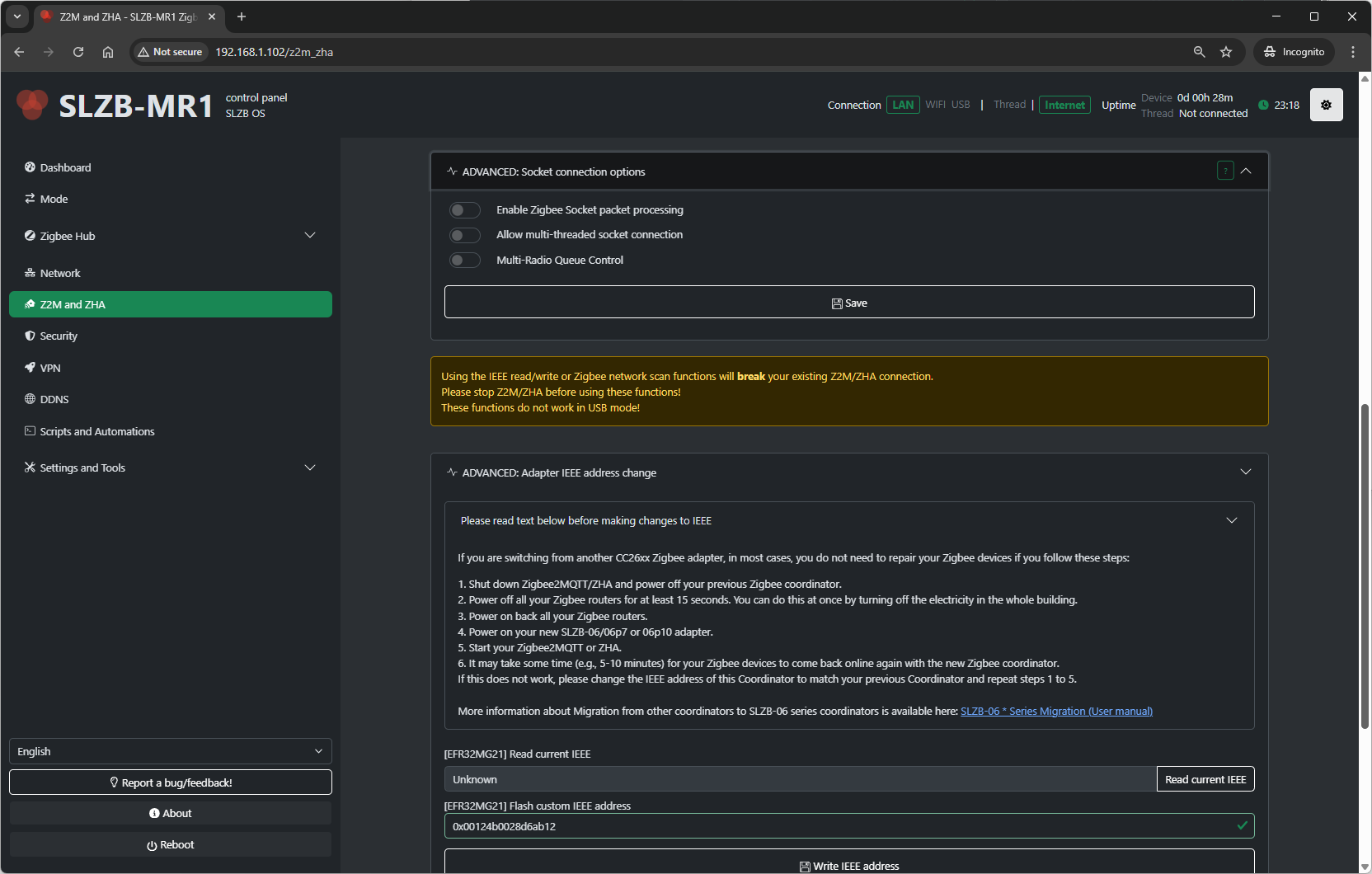
Important notes from the UI:
-
Using IEEE read/write or Zigbee network scan will break your current Z2M/ZHA connection.
-
Stop Z2M/ZHA before using these functions.
-
Does not work in USB mode.
Migration tip from SLZB-OS:
If migrating from another CC26xx adapter, you may avoid re-pairing devices if you:
-
Shut down Zigbee2MQTT/ZHA and power off your old coordinator.
-
Power off all Zigbee routers for ≥15 seconds (e.g., cut building power briefly).
-
Power on the new coordinator.
-
Power on routers.
-
Start Zigbee2MQTT/ZHA.
Devices may take 5–10 minutes to reconnect. -
If they do not, set the IEEE address of your new coordinator to match the old one, and repeat steps 1–5.
IEEE tools in UI:
-
Read factory IEEE
-
Read current IEEE
-
Flash custom IEEE address
-
Write IEEE address