SMHUB services and UI 2.0 Beta 1: a Rust backend and a new web interface
The first beta of the new SMHUB services and UI is out: the interface is ready in 168 ms, the backend uses 5.1 MiB of memory, and your setup stays.
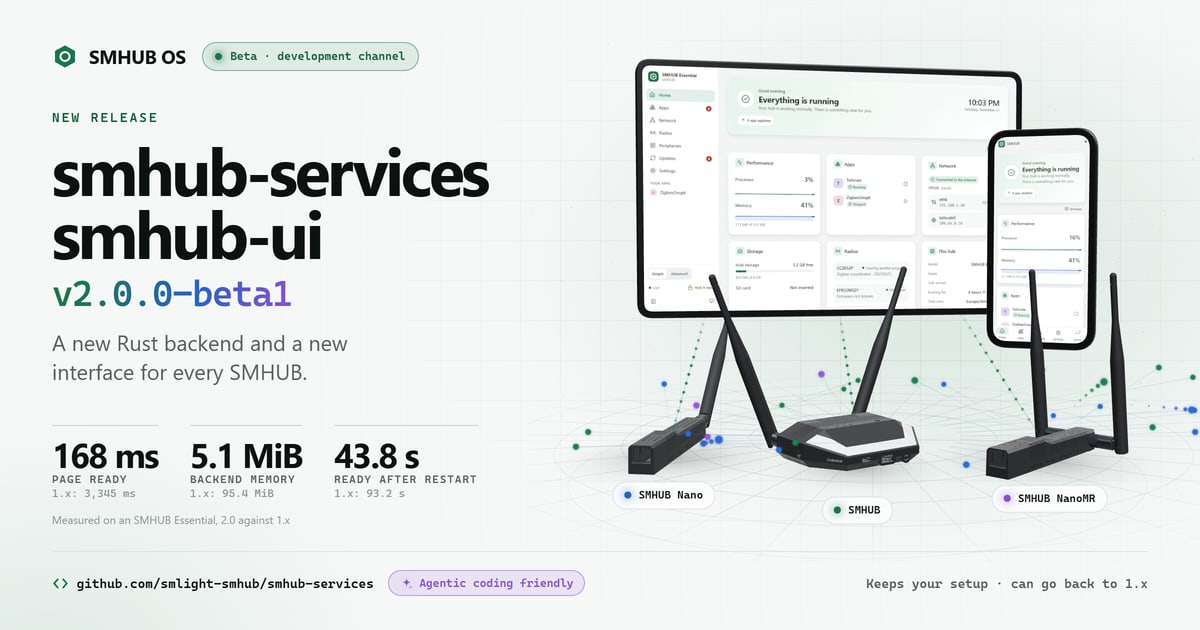
Today we are releasing the first beta of the new SMHUB services and UI: smhub-services v2.0.0-beta1, the backend of SMHUB OS rebuilt on a Rust core, and smhub-ui v2.0.0-beta1, its new web interface, for every SMHUB. It is on the development channel, and it keeps your setup.
This is a beta
It runs on the development channel, and our core test model is the SMHUB Essential. Try it on a hub you can experiment with, keep a backup of your setup, and tell us how it runs. If something goes wrong, you can go back to 1.x with your data.
Fast, measured
Measured on an SMHUB Essential, 2.0 against 1.x on the same hub on the same day:
| 1.x | 2.0 beta | |
|---|---|---|
| Interface ready on a visit | 3,345 ms | 168 ms |
| Backend memory | 95.4 MiB | 5.1 MiB |
| Ready after a restart | 93.2 s | 43.8 s |
The whole hub in one app
Apps, radios, network, updates and settings sit in one interface, and the hub's own hardware is in the app now: the buzzer, the light ring and LEDs, the infrared remote and the buttons. The interface comes in 31 languages, light and dark, with a Simple and an Advanced level, and it works on your phone.
Keeps your setup
Your database, apps and settings stay when you update. If you want to go back, 1.x installs over 2.0 and keeps your data the same way.
Try the beta
With the development channel turned on, the beta is in your hub's app store: install it from there. You can also install it from the hub's terminal:
curl -fsSL https://raw.githubusercontent.com/smlight-smhub/smhub-services/main/packaging/update-beta.sh | sh
When it prints Done, reload the hub's page. Running a Premium, Nano or NanoMR? Your report helps most: open an issue. Security problems go to the repository's Security tab, not a public issue.
A team of AI agents works on it
We built SMHUB services and UI differently: alongside our engineers, a team of AI coding agents takes care of the development, day and night. When you report a problem or share an idea, the agents pick it up:
- Triage. An agent sorts the report and asks for what is missing, such as the hub model or the logs.
- Investigate. It reproduces the problem on a test hub and finds the cause.
- Fix. It prepares a fix as a pull request, with a test that shows the problem is gone.
- Review. Every pull request, whether an agent or a person wrote it, is reviewed by our AI development team. Changes that meet certain triggers also go to an engineer at SMLIGHT before they reach your hub.
Your pull requests go through the same review as the agents' own, and your reports go straight into the queue the team works on. That is why they matter so much in this beta.
Built in the open
The code is on GitHub, and it is ready for AI coding: the repository carries an AGENTS.md that gives AI coding agents its rules, its API contract and the checks to run. Found a bug or have an idea? Open an issue, or send a pull request with your fix. Your reports and code shape the next beta.
Everything SMHUB OS does with the new services and UI, with a tour of its screens, is on the SMHUB OS page.