§ Series · Ethernet single-radio · Zigbee · Thread · Matter
SLZB-06xU.
One body. Six radio brains.
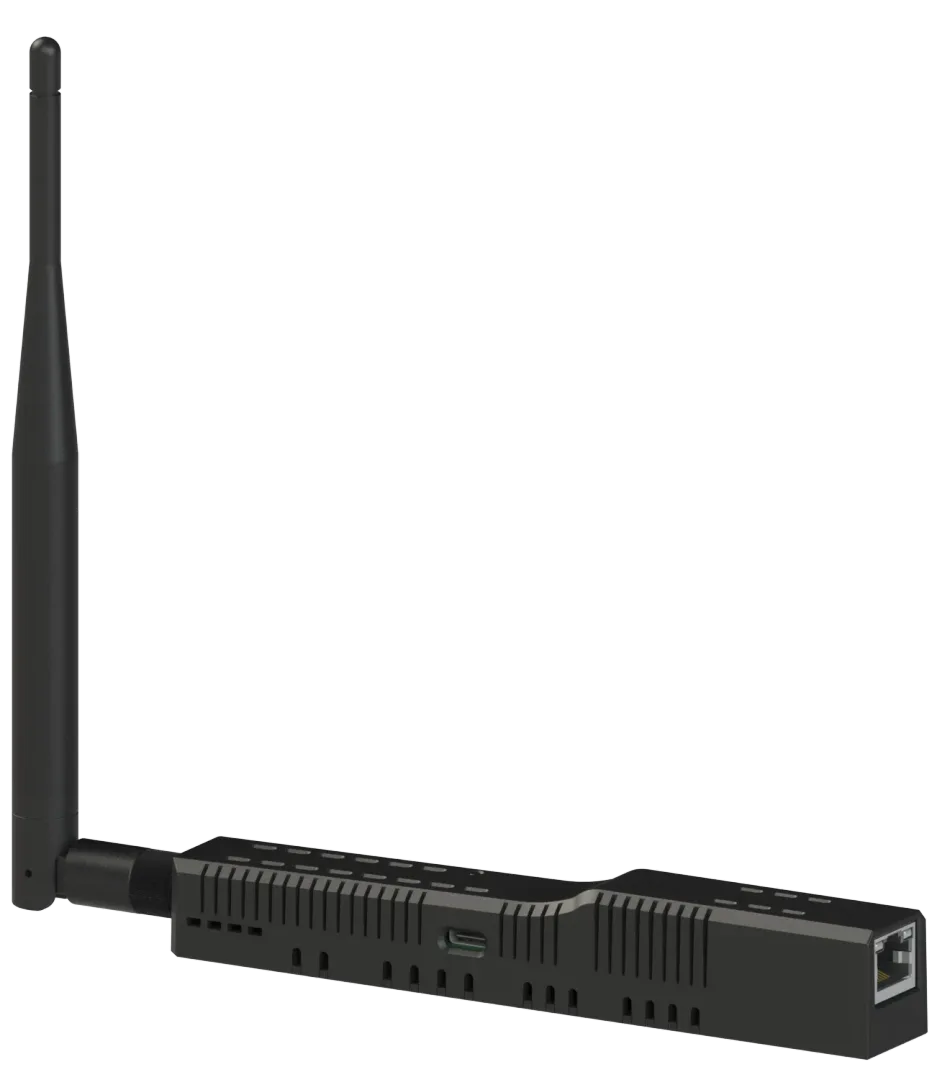
SMLIGHT's flagship Ethernet Zigbee coordinator. Pre-flashed, PoE-ready, with a one-click switch between Zigbee coordinator, router, and Matter-over-Thread border router. Six SoC picks across TI and Silicon Labs.
Current model
SLZB-06Mg26U
Radio SoC
EFR32MG26
Availability
Pre-order — ships Apr 2026
┌
┐
└
┘
§ SELECT MODELEverything identical except the radio SoC
§ 01 / Why 06xU
Six variants. One hardware philosophy.
01
Ethernet-first by design
LAN is the headline. Wi-Fi is there as a fallback. One Cat6 drop delivers data and power — anywhere the mesh needs to live.
02
Zigbee OR Thread — your choice
One-click switch in the web UI between Zigbee coordinator, Zigbee router, and Matter-over-Thread border router. No reflashing cable, no toolchain.
03
PoE, USB-C, or both
802.3af PoE (48V) or USB-C 5V. Both can be connected at once — optoelectronic isolation keeps them safely separate.
Gallery
See it up close.
§ 02 / Chipsets
The only thing that changes between variants.
RADIO SOC
EFR32MG26
Silicon Labs
Zigbee / Thread
ANTENNA · +5 dB · rotatable L-I
MODE
Zigbee / Thread
One-click switch
Coordinator · Router · Border Router
SET VIA SLZB-OS WEB UI
Radio SoC
Vendor
Capabilities
Year
Current pick?
CC2652P
TI
Zigbee 3.0 · Thread · mainstream
2020
—
CC2652P7
TI
Zigbee 3.0 · Thread 1.3 · +20 dBm · extended
2023
—
CC2674P10
TI
Zigbee 3.0 · Thread 1.3 · +20 dBm · extended RAM
2024
—
EFR32MG21
Silicon Labs
Zigbee 3.0 · Thread · +20 dBm
2019
—
EFR32MG24
Silicon Labs
Zigbee 3.0 · Thread 1.3 · AI/ML accelerator
2022
—
EFR32MG26
Silicon Labs
Zigbee 3.0 · Thread 1.4 · 2× RAM vs MG24
2025
● IN 06Mg26U
Shared across every variant
ESP32-S3
Core · 2× 240 MHz
Runs SLZB-OS. Handles the radio, USB passthrough, web UI, OTA updates.
W5500
Ethernet · WIZnet
Hardwired 10/100 Mb Ethernet SoC — the PHY that keeps the network link deterministic.
PoE Xfmr
SMLIGHT 5V
Isolated PoE transformer — 802.3af (48V). Delivers clean power while keeping USB-C-side circuitry separated.
§ 03 / Functions
What this thing actually does.
CORE
Zigbee Adapter
Coordinator or Router. Compatible with Zigbee2MQTT and ZHA.
CORE
Thread Adapter
Matter-over-Thread. One-click switch between Zigbee and Thread.
CORE
USB Passthrough
Plug any CP210x / CH340 / CH9102 dongle into the 06U and expose it over the network.
I/O
LAN · Wi-Fi · USB · PoE
Network over Ethernet, Wi-Fi, or USB. Power via USB-C or PoE.
FIRMWARE
Pre-flashed
Ships ready. Plug and play — no flashing cable, no toolchain.
FIRMWARE
ESPHome
Swap to ESPHome via the built-in web flasher if you need custom YAML.
FIRMWARE
SLZB-OS
WireGuard · DDNS · OTA · Zigbee Hub · USB Passthrough · OTBR.
FIRMWARE
Login & secrets
Web-UI auth on by default. Not an exposed service.
HARDWARE
Rotatable +5 dB antenna
L-I-shaped external antenna. 3-axis positioning for best signal.
HARDWARE
4 LEDs + button
Visual feedback for power, link, radio state. One physical button for mode control.
HARDWARE
DIY pinouts
Limited debug pinouts exposed for ESP32-S3 and the radio SoC.
CORE
OTBR ready
Silicon Labs variants focus on Matter-over-Thread border-router duties via SLZB-OS + OTBR.
§ 04 / Firmware · SLZB-OS
Ships with SLZB-OS. Swap at any time.
SLZB-OS
The official operating system running on the ESP32-S3 core. Ships pre-flashed and tested on every SLZB-06Mg26U.
- Web UI — setup, configuration, one-click firmware updates
- Zigbee Coordinator, Zigbee Router, and Matter-over-Thread border-router roles
- Home Assistant integration — ZHA, Zigbee2MQTT, and SMLIGHT's native HA integration
- WireGuard VPN · DDNS · PoE control · debug logging · hardware diagnostics
- One-click reflash to ESPHome / Bluetooth-Proxy firmware / community builds, and back
ESPHome
For DIY geeks. Basic adapter functionality, YAML-configurable.
Bluetooth Proxy
ESPHome-based BLE proxy firmware — relay Bluetooth signals to Home Assistant over the network.
Open-source core
SMLIGHT also publishes a lighter open-source core FW — a starting point for customization and community contributions.
§ 05 / Updates & Recovery
Never requires a flashing cable.
01
Remote radio update
Flash the radio SoC firmware remotely through the web UI. No physical access required.
02
Remote core update
SLZB-OS updates over-the-air. Click to deploy. Full control wherever you are.
03
Reset function
Quickly restore the device if something goes wrong during setup, update, or configuration.
04
Ethernet support
DIY-enthusiast friendly: limited pinouts exposed for both the ESP32-S3 and the radio SoC.
§ 06 / Topology
Put it anywhere. Run it from anywhere.
With the Ethernet-enabled SLZB-06xU, run your Zigbee or Matter-over-Thread mesh anywhere — without tying the coordinator to your Home Assistant, openHAB, or HomeSeer server. Remote, across buildings, or on different sides of the globe. One smart network, unlimited range.
§ 07 / Compare
Six variants. Side by side.
Radio SoC
CC2652P
CC2652P7
CC2674P10
EFR32MG21
EFR32MG24
EFR32MG26
Radio vendor
Texas Instruments
Texas Instruments
Texas Instruments
Silicon Labs
Silicon Labs
Silicon Labs
Positioning
MAINSTREAM
EXTENDED
RECOMMENDED
SILABS
MG24
PREMIUM
Zigbee Hub mode1
● YES
● YES
● YES
—
—
—
Availability
In stock — ships in 48h
In stock
In stock
In stock
In stock
Pre-order — ships Apr 2026
Everything else
ESP32-S3 core · W5500 Ethernet · PoE 802.3af · USB-C · Type-C passthrough · rotatable +5 dB antenna · 4 LEDs · button · 160×24×28 mm · 86 g · SLZB-OS
1 Zigbee Hub mode lets you pair and control Zigbee devices straight from the SLZB's own web page — no Home Assistant, Zigbee2MQTT or other server required. Think of it as a tiny, built-in version of Zigbee2MQTT / ZHA running on the device itself: ideal for small setups and basic control. For bigger networks, pair it with Home Assistant or Zigbee2MQTT instead.
Not sure which to pick?
You want the default, mainstream pick
You want extended TI range with Thread 1.3
You want the latest TI chip & most RAM
You're on the Silicon Labs stack (entry)
You want Silabs w/ AI/ML accelerator
You want top-shelf Silabs, future-proof
§ 08 / Electrical diagram
How the SLZB-06Mg26U is wired.
§ 09 / In the box
What you actually unbox.
01
SLZB-06Mg26U device
160 × 24 × 28 mm · 86 g
02
External antenna
L-I · +5 dB · rotatable · 192 × 12 × 12 mm · 15 g
03
Mount kit
2× screws · 2× adhesive pads
04
Hex wrench
For the mount-kit screws — fix the device anywhere
05
QR-code manual card
Scan for the complete online manual.
06
Ruler
Stickered scale for placement planning.
§ 10 / Full specifications
Every number. Every port.
Radio chip
EFR32MG26 (Silicon Labs)
Core chip
ESP32-S3 Espressif
Ethernet
W5500 WIZnet
USB-to-Ethernet passthrough
Yes
Antenna (Zigbee / Thread)
L-I-shaped +5 dB Baishi
Antenna (Wi-Fi / Bluetooth)
On-PCB, +2 dB
PoE Transformer
SMLIGHT 5V
§ 12 / FAQ
12 questions. Straight answers.
The SLZB-06Mg26U is a smart-home adapter — a bridge between your Zigbee or Thread devices and your smart-home system, Home Assistant and the like. Think of it as the middleman that helps your smart lights, sensors and switches talk to your hub. It supports Ethernet, USB, Wi-Fi and PoE, and ships pre-configured and ready to use.
§ 13 / Video reviews
Independent reviewers. Actual installs.
14:22
SLZB-MR1U Review — the new mainstream Zigbee coordinator
89k views·Mar 2026
22:08
I replaced 3 Zigbee dongles with one SLZB-MR3U — here's what happened
156k views·Feb 2026
31:47
Multi-radio deep dive: MR1U vs MR3U vs MR5U side-by-side
62k views·Apr 2026
§ 14 / Owner feedback
12 owners. In their own words.
🇺🇸MR1U
Swapped from a CC2652P dongle to the MR1U for the Ethernet + PoE combo. Put it in the basement wiring closet where my mesh was weakest — and suddenly the whole top floor came alive again.
🇺🇸MR3U
Running MR3U as a dedicated Matter-over-Thread border router alongside my existing Zigbee coordinator. The dual-radio split lets me keep both networks on their optimal channels. Setup took 10 minutes.
🇩🇪MR5U
MR5U with twin MG24s is a dream for my standardization — one toolchain, one set of firmware builds, one debugging workflow. Silicon Labs only. Beautiful.
§ 15 / Useful links
Everything else. Guides, forums, firmware, mounts.
●Guides
SLZB-MRxU full setup guide
smlight.tech/docsApr 2026→
●Guides
Matter-over-Thread on MR3U — step by step
smlight.tech/manualMar 2026→
●Guides
PoE network planning for multi-radio coordinators
docs.smlight.techFeb 2026→
●Guides
SLZB-OS — WireGuard setup walkthrough
smlight.tech/slzbosJan 2026→
r/Community
r/homeassistant · SLZB-MR series megathread
reddit.comOngoing→
◈Community
SMLIGHT Discord · #mr-series channel
discord.gg/smlightLive→
✦Community
HA forum · ZHA vs Z2M with MR coordinators
community.home-assistant.ioMar 2026→
✦Community
Zigbee2MQTT — SMLIGHT device compatibility
zigbee2mqtt.ioUpdated weekly→
❯Reviews
SLZB-MR1U review — SmartHomeScene
smarthomescene.comMar 2026→
❯Reviews
Best Zigbee coordinator 2026 — independent roundup
smarthomescene.comFeb 2026→
❯Reviews
SLZB-MR4U deep dive
haade.frMar 2026→
❯Reviews
Kiril Peyanski · MR series comparison
peyanski.comApr 2026→
●Firmware
SLZB-OS releases & changelog
smlight.tech/slzbosWeekly→
●Firmware
Official Web Flasher — SLZB series
smlight.tech/flasherLive→
</>Firmware
ESPHome config examples for MRxU
github.com/smlight-devMar 2026→
</>Firmware
Open-source core firmware (MIT)
github.com/smlight-devOngoing→
⌂DIY
3D-print mount holders — Printables
printables.com2025→
⌂DIY
DIY debug probe adapter for MRxU
hackaday.ioFeb 2026→
●DIY
Rack-mount bracket (ref design)
smlight.tech/downloadsJan 2026→
●DIY
Antenna placement & polarization guide
smlight.tech/docsMar 2026→
⇌Integrations
Home Assistant native integration
home-assistant.io/integrations/smlightOngoing→
⇌Integrations
ZHA — SMLIGHT radio profiles
zigbee2mqtt.ioUpdated weekly→
⇌Integrations
openHAB 4.3 — SMLIGHT binding
openhab.orgFeb 2026→
●Integrations
Matter commissioning via OTBR
smlight.tech/docsMar 2026→
← Scroll horizontally for more·Filter by category above