
FAQ and troubleshooting
FAQ
How to reset SLZB device to factory settings?
For U devices and Ultima - reflash the device via USB using this tool https://smlight.tech/flasher/#SLZB-06U-MRxU
Video guide for devices before the U series https://youtu.be/ps-x_-CQXp0?t=139
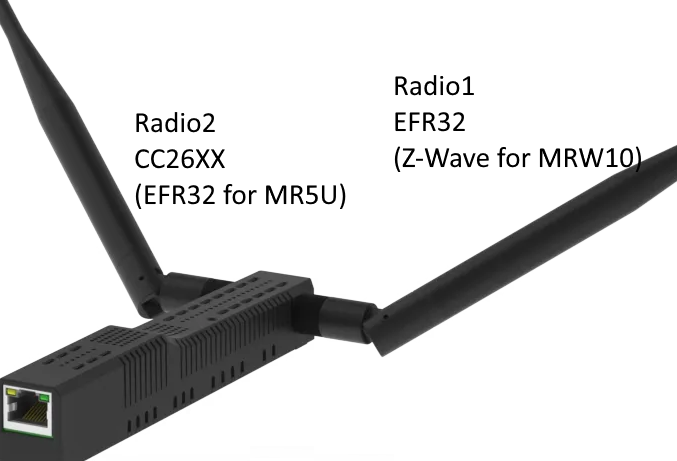
Location of radio modules for MR coordinators
My device shows a temperature of X degrees, is this normal?
Temperatures up to 75 degrees are normal.
From 75 to 90 you should pay attention to ventilation and ambient temperature!
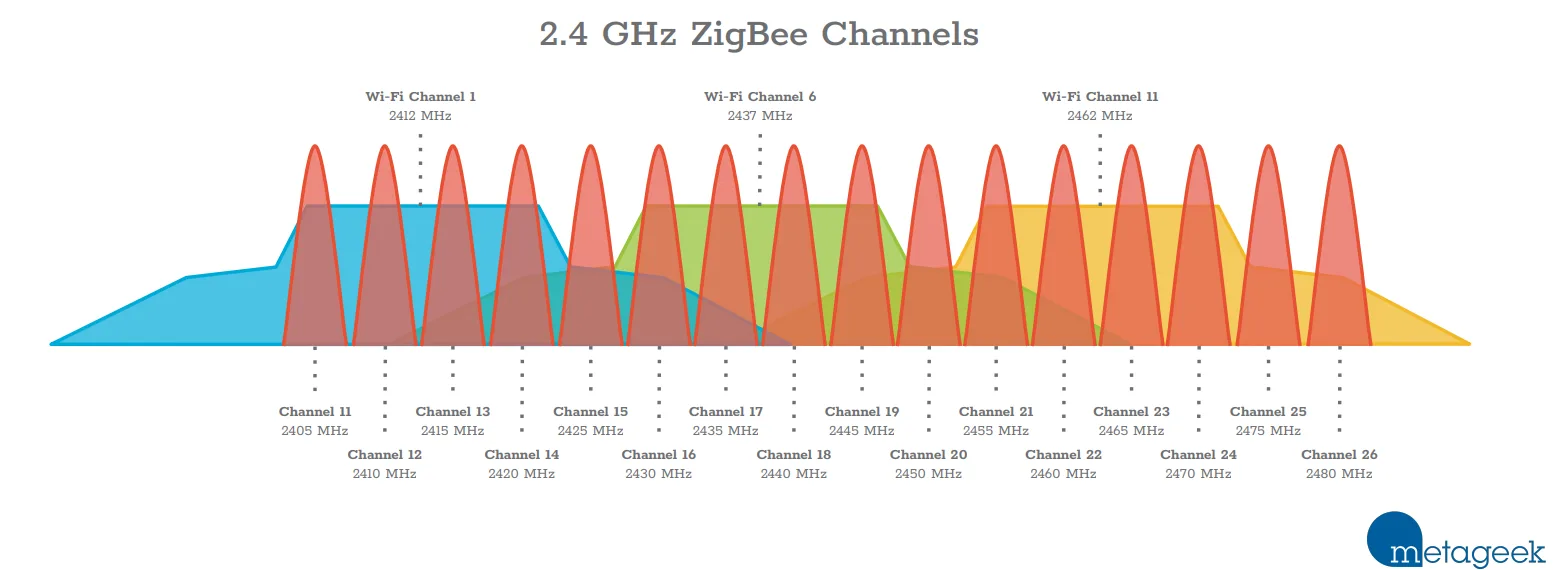
What is the best channel for a Zigbee network?
According to this article by Metageek the best is to use channel 15 for ZIgbee and channels 1,6 and 11 for your home WiFi networks.
Does SLZB coordinators webserver support HTTPS?
No, HTTPS is not supported.
We are looking into HTTPS support on the U series but there is no ETA for this at this time.
I can't find the Transparent 802.1D WiFi bridge option
Starting with OS 3.2.6.dev0 this option is not available on U devices. Please use older firmware if you need this option.
Troubleshooting
Coordinator is restarting with reason "TASK_WDT"
Known problematic devices spamming the network with mDNS requests:
- Amino Aria
- Sonos
Reason: coordinator network interface is receiving too much multicast traffic and the CPU power is not enough to handle it.
Most likely, your network has a misconfigured video/IP TV stream or broken mDNS devices.
Possible solution: disable mDNS on the "Network" page.
Disabling mDNS is incompatible with OTBR!
REQ error: http_code -1
Your coordinator is not connected to the Internet.
Possible reasons:
- DNS servers or network gateway are incorrectly configured.
- blocking on the side of your router/provider of access to our update servers in Ukraine
warning: zh:ember:uart:ash: Frame(s) in progress cancelled
The problem is that Home Assistant automatically offers to install ZHA when it detects a SLZB device on the network. If you have agreed and installed ZHA and then try to run Z2M, you will get this error.
Please make sure that ZHA is not installed
Data request failed with error: 'MAC channel access failure' (225)
This error occurs when the coordinator is close to another radio wave source (e.g. WiFi router, microwave, etc.).
To fix this you need to move the coordinator away from the radio wave sources. Sometimes a distance of a few meters is not enough, if the error still occurs then move the coordinator outside the coverage area of your WiFi router.
I switched from conbee/efr32 to SLZB-06/p7/p10 and now LQI is lower
The difference in LQI between different manufacturers of ZigBee chips is a typical situation.
Unfortunately, LQI is not a standardized parameter, so each manufacturer calculates it in their own way. LQI in conbee and efr32 is always greater than in cc2652x, even with the same RSSI. Therefore, LQI is a conditional parameter that may not reflect the real situation.
The second factor that affects LQI is the location of the coordinator. If the USB coordinator was in one location, but after migration you placed the network coordinator in another location, this will affect the LQI of some devices, since they will be further from the coordinator, the best option in this case is to re-pair these devices.
Current backup file is not for EmberZNet stack
If you see the error "Current backup file is not for EmberZNet stack" it means that your previous backup was for an adapter on the CC2652x chip.
Please take look at this guide for migrating between zstack/ember https://github.com/Koenkk/zigbee2mqtt/discussions/26716
I wrote a custom IEEE address to my coordinator, is there a way to get its original IEEE address?
Yes! Just write IEEE 0xFFFFFFFFFFFFFFFF
What ports/addresses does the coordinator use?
Ports:
80 - device web interface
81 - SSE
5050 - SLZB BLE proxy
6638 - zigbee chip socket
7638 - zigbee chip socket for Radio 2 (for MRx devices)
8638 - USB to Ethernet passthrough mode
9638 - zigbee chip socket for Radio3 (for Ultima3 Z-Wave addon)
URL:
google.com - device sends DNS request to check internet
updates.smlight.tech - device and zigbee module firmware updates
stats.smlight.tech - used to send feedback via device web interface and send telemetry (if active in settings)
Error: network commissioning timed out - most likely network with the same panId or extendedPanId already exists nearby Error: AREQ - ZDO - stateChangeInd after 60000ms
You need to update pan_id in both zigbee2mqtt/configuration.yaml and zigbee2mqtt/coordinator_backup.json. Note that the values need to match, but in configuration.yaml the value is encoded decimal, while in coordinator_backup.json the value is encoded hexadecimal. You can use a tool to convert.
Here’s the steps:
- Make sure Z2M is stopped.
- Make backup of database.db and coordinator_backup.json
- Note the existing
pan_idvalues (both hexadecimal and decimal) - Change the value to something different. Make sure to use the same value in both files, but encode it decimal in the configuration and hexadecimal in he coordinator backup. (I just added 1 to the original value for simplicity.)
- Start Z2M.
- When Z2M has finished booting, stop it again.
- Change the
pan_idback to the original values in both files. - Start Z2M again.
If you have empty devices list or devices offline:
- Make sure Z2M is stopped.
- Restore original database.db and coordinator_backup.json
- Start Z2M again.