
Zigbee network sniffing guide for SLZB-MRx and SLZB-06Mx adapters
Prerequisites
1. Coordinator
You will need coordinator with EFR32 radio module from Silicon Labs.
You can use radio module1 on SLZB-MR adapters or single-radio adapters with EFR32 only: SLZB-06M, 06Mg24, 06Mg26 and their U versions.
2. Host PC with internet access
Software preparation
1. Coordinator preparation
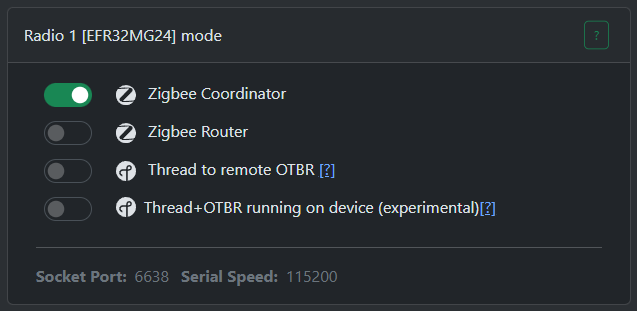
Go to "Mode" page and select "Zigbee Coordinator". Wait for the update to complete.
2. Preparing the PC
You must have NodeJS installed. If you don't have it, please download and install it first from this link https://nodejs.org/en/download/current
Open CMD or terminal and run the command: npm install -g ember-zli and wait for install to complete.
To start configuring the sniffer, run the command: ember-zli sniff

Note the "Data Folder", this is where the capture files will be saved.
Select "TCP"

Answer n

Enter the IP and port of your coordinator
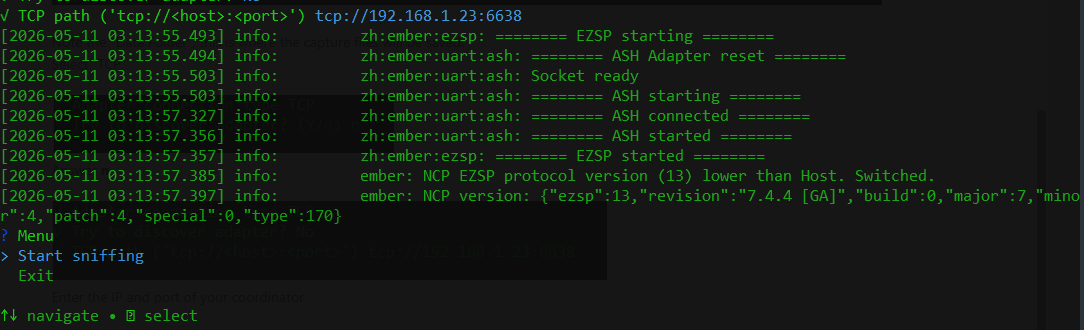
Wait for connection.
Select "Start sniffing"

Select "Wireshark" for Wireshark server or select "PCAP file" if if you want to save to a capture file.