
MQTT API
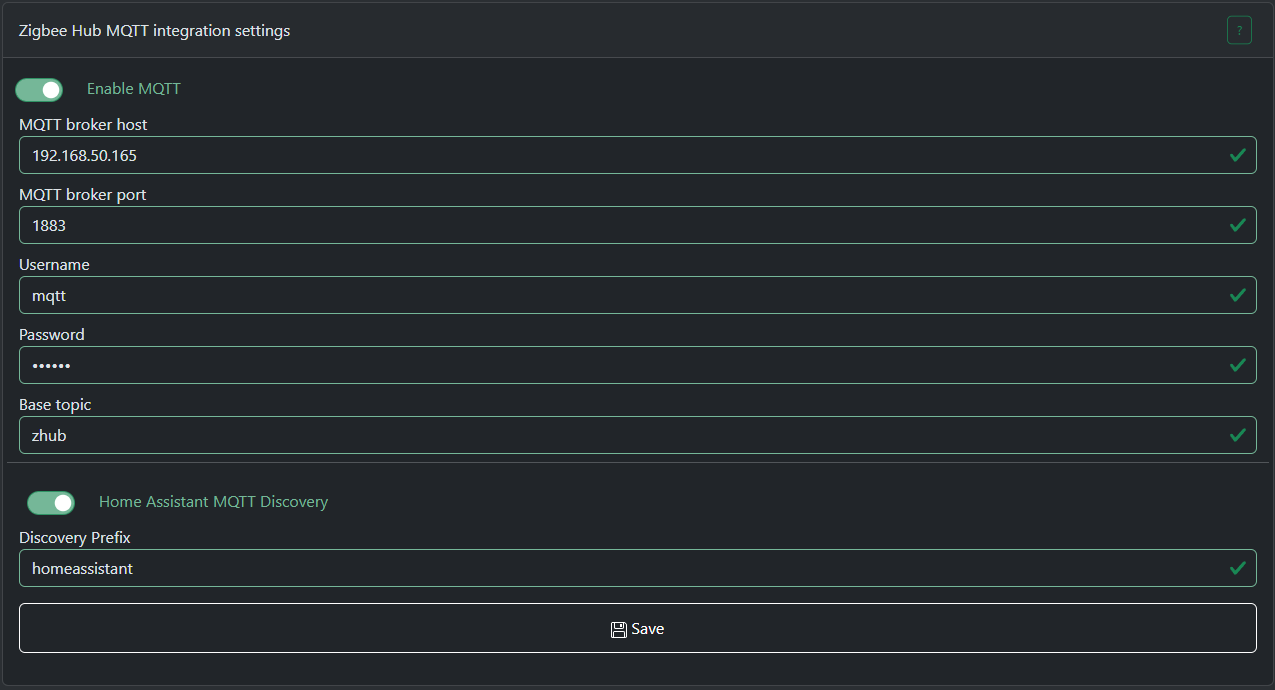
Zigbee Hub mode has the ability to connect to local or remote MQTT brokers. Currently only TCP connections are supported.
This document describes MQTT API for SLZB-OS 3.0.9 or higher
Topics are divided into IN and OUT.
IN - you can send messages to these topics.
OUT - Zigbee Hub sends messages to these topics.
zHub topics format
Data topic (OUT)
General data topic format below:base topic / data / zigbee device ieee / zigbee endpoint / zigbee cluster / zigbee attribute
base topic - global prefix, so you can have few Zigbee Hubs connected to one broker, you just have to set different base topics.data - static text (topic type)zigbee device ieee - sender IEEE address in HEX format.zigbee endpoint - zigbee endpoint from which this message is coming, DEC format.zigbee cluster - zigbee cluster from which this message is coming, HEX format.zigbee attribute - zigbee attribute from which this message is coming, HEX format.
Data topic example: zhub/data/a4c1383439bf5cc9/1/0000/0001
Command topic (IN)
This topic is intended for sending ZCL commands to a Zigbee device.
General cmd topic format below:base topic / cmd / zigbee device ieee / zigbee endpoint / zigbee cluster / zigbee command
base topic - global prefix, so you can have few Zigbee Hubs connected to one broker, you just have to set different base topics.cmd - static text (topic type)zigbee device ieee - target zigbee device IEEE address in HEX format.zigbee endpoint - target zigbee device endpoint to which this message is coming, DEC format.zigbee cluster - target zigbee device cluster to which this message is coming, HEX format.zigbee command - zigbee command to send, HEX format.
Some clusters have special handlers for input commands, such as the ON/OFF or Light cluster. You can find their formats below:
ON/OFF cluster payload format for command topic
ON - send ON commandOFF - send OFF command
Example: zhub/cmd/a4c1383439bf5cc9/1/0006 payload: ON
Will send command to enable relay or light device.
Level control for Light cluster payload format
0000 command payload is a number in DEC from 1 to 254, the larger the number, the brighter the lamp will be.
Color control cluster payload format
0007 command payload is a color in HEX or RGB format. For example: 255,29,0 or #FFFFFF000a command payload is a light temperature in mired. For example: 200
Other clusters
If no built-in clusters or ZCN converters has overridden the processing of this command, if the command contains a payload, it must be a HEX string of the following format:
- Bytes without spaces, uppercase, multiple of two. Example: 010203FF
- Bytes with spaces, uppercase, grouped by two. Example: 01 02 03 FF
Write topic (IN)
This topic is intended for writing ZigBee device ZCL attributes.
General write topic format below:base topic / write / zigbee device ieee / zigbee endpoint / zigbee cluster / zigbee attribute
base topic - global prefix, so you can have few Zigbee Hubs connected to one broker, you just have to set different base topics.write - static text (topic type)zigbee device ieee - target zigbee device IEEE address in HEX format.zigbee endpoint - target zigbee device endpoint to which this message is coming, DEC format.zigbee cluster - target zigbee device cluster to which this message is coming, HEX format.zigbee attribute - target zigbee device attribute to which this message is coming, HEX format.
Cluster 0006, attribute 4003 payload format
Last state - device will remember its stateON - device will be on after power lossOFF - device will be off after power lossCluster EF00 (Tuya DP) payload format
Please note that the write topic format for Tuya is different!
base topic / write / zigbee device ieee / 1 / ef00 / data point / data type
data point - Tuya data point id. You can read more about it here: https://www.zigbee2mqtt.io/advanced/support-new-devices/03_find_tuya_data_points.htmldata type - a number that represents the type of data being sent.
0 - RAW, 1 - BOOL, 2 - INT, 3 - STRING, 4 - ENUM, 5 - BITMAP
Examples:
topic: zhub/write/a4c138d089d1418c/1/ef00/0018/1
payload: 1
Any other clusters/attributes payload format
Payload should contain JSON: {"type": <zigbee data type>, "data":<data to be sent>}type - a number that represents the type of data being sent.
Zigbee Data Types and Data Type IDs
|
Data Class |
Data Type |
Data Type ID |
|---|---|---|
|
Null |
No data |
0x00 |
|
General Data |
8-bit data |
0x08 |
|
Logical |
Boolean |
0x10 |
|
Bitmap |
8-bit data |
0x18 |
|
Unsigned integer |
Unsigned 8-bit integer |
0x20 |
|
Signed integer |
Signed 8-bit integer |
0x28 |
|
Enumeration |
8-bit enumeration |
0x30 |
|
Floating point |
Semi-precision |
0x38 |
|
String |
Reserved |
0x40 |
|
Ordered sequence |
Array |
0x48 |
|
Collection |
Set |
0x50 |
|
Reserved |
- |
0x58—0xdf |
|
Time |
Time of day |
0xe0 |
|
Identifier |
Cluster ID |
0xe8 |
|
Miscellaneous |
IEEE Address |
0xf0 |
|
Unknown |
Unknown |
0xff |
data - a HEX string of the following format:
- Bytes without spaces, uppercase, multiple of two. Example: 010203FF
- Bytes with spaces, uppercase, grouped by two. Example: 01 02 03 FF
Please note that the number of bytes in the payload strictly depends on the data type!
For example, if you send data with type 16-bit integer, the number of bytes in the payload should be 2.
Example: {"type": 33, "data":"0000"}
33 - is 0x21 converted to DEC
System control topic (IN) (available from v3.3.0)
This topic allows you to control main functions of the Zigbee Hub.
Topic format: base topic / system_control
Payload format: {"action": "<system control actions>", <additional parameters>}
Permit join action
Allows you to open a ZigBee network to add new devices.
Payload format: {"action": "permit_join", "time": <time to open the network in seconds, from 1 to 254>, "addr": <network address of the device on which to open the network. Can be omitted if the network needs to be opened on all devices>}
Examples:{"action": "permit_join", "time": 60} - open the entire network for 60 seconds{"action": "permit_join", "time": 0} - close network{"action": "permit_join", "time": 60, "addr": 64580} - open the network for 60 seconds only on device with network address 64580 (DEC number, not HEX)
Configure reporting action
Configures reporting for the selected device. If the device is battery-powered, it must be woken up to accept this command.
Payload format: {"action": "configure_reporting", "ieee": <IEEE address of the target device, HEX string>, "ep": <target endpoint, DEC>, "cl": <target cluster, DEC>, "attr": <target attribute, DEC>, "minRep": <minimum time for reporting in seconds, DEC>, "maxRep": <max time for reporting in seconds, DEC>, "dType": <zigbee reporting data type for this attribute, DEC>, "change": <how much the attribute value must change for reporting to occur. Should be omitted for discrete attributes>}
Examples:{"action": "configure_reporting", "ieee": "3425b4fffe12e9e9", "ep": 1, "cl": 6, "attr": 0, "minRep": 1, "maxRep": 3600, "dType": 0} - configure ON/OFF attribute repotring to minimum 1s and max 3600s report time. "change" field is omitted because it is a discrete attribute.{"action": "configure_reporting", "ieee": "3425b4fffe12e9e9", "ep": 1, "cl": 2820, "attr": 1285, "minRep": 30, "maxRep": 3600, "dType": 33, "change": 200} - configure RMS Voltage attribute repotring to minimum 1s and max 3600s report time. Reporting will occur no earlier than 30s if the value has changed by 200 or more (2v) or after a 3600s timeout if value does not changed.
Binding action
Binds the target device to the coordinator or to another device.
If one device bound to another, the coordinator will stop receiving reports from the bound device cluster.
Payload format: {"action": "binding", "mode": "<binding mode>", "scrIeee": "<IEEE of the device to which the binding request will be sent, HEX string>", ""scrEp": <endpoint number that needs to be bound, DEC number>, "scrCl": <cluster number that needs to be bound, DEC number>, <additional parameters>}
To device mode
Binds one device to another.
Payload format: {"action": "binding", "mode": "to_device", "scrIeee": "<IEEE of the device to which the binding request will be sent, HEX string>", ""scrEp": <endpoint number that needs to be bound, DEC number>, "scrCl": <cluster number that needs to be bound, DEC number>, "dstEp": <endpoint number to which the binding will be done, DEC number>, "dstIeee": "<IEEE device to which binding will be performed, HEX string>"}
Example: {"action": "binding", "mode": "to_device", "scrIeee": "3425b4fffe12e9e9", ""scrEp": 1, "scrCl": 6, "dstEp": 1, "dstIeee": "a4c1389ffb198304"} - binding a Zigbee button (ON/OFF cluster) to a Zigbee relay.
To coordinator mode
Binds to the coordinator so that it can receive reports from this cluster.
Zigbee Hub will attempt to bind automatically when interviewing a device, but this does not always work perfectly.
Payload format: {"action": "binding", "mode": "to_device", "scrIeee": "<IEEE of the device to which the binding request will be sent, HEX string>", ""scrEp": <endpoint number that needs to be bound, DEC number>, "scrCl": <cluster number that needs to be bound, DEC number>}
Example: {"action": "binding", "mode": "to_coordinator", "scrIeee": "3425b4fffe12e9e9", ""scrEp": 1, "scrCl": 6} - binding a Zigbee button (ON/OFF cluster) to the coordinator.