ZeroStack.
Your coordinator, rebuilt from zero.
New firmware for the Texas Instruments radio inside your SMLIGHT adapter, re-engineered from the operating system up. Same Zigbee2MQTT. Same ZHA. One update, no re-pairing.Rust core + FreeRTOS · Keeps your paired devices · Built for 250+ device meshes · Included with every supported adapter
What ZeroStack is.
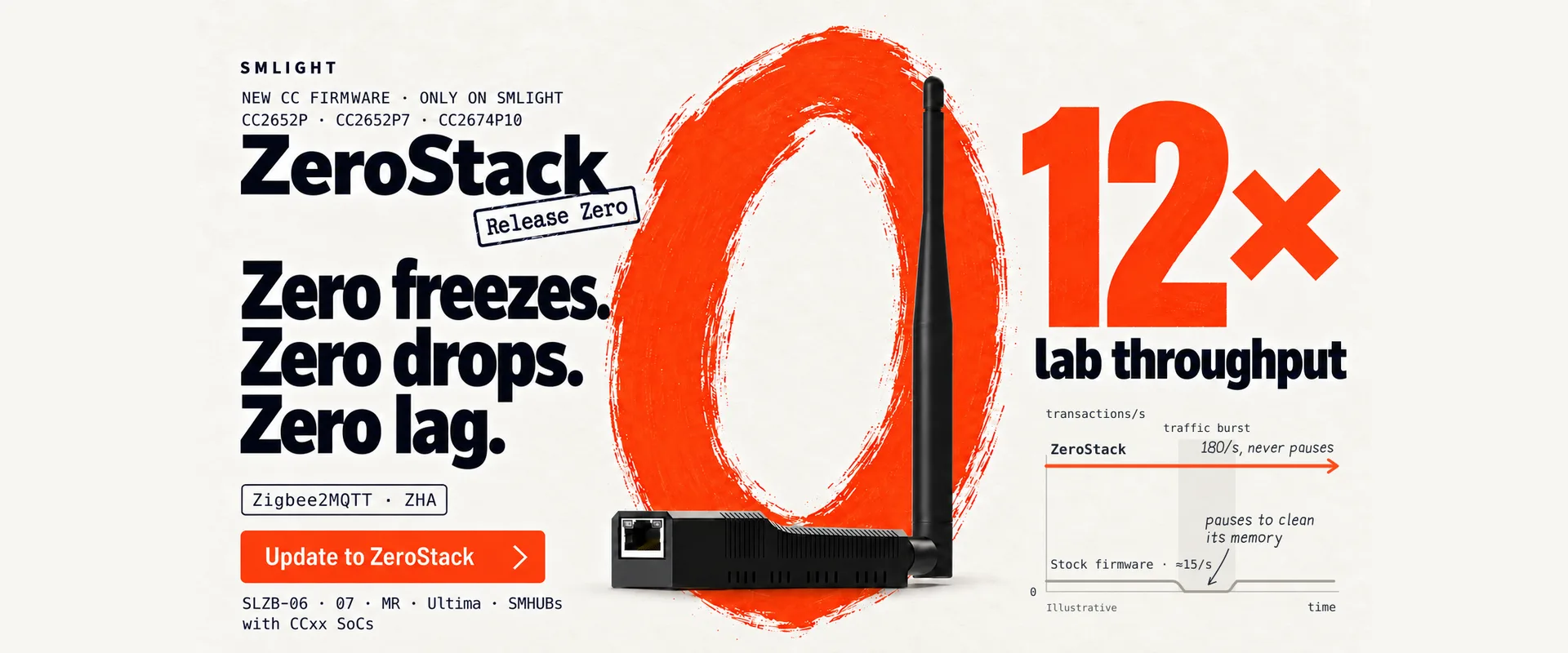
ZeroStack is new firmware for the Texas Instruments radio chip inside your SMLIGHT adapter: the CC2652P, CC2652P7 and CC2674P10. It replaces the stock Zigbee coordinator stack with one we re-engineered from the operating system up, and it speaks exactly the same Z-Stack language to Zigbee2MQTT and ZHA as before. Flash it, restart your hub, and the adapter you already own becomes a different device: twelve times the traffic in our lab, no freezes, no dropped battery sensors, no lag between your command and the light.
It is designed and signed specifically for SMLIGHT coordinators.
If your log looks like this, you already know why ZeroStack exists.
Home Assistant and Zigbee2MQTT users with 50 to 300 devices on a CC-based coordinator have seen these lines. Each one has a specific cause inside the stock firmware. ZeroStack removes the cause, not the symptom.
| What you saw | With ZeroStack |
|---|---|
SRSP - AF - dataRequest after 6000ms and Zigbee2MQTT stalling for six seconds per command | Gone. Commands from your hub are answered under load: 17.5 ms round trip, steady. |
Failed to connect to the adapter (SRSP - SYS - ping after 6000ms) after restarting Zigbee2MQTT, fixed only by unplugging | Gone. The coordinator is ready 0.8 s after a restart, well inside the 6 s timeout. |
Battery sensors (Aqara, Sonoff, Tuya, IKEA) dropping with MAC_NO_ACK (0xe9), 0xf0, 0xf1 once you pass about 32 of them | Gone. 40+ sleepy devices with zero drops. |
MEM_ERROR (0x10), BUFFER_FULL (0x11), NWK_TABLE_FULL (0xc7), APS_TABLE_FULL (0xb2) | Gone. Memory and tables are sized for real homes and stay stable under sustained load. |
MAC_CHANNEL_ACCESS_FAILURE (0xe1) on a clean channel | Gone. The radio recovers on its own. |
| Everything “online” but nothing responds, then a power cycle | Zero freezes. |
Not sure which of these you have been hitting? The in-browser ZeroStack log analyzer, published with the release, matches a Zigbee2MQTT, ZHA or OpenThread Border Router log against this catalogue and tells you which of them you were hitting and whether ZeroStack removes it. Nothing leaves your browser. The same catalogue ships as an MCP server, so an AI coding or operations agent can read your log and reach the same conclusion.
Why stock firmware freezes.
The Zigbee stack inside every CC-based coordinator on the market has a long lineage. Its design goes back to the first Zigbee radios of the early 2000s, chips with a few hundred bytes of RAM. Twenty years and several owners later, the decisions made for those chips are still in the code.
Those early decisions each cost a small stall somewhere on the path between the radio and your hub. We traced the freezes people report to a handful of them, all in the foundations of the stack, none of them fixable with a setting.
Under a burst of traffic, say Zigbee2MQTT restarting and re-interviewing 40 routers, those stalls compound. The queue grows faster than it drains, your hub logs a six-second timeout, and the coordinator stops answering. The stock stack falls off a cliff. Below the cliff, throughput is zero.
Zero freezes. Zero drops. Zero lag.
Release Zero at a glance.
What it is
- Zigbee coordinator and router firmware
- For the CC2652P, CC2652P7 and CC2674P10
- Designed and signed specifically for SMLIGHT coordinators
- Release Zero: the first release, build 20261026
What stays the same
- The Z-Stack host protocol: a Z-Stack 3.x coordinator to your hub
- Zigbee2MQTT and ZHA, with no configuration change
- Adapter type, port and baud rate
- Your coordinator backup and your paired devices
What you notice
- No pauses under load, no freezes
- Ready 0.8 s after a restart
- 17.5 ms command round trip, steady
- 40+ battery devices with zero drops
Also included
- Crash reports that survive a reboot, retrievable through SLZB-OS
- A ZeroStack router build in the same firmware list
- Builds for 115200 and 460800 baud
- Updates through SLZB-OS, or the web flasher for USB adapters
The numbers.
All measurements from SMLIGHT’s radio lab: real adapters, hardware debuggers reading the chip’s memory while it runs, RF sniffers validating every frame on air, Zigbee2MQTT attached as the host. One transaction is one command and its confirmation, for example switching a light on. The comparison is stock TI firmware on the same adapter.
| Metric | Stock TI firmware | ZeroStack |
|---|---|---|
| Sustained traffic | About 15 transactions/s, then throughput drops to zero | 180 transactions/s and still running. 180 is the limit of our test rig, not of the firmware. |
| Coordinator ready after a warm reset (container or integration restart) | 4,200 to 6,500 ms; frequently trips the 6,000 ms host timeout | 804 ms |
| Command round trip under load | 38 to 65 ms, with jitter up to 140 ms | 17.5 ms, deterministic |
| Battery devices above about 32 per coordinator | Frames dropped (30 of 30 in the stress test) | 0 of 30 dropped, 40+ sleepy devices |
| Router traffic while battery devices are waiting | 10 of 10 dropped | 0 of 10 dropped |
| Memory errors under sustained load | MEM_ERROR within hours | None across 10⁷ allocation cycles |
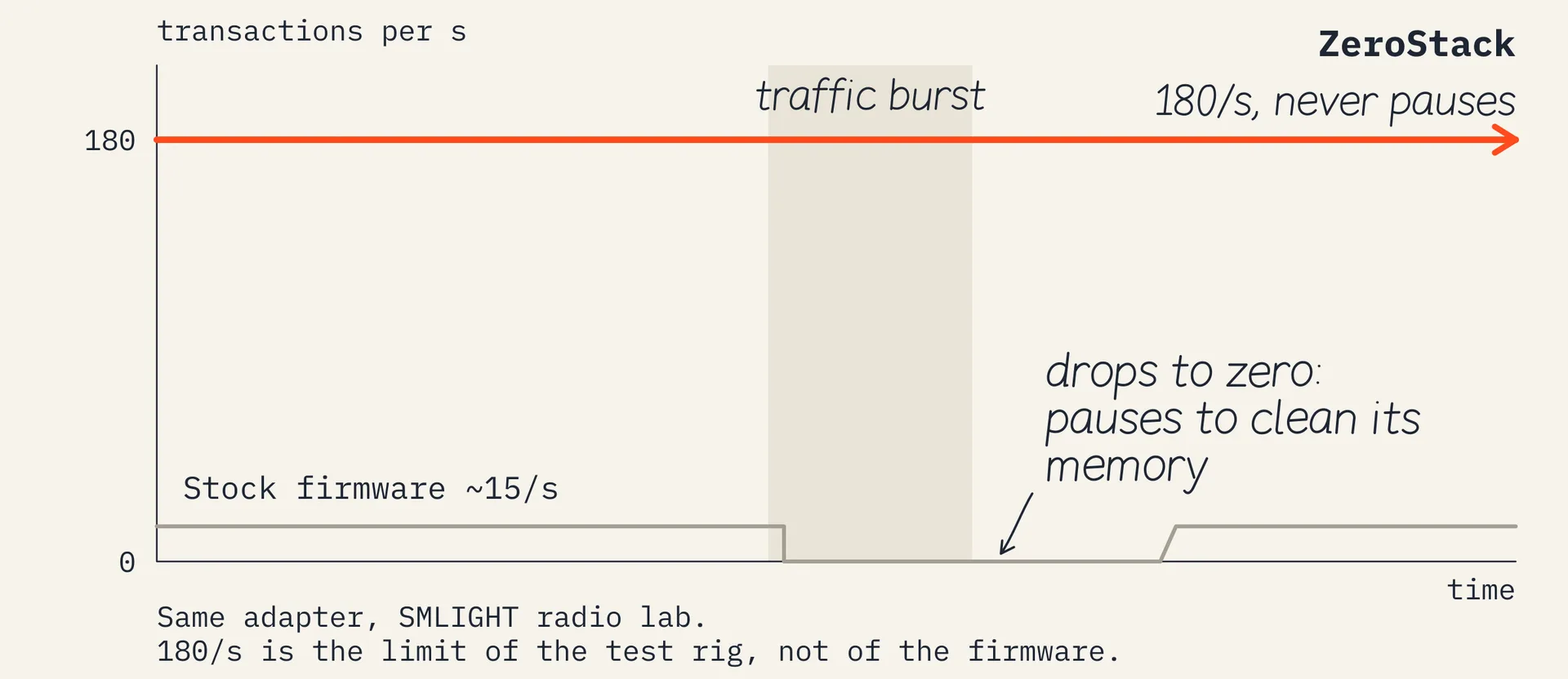
Every number above comes from a specific, repeatable lab run. The engineering notes behind them are published with the release.
Built for big meshes.
Memory and table sizes are set per chip, so every model uses all the RAM it has.
| Capacity per coordinator | SLZB-06 class · CC2652P | p7 class · CC2652P7 | p10 class · CC2674P10 |
|---|---|---|---|
| Joined devices with trust-centre keys | 200 | 300 | 400 |
| Routing table entries | 120 | 200 | 250 |
| Source routes (many-to-one) | 100 | 200 | 250 |
| Direct children | 50 | 100 | 150 |
| Router neighbours | 50 | 100 | 150 |
| Storage reserved for network data | 40 KB | 128 KB | 128 KB |
Update in five minutes.
- Check your hub’s backup. Zigbee2MQTT writes
coordinator_backup.jsonwhen it stops; ZHA keeps its own backups automatically. Stop Zigbee2MQTT or ZHA cleanly before you flash, so the backup is current. - Open SLZB-OS in your browser and go to Settings and Tools → Firmware update.
- Pick ZeroStack in the Zigbee firmware list for your model, 115200 baud unless you have set your hub to 460800, and press Flash. The adapter fetches the signed image from SMLIGHT’s update server and flashes the radio. About 30 seconds.
- Start Zigbee2MQTT or ZHA. The hub finds a blank radio, recognises its own network in the backup, and restores it onto ZeroStack: same channel, same PAN, same network key, same device link keys. Zigbee2MQTT logs
Started with result 'restored'. - Done. Mains-powered devices answer at once. Battery devices rejoin on their own the first time they wake up, as they do after any coordinator restore, then report normally.
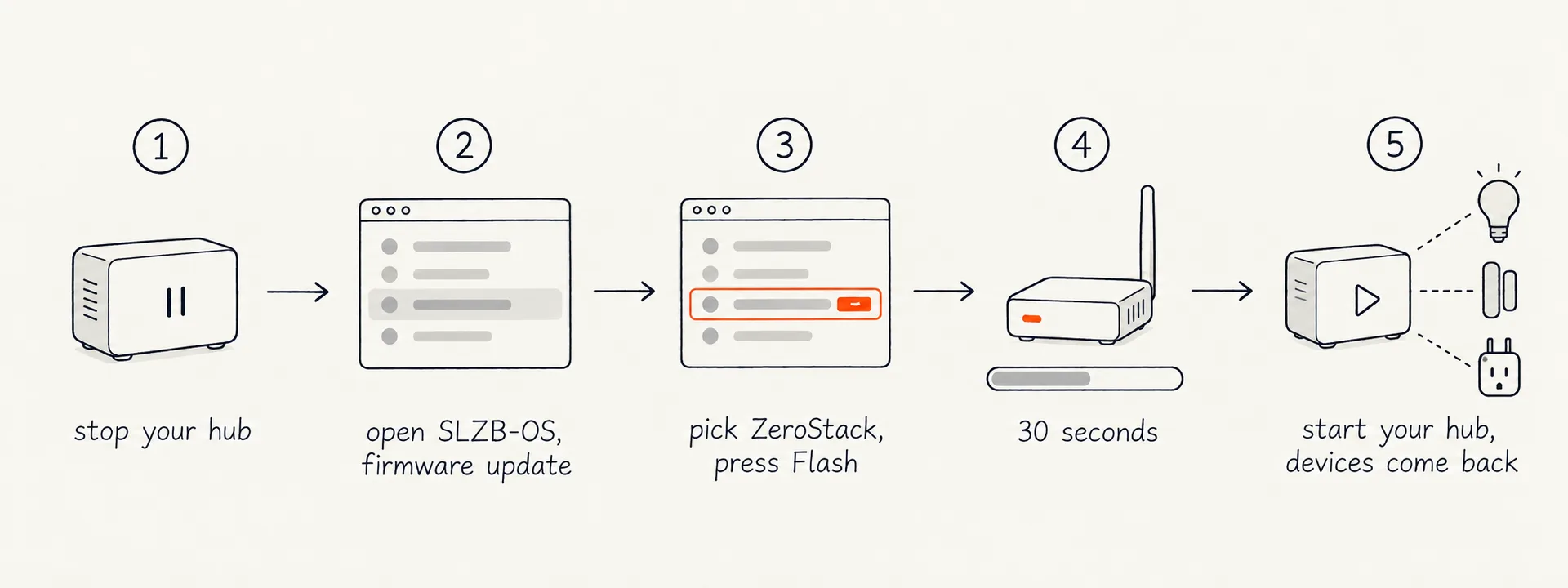
We tested exactly this path. On Oct 25 we took a live Zigbee2MQTT 2.14 network (routers and sleepy end devices) from stock firmware to ZeroStack, back to stock, and to ZeroStack again. Each time the network restored from the hub’s backup and no device was paired again.
zh:zstack: Detected znp version 'ZStack3x0' ({"majorrel":2,"minorrel":8,"revision":20261026})
zh:adapter:zstack:manager: determined startup strategy: restoreBackup
zh:zstack:backup: successfully recovered link key for 94b216fffec6687d using tclk seed
zh:controller: Started with result 'restored'
z2m: Currently 35 devices are joined.
Going back. The stock firmware stays in the same list. Flash it, start your hub, and it restores the network the same way. Note that the update erases the radio’s own copy of the network; the restore relies on your hub’s backup. If you run a hub without backups, make one first.
460800 baud. Builds for 460800 are in the list for people who want the faster serial link. The baud rate is part of the firmware, so changing a setting is not enough: flash the 460800 build of ZeroStack, then set 460800 in SLZB-OS and in your hub. All three must match. 115200 remains the default.
USB adapters. The SLZB-07p7 and SLZB-07p10 update from the SMLIGHT web flasher in your browser instead of SLZB-OS. Steps 1, 4 and 5 are the same.
Works with.
ZeroStack keeps the Z-Stack host protocol. To Zigbee2MQTT and ZHA it is a Z-Stack 3.x coordinator, build 20261026, with the same adapter type, port and baud rate as before. No configuration change, no driver change, no plugin. Two things you will notice: Zigbee2MQTT shows the coordinator firmware revision as 20261026, and everything feels quicker, pairing included.
Which models get it.
ZeroStack runs on the Texas Instruments radio in these SMLIGHT models. It does not apply to models with a Silicon Labs radio (SLZB-06M, 06Mg24, 06Mg26, SLZB-07, 07Mg24, and the Silicon Labs radio inside MR and Ultima units).
| Radio chip | Models |
|---|---|
| CC2652P | SLZB-06, SLZB-06U, SLZB-MR2 (TI radio), SMHUB Essentials |
| CC2652P7 | SLZB-06p7, SLZB-06p7U, SLZB-07p7, SLZB-MR1 (TI radio), SMHUB Nano P7, SMHUB NanoMR6 |
| CC2674P10 | SLZB-06p10, SLZB-06p10U, SLZB-07p10, SLZB-MR3 (TI radio), SLZB-Ultima 3 (TI radio), SMHUB Premium |
Requirements: a current SLZB-OS with ZeroStack in its Zigbee firmware list, and Zigbee2MQTT or ZHA with a current coordinator backup.
How we tested it.
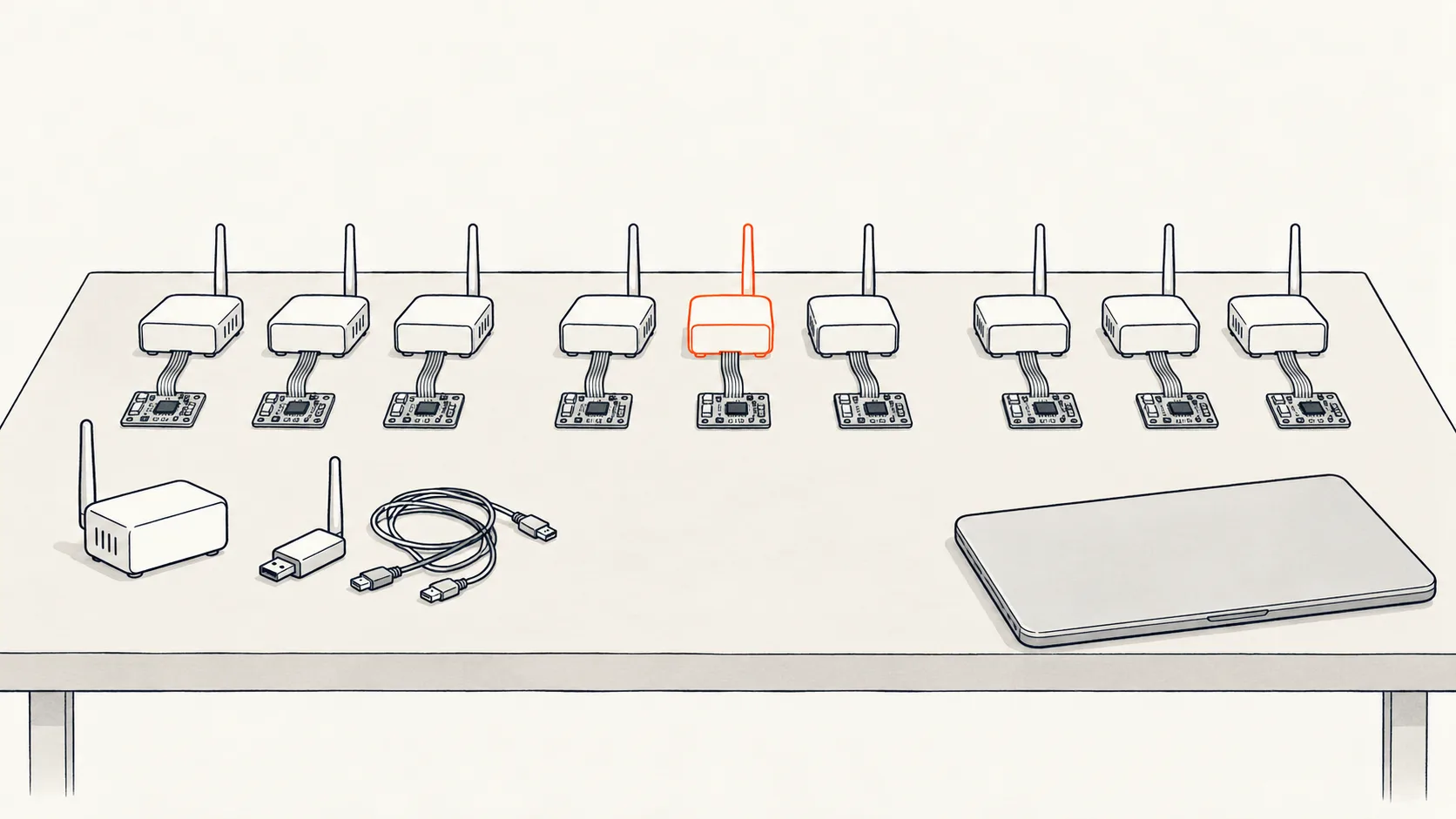
ZeroStack came out of the SMLIGHT Radio Lab, the test bench we built to push coordinators past their limits before customers do. Nine live radios on the bench, each with a hardware debugger reading the chip’s memory in real time, ZREL units injecting traffic at a chosen rate, and an RF sniffer validating every frame on air against the specification.
- Sustained load. 180 transactions per second for the length of the run, with Zigbee2MQTT attached: 1,686 incoming messages processed, 0 errors, 0 timeouts. Stock firmware on the same bench stopped answering long before that.
- Fuzzing. 2.4 million malformed host frames in three seconds against the host interface. That alone found four memory-safety bugs. All fixed before release.
- Hardware validation. Every chip in the release passed the same hardware validation suite under the debugger.
- Upgrade and downgrade. Live network moved to ZeroStack and back, twice, no re-pairing.
- Field builds. Early builds went to users with chronic freezes before the release.
The specifics.
| Protocol | Zigbee · coordinator and router builds |
| Radio chips | CC2652P · CC2652P7 · CC2674P10 |
| Host interface | Z-Stack 3.x · build 20261026 · same adapter type, port and baud rate |
| Serial | 115200 baud by default · 460800 builds in the same list |
| Core | FreeRTOS · memory-safe Rust MAC layer written by SMLIGHT |
| Memory | Tables sized per chip · stable under sustained load |
| Diagnostics | Crash reports that survive a reboot, retrievable through SLZB-OS |
| Delivery | SLZB-OS → Settings and Tools → Firmware update · USB adapters: the SMLIGHT web flasher · about 30 seconds |
| Made for | Designed and signed specifically for SMLIGHT coordinators · included with every supported adapter |
Quick questions.
Get ZeroStack.
ZeroStack is included for every supported SMLIGHT adapter. Ethernet and PoE models update from SLZB-OS: open your adapter’s web interface, go to Settings and Tools → Firmware update, pick ZeroStack and flash. USB adapters flash from the SMLIGHT web flasher in your browser. Stop Zigbee2MQTT or ZHA first; your network restores from the hub’s backup. Release Zero fixes the foundations. More will follow, and the fastest way to steer it is to send us logs and crash reports from real networks.