SMHUB-OS release notes

v1.0.0

TL released on 20260710

The official, stable release of SMHUB OS v1.0.0 is finally here! 🚀 This milestone release marks the culmination of extensive testing and brings powerful new customization options, improved hardware integrations, and bulletproof system reliability to your smart hub.

✨ New Features

    Community App Repository [📦]: Added support for the community app repository directly in opkg. While still a work in progress, this lays the groundwork for allowing community-published apps in the smhub ecosystem! Serial Bridge Config & Service Controls [⚙️]: Take complete control over your serial interfaces!
      Dedicated Settings Page: Added a brand new page to configure ser2net and easily manage the service directly from the web UI. Service Controls: Added underlying support for configuring ser2net service controls. Modern Config Formats: Bumped ser2net to v4.6.7 for clean, readable v2 YAML configuration support. Intelligent 4G Modem Switching [📶]: Bulletproof cellular failover! The system now checks the current USB mode before enabling a 4G modem and automatically switches to USB host mode if required. Seamless Updates [🌐]:
        Background Progress Tracking: The web UI now keeps track of your OTA progress seamlessly, even if you navigate away from the Updates page. Reboot Notifications: Added a post-update reboot notification so you know exactly when your hub is back online. Uninstalled App Persistence: Allowed zigbee2mqtt to remain uninstalled after an OTA upgrade if you have previously opted to remove it.

        🔧 Bug Fixes

          Factory Reset & OTA Reliability:
            Fixed several edge-case issues during OTA upgrades when migrating from older factory images. Resolved a bug causing certain packages to go missing after a factory reset. Hardened the creation and verification of the python virtual packages. Timezone Settings: Squashed a validation bug when setting or changing the system timezone from the web UI. App Status: Fixed a display bug with the OpenThread app running status reporting and control buttons.

            OS v1.0.0.beta5

            TL released on 20260622

              Restore aic8800 drivers missed in beta4

              OS v1.0.0.beta4

              TL released on 20260617

              Beta 4 is a quick stability update focused on factory reset behavior and a few targeted fixes.

              🔧 Bug Fixes

                Fixed an issue saving ESPHome encryption keys from the web UI. Install minimal ESPHome firmware on SMHUB Nano devices Improved reliability of physical button detection. Restored factory reset functionality when smhub-broker is installed. Factory reset from the button now keeps backups enabled by default. Improved USB host mode stability.

                OS v1.0.0.beta3

                released on 20260614

                Beta 3 is here, and it's a game-changer! 🚀 This release is all about unlocking the hidden potential of your hardware and introducing seamless ESPHome integration.

                For a long time, your smhub has been keeping a secret from you: a dedicated, hidden RTOS co-processor core. With Beta 3, we are officially bringing native ESPHome firmware support directly to that dedicated RTOS core! 🚀 This means ultra-low-latency real-time control, robust device proxying, and offline smart home orchestration directly on the metal, completely decoupled from the main Linux OS.

                ✨ New Features

                  ESPHome on the RTOS Core [🏠]: Unlocked the secondary real-time co-processor! We are bringing native ESPHome firmware support directly to that dedicated, hidden RTOS core for lightning-fast sensor handling, robust device proxying, and rock-solid automation completely decoupled from the main Linux OS.
                    Pre-bundled Packages: Default software packages have been updated to ship with esphome-bin and smhub-broker pre-installed for an effortless, zero-configuration local setup of ESPHome. Native Bluetooth Proxy [📶]: Experience high-performance, low-latency Home Assistant Bluetooth Proxy support out-of-the-box! Enjoy lightning-fast tracking, robust connection proxying, and full support for up to 16 active concurrent connections. Intelligent Coexistence: The system automatically and intelligently handles Bluetooth proxy mode behind the scenes by disabling the conflicting host bluetoothd daemon when active, routing raw HCI traffic directly to ensure maximum message throughput with zero bluetooth radio conflicts. Boot Animation: Added a sleek, power-on boot animation so you get instant visual feedback the second your device starts up. Kernel RTC Support [⏱️]: Time-travel protection for offline setups! Enabled the ds1307 kernel driver to provide support for popular I2C Real-Time Clock modules. If you are running completely offline, simply wire a compatible RTC to the DIY expansion header to maintain perfect chronological order without NTP servers. OpenRC Serial Proxy: Added an OpenRC service script for ser2net to smoothly proxy serial devices over network ports.

                    🔧 Bug Fixes

                      MQTT Save Fix: Fixed a critical validation and saving bug when updating your Mosquitto MQTT configuration settings. Zigbee Flashing: Squashed a pesky "invalid IEEE address" error that would sometimes crop up when flashing CC2652-based coordinators. Unified Channels: Streamlined system updates—Operating System and Application channels now remain in lockstep automatically for a bulletproof upgrade experience. Log Diagnostics: Resolved issues with log history viewing and ensured reliable exporting of system logs. Restart Prompts: Added a dedicated modal confirmation dialog prompting to restart the application after saving app-level settings.

                      OS v1.0.0 Beta 2

                      released on 2026-05-27

                      Beta 2 is all about stability and recovery! 🛠️

                      We've introduced the Recovery Console to safely rescue data, squashed reboot bugs, beautifully polished the dark theme and laid the groundwork for running the ultra-lightweight PicoClaw AI assistant directly on your hub. 🚀

                      ✨ New Features

                        Recovery Console: Users can now download logs and backups directly from the smhub-flasher recovery console, making it easy to safely rescue data from an unbootable device before performing a factory reset. Dynamic Ports: Transitioned stunnel to use proper OpenRC scripts and adjusted the configuration to reliably handle dynamic port assignments based on app provided schema. PicoClaw Support [🦀]: Added underlying system support for PicoClaw, allowing you to run this ultra-lightweight personal AI assistant directly on the system. Available to install from the apps page. Dark Theme 🌑: The frontend user interface now features a beautifully polished dark theme.

                        🔧 Bug Fixes

                          Reboot Reliability: Improved how underlying hardware components (like USB and networking) are safely powered down during a system restart, preventing occasional freezes and ensuring smoother reboots. Boot Stability: Added an automatic filesystem check (fsck) for the MISC partition during early boot to prevent occasional startup halts after OTA updates. Log Permissions: Fixed file permissions and ownership on several system log files (like dmesg) to ensure easier access. Package Management: Clarified description on the Python virtual package for cleaner opkg status reporting. Backups: Restore missing xz package that broke backup restore feature in beta1

                          Note to Beta Testers: Checkout the new smhub-flasher if you are doing a Type-C re-install this completely replaces the old tools.

                          OS v1.0.0 Beta 1

                          released on 2026-05-19

                          We are thrilled to announce the very first beta release of SMHUB OS v1.0.0! 🚀

                          This update goes to the core of SMHUB and brings substantial performance updates along with other features.


                          ✨ New Features

                            Updated Bootloader: Transitioned to mainline OpenSBI 1.8 and U-Boot 2026.04 for better stability and hardware support during the boot process. Fastboot Flashing: Switched to using fastboot for Type-C flashing (requires the new smhub-flasher tool) for much more reliable device recovery. Component Renaming: The smhub-web package has been renamed to smhub-ui to better reflect its purpose as the primary user interface. Packaging Improvements: Added a new service helper library for opkg scripts to streamline package management and updates behind the scenes. Persistent Device Identity: Added EEPROM storage regions for your hostname and SSH keys, allowing them to be pre-loaded and survive after a full Type-C flash. SD Card Configuration: Introduced a new sdcard config service that allows configuring device parameters via a JSON file on an SD card. Dual-Core Support: Added support for communicating with the secondary RTOS processor, laying the groundwork for running ESPHome directly on the hub. Hardware Customization: Added support for Linux device tree overlays, making it easier to dynamically configure peripheral hardware. Hardware RNG: Added a new kernel driver for the Hardware Random Number Generator to improve system security and entropy generation.

                            ⚡ Performance Improvements

                              Hardware Crypto Offload: Added kernel and OpenSSL support for hardware-accelerated AES and SHA256, improving encryption speeds and lowering CPU usage. F2FS for User Data: Switched new installations to use the Flash-Friendly File System (F2FS) on the user partition, optimized specifically for eMMC to boost I/O performance and longevity (Note: requires a full re-install for existing users to take effect). Upgraded USB Networking: Switched the USB networking gadget to CDC-NCM for increased throughput and stability over USB connections. BFG CPU Scheduler: Migrated the Linux kernel task scheduler to BFG, resulting in smoother multitasking and better overall system responsiveness. Memory Compression: Enabled zRAM to compress memory pages directly in RAM, effectively expanding available memory without needing a traditional swap file that would quickly wear out the flash storage.

                              🔧 Bug Fixes

                                Library Paths: Fixed ldconfig execution so that custom libraries installed in /opt paths are recognized correctly. Smart Home Stability: Disabled smhub-mqtt-bridge by default to resolve configuration conflicts with the primary mosquitto broker. MQTT Permissions: Properly configured mosquitto to run with restricted user privileges instead of root, and fixed its logging behavior. USB Reliability: Applied specific vendor quirks to the Linux USB PHY driver to resolve an interrupt storm bug, dramatically reducing unnecessary CPU load. Time Synchronization: Added a driftfile to ntpd to improve long-term clock stability (Thanks Ian). Package Management: Restored the python lzma module that was accidentally lost during a recent Buildroot update. App compatibility: Patched opkg to respect the Require-OS-Version metadata rule, ensuring you don't accidentally install packages meant for newer firmware.

                                Note to Beta Testers: Since this is a beta release, please back up your Zigbee network map before flashing. If you encounter any unexpected regressions, please open an issue on our GitHub Tracker. Happy hacking! 🎉


                                2026-Feb-28:

                                OS 0.9.6.dev, smhub-services 0.2.11-1, smhub-web 0.3.0-1 Released


                                This update brings major improvements to system stability, recovery options, backups, and peripheral control via apps and CLI.


                                🆕 Linux Kernel 6.18

                                SMHUB now runs on Linux Kernel 6.18, improving overall stability, performance, and hardware compatibility. Previous firmwares v0.3x and before were based on the vendor's Linux kernel 5.4. x. 


                                🧪 Base for pre-1.0.0 Release Candidate

                                Despite a DEV channel, this is a strong version which we can reccomend and this version is a base for the pre-1.0.0 release candidate, meaning we are approaching the first major stable milestone with feature-complete functionality and refined behavior.


                                🔄 Factory Reset Support

                                Factory Reset is now supported via the hardware button - press and hold for 10 seconds the middle button on SMHUB Essentials/Premium to reset the device to factory settings.


                                💾 User Data Backup & Restore

                                User data backup and restore is now supported, making it easier to protect and migrate your configuration.


                                🧩 New Backups Page in Web UI

                                A dedicated Backups page has been added to the Web UI for managing user data backup and restore operations.
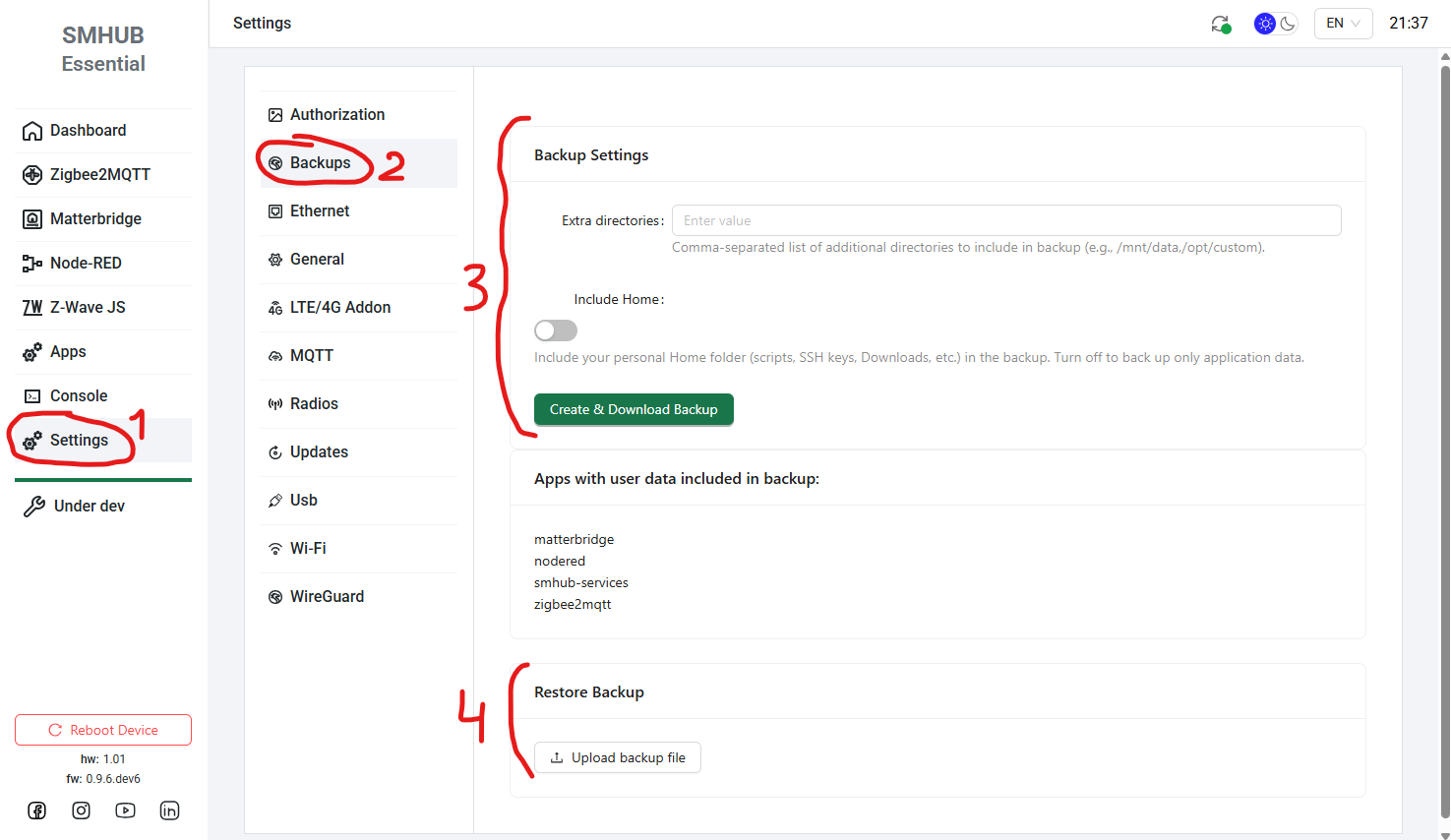
                                image.png


                                🎛️ Peripheral Control via Apps & CLI

                                You can now control peripherals directly via apps and command line tools:

                                  IR (learn and replay infrared commands) Buzzer (play notification sounds) WS2812 / Ambilight LEDs (colors, effects, notifications)

                                  Example commands:

                                  IR:

                                  smhub-irctl learn tv_power
                                  smhub-irctl send tv_power

                                  Buzzer:

                                  smhub-buzzerctl play builtin success
                                  smhub-buzzerctl stop

                                  Ambilight:

                                  smhub-ambilightctl color 255 0 0
                                  smhub-ambilightctl effect breathe 0 255 0

                                  For more detailed information, please look at:

                                    [IR, Buzzer, Ambilight documentation link placeholder]

                                    ⚙️ Update Instructions

                                      OS: Setting -> Update and Restore -> Update ->  Set "OS Update Channel" to Development -> refresh available OS list and update.

                                      -web and -services apps: UI update or Console update: 
                                        UI (smhub-services restart after update can take up to 4 minutes): 
                                        Web  → Apps → Refresh → smhub-services/smhub-web → Upgrade Console (smhub-services restart after update can take up to 4 minutes):
                                        sudo opkg update
                                        sudo opkg upgrade
                                        Can be updated via Type-C or SD-Card flashing methods - please read here: https://smlight.tech/support/manuals/books/smhub/chapter/restore-and-updating. After such an update, all apps are updated automatically.

                                        2026-Jan-22:

                                        smhub-services 0.2.8-1, openthread 0.3.1-2, OS 0.3.11 Released


                                        🚀 Key Highlight

                                          Fixed issue with cron.daily preventing daily package updates

                                          Enabled kernel options required for OTBR firewall functionality

                                          Migrated autostart files to a new structure for improved service handling

                                          Updated system-config to v0.1.16

                                          Added support for configuring the OTBR app directly

                                          Added full configuration support for OpenThread from the web UI

                                          Improved logging and debugging output

                                          Improved pairing of new Thread devices in some cases

                                          Added support for firewall and NAT64 configuration


                                          ⚙️ Update Instructions

                                            OS: Setting -> Update and Restore -> Update -web and -services apps: UI update or Console update: 
                                              UI (smhub-services restart after update can take up to 4 minutes): 
                                              Web  → Apps → Refresh → smhub-services/smhub-web → Upgrade Console (smhub-services restart after update can take up to 4 minutes):
                                              sudo opkg update
                                              sudo opkg upgrade
                                              Can be updated via Type-C or SD-Card flashing methods - please read here: https://smlight.tech/support/manuals/books/smhub/chapter/restore-and-updating. After such an update, all apps are updated automatically.

                                              2025-Dec-12:

                                              smhub-services 0.2.5, smhub-web 0.2.18 + Openthread app 0.3.0-3 Released


                                              🚀 Key Highlight

                                                MQTT (Mosquitto) Improvements

                                                    Fixed MQTT settings pages in the Web UI.

                                                    Fixed MQTT bridge mode configuration for connecting SMHUB to external brokers.

                                                    📘 Manual: https://smlight.tech/support/manuals/books/smhub/page/connecting-zigbee2mqtt-on-smhub-to-home-assistant


                                                      App Settings & Configuration

                                                          Fixed saving of numeric values in app settings forms.

                                                          Improved app configuration forms with additional options:

                                                            MQTT credentials fields added where applicable

                                                            Home Assistant enablement option added to Zigbee2MQTT settings

                                                            These changes make app configuration more reliable and reduce the need for manual edits.


                                                            Openthread App Updates (v0.3.0-3)

                                                                Fixed Run and Stop buttons in the OpenThread app.

                                                                Corrected OpenThread port settings for SMHUB Nano series devices.

                                                                📘 Manual: https://smlight.tech/support/manuals/books/smhub/page/using-smhub-as-thread-border-router-for-matter-devices


                                                                ⚙️ Update Instructions

                                                                  -web and -services apps: UI update or Console update: 
                                                                    UI (smhub-services restart after update can take up to 4 minutes): 
                                                                    Web  → Apps → Refresh → smhub-services/smhub-web → Upgrade
                                                                    Console (smhub-services restart after update can take up to 4 minutes):
                                                                    sudo opkg update
                                                                    sudo opkg upgrade

                                                                    2026-Jan-19:

                                                                    smhub-services 0.2.7, smhub-web 0.2.23, OS 0.3.10 Released


                                                                    🚀 Key Highlight

                                                                      Added nftables (+ iptables compat) for Tailscale/firewall Optimized startup: faster boot time by about 30 sec. Auto log truncation (daily / size limit) – to resolve freezes issue Improved NanoMR4 EFR flashing (CC flash reset) Zigbee2MQTT default logs set to info Fixed rare boot into backup partition Faster startup (deferred component loading) Increased flasher load timeout Updated GPIO mapping for kernel 6.18 Updated Buildroot to 2025.11.x


                                                                      ⚙️ Update Instructions

                                                                        OS: Setting -> Update and Restore -> Update -web and -services apps: UI update or Console update: 
                                                                          UI (smhub-services restart after update can take up to 4 minutes): 
                                                                          Web  → Apps → Refresh → smhub-services/smhub-web → Upgrade Console (smhub-services restart after update can take up to 4 minutes):
                                                                          sudo opkg update
                                                                          sudo opkg upgrade
                                                                          Can be updated via Type-C or SD-Card flashing methods - please read here: https://smlight.tech/support/manuals/books/smhub/chapter/restore-and-updating. After such an update, all apps are updated automatically.

                                                                          2025-Dec-12:

                                                                          smhub-services 0.2.5, smhub-web 0.2.18 + Openthread app 0.3.0-3 Released


                                                                          🚀 Key Highlight

                                                                            MQTT (Mosquitto) Improvements

                                                                                Fixed MQTT settings pages in the Web UI.

                                                                                Fixed MQTT bridge mode configuration for connecting SMHUB to external brokers.

                                                                                📘 Manual: https://smlight.tech/support/manuals/books/smhub/page/connecting-zigbee2mqtt-on-smhub-to-home-assistant


                                                                                  App Settings & Configuration

                                                                                      Fixed saving of numeric values in app settings forms.

                                                                                      Improved app configuration forms with additional options:

                                                                                        MQTT credentials fields added where applicable

                                                                                        Home Assistant enablement option added to Zigbee2MQTT settings

                                                                                        These changes make app configuration more reliable and reduce the need for manual edits.


                                                                                        Openthread App Updates (v0.3.0-3)

                                                                                            Fixed Run and Stop buttons in the OpenThread app.

                                                                                            Corrected OpenThread port settings for SMHUB Nano series devices.

                                                                                            📘 Manual: https://smlight.tech/support/manuals/books/smhub/page/using-smhub-as-thread-border-router-for-matter-devices


                                                                                            ⚙️ Update Instructions

                                                                                              -web and -services apps: UI update or Console update: 
                                                                                                UI (smhub-services restart after update can take up to 4 minutes): 
                                                                                                Web  → Apps → Refresh → smhub-services/smhub-web → Upgrade
                                                                                                Console (smhub-services restart after update can take up to 4 minutes):
                                                                                                sudo opkg update
                                                                                                sudo opkg upgrade

                                                                                                2025-Nov-26:

                                                                                                smhub-services 0.2.2, smhub-web 0.2.16, OS 0.3.7 Released


                                                                                                🚀 Key Highlight

                                                                                                  Improved Radio Flashing & Model Handling - smhub-services v0.2.2

                                                                                                    Added support for reading EEPROM v1 format.

                                                                                                    Radio flashing endpoints now adapt automatically based on the EEPROM model (better model-aware flashing).

                                                                                                    Updated pysmlight to v0.2.11 adding support for Nano flashing.

                                                                                                    Corrected default configuration values for Zigbee2MQTT.
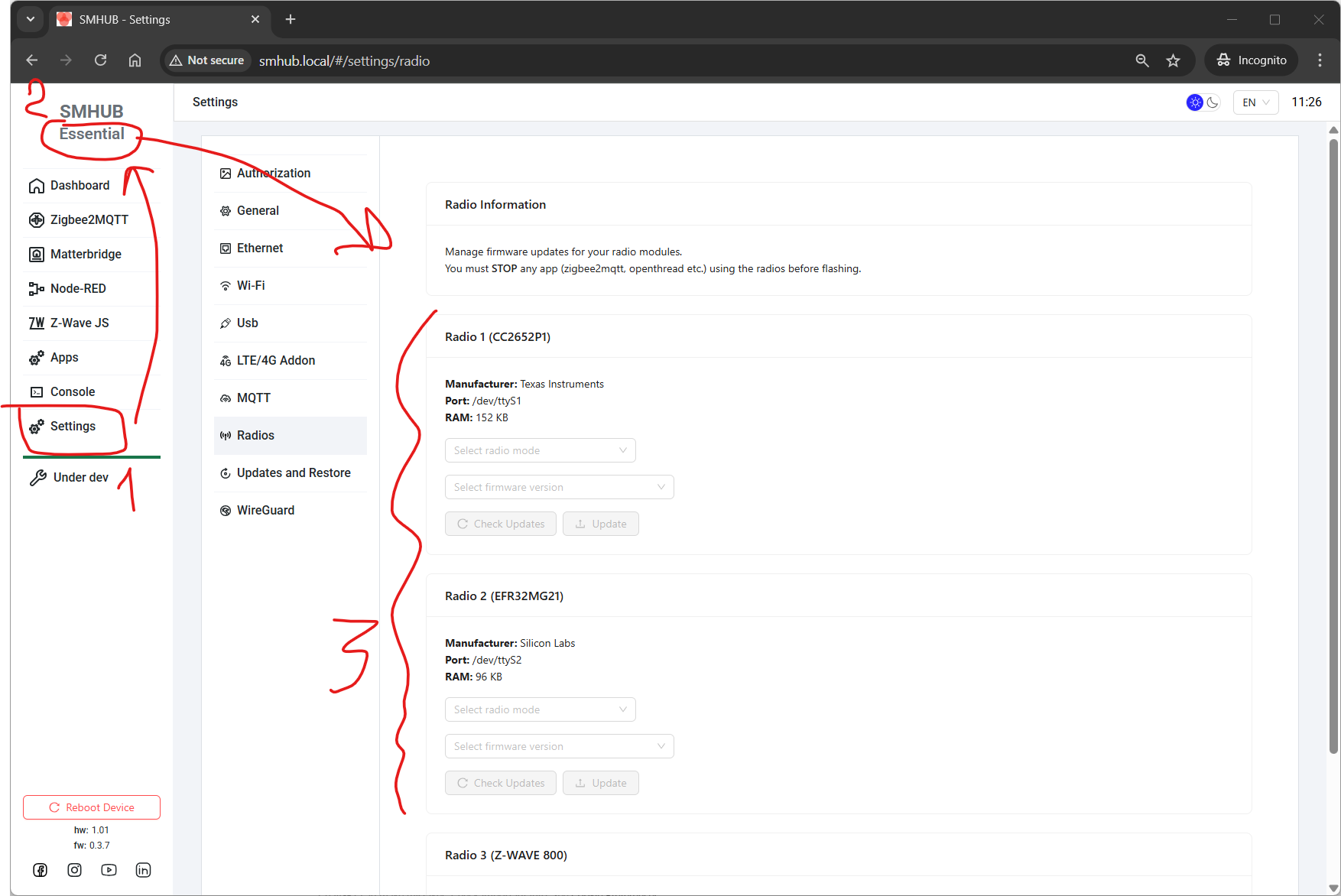
                                                                                                    image.png image.png


                                                                                                      Web UI Improvements - smhub-web v0.2.16

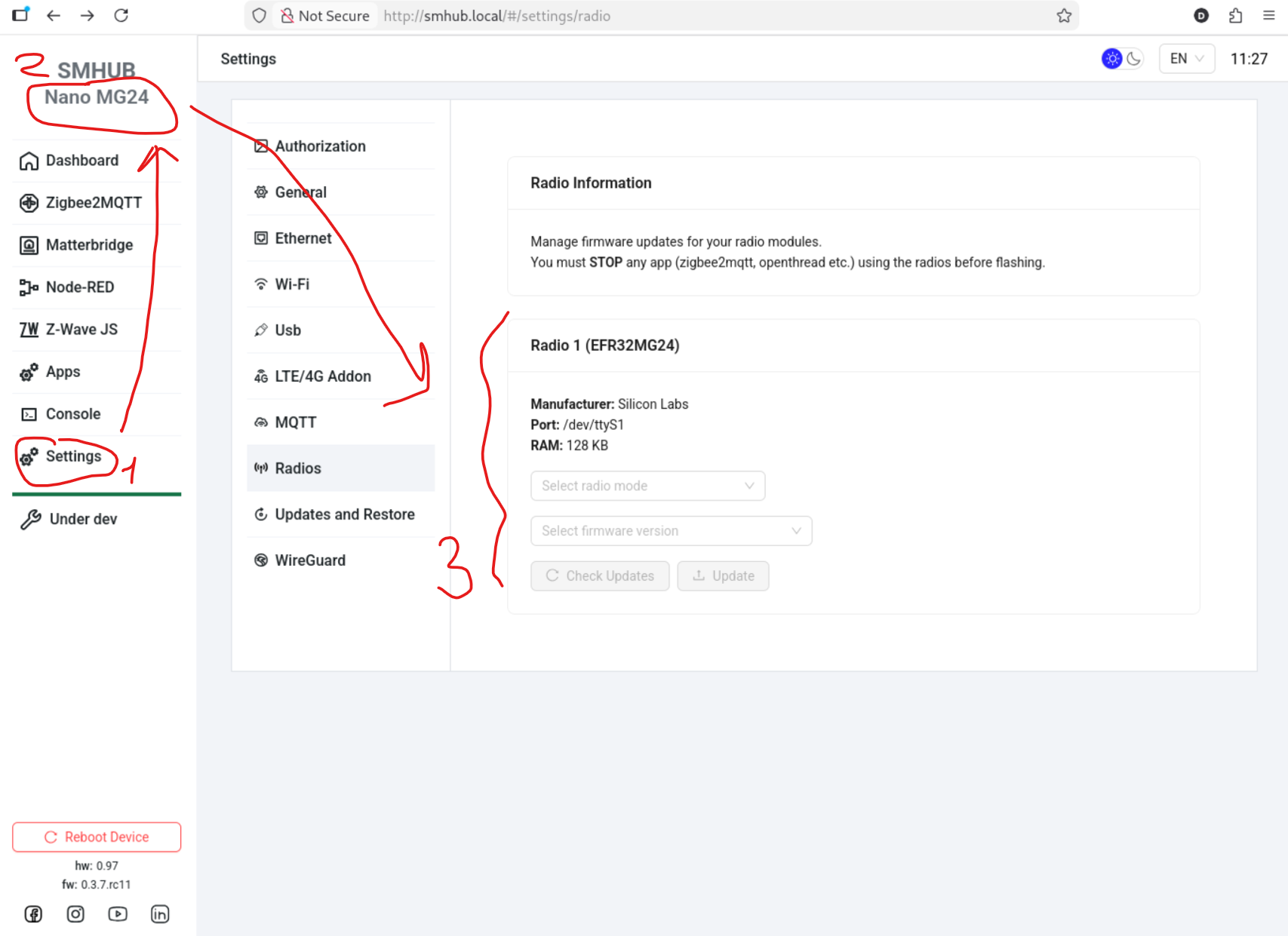
                                                                                                        Updated Radio page to support Nano Mg24 flashing.

                                                                                                        The device model is now displayed in the sidebar for quick identification.
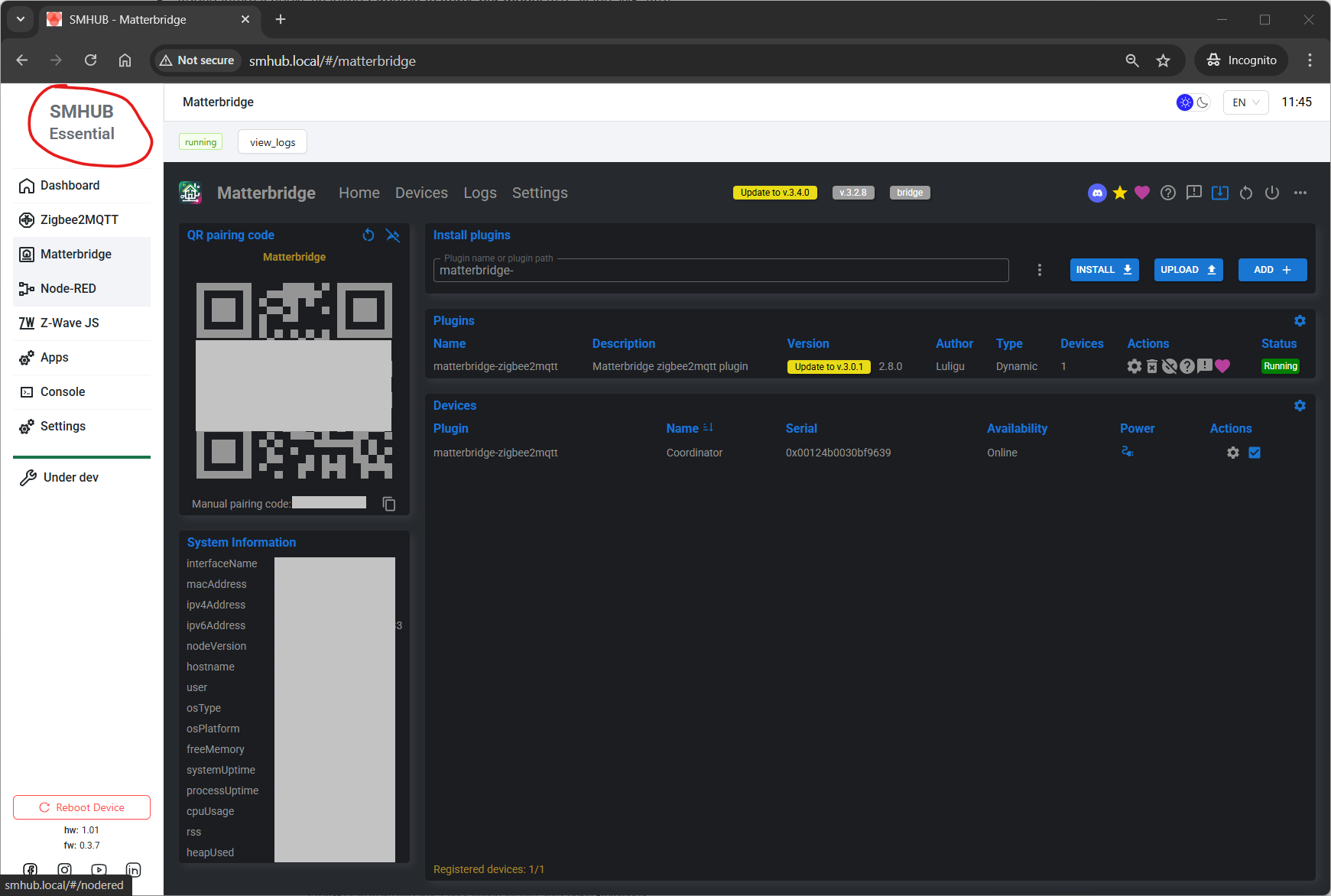
                                                                                                        image.png

                                                                                                        Updated default Zigbee2MQTT settings.

                                                                                                        App status (running/stopped) now shown inside Apps settings.
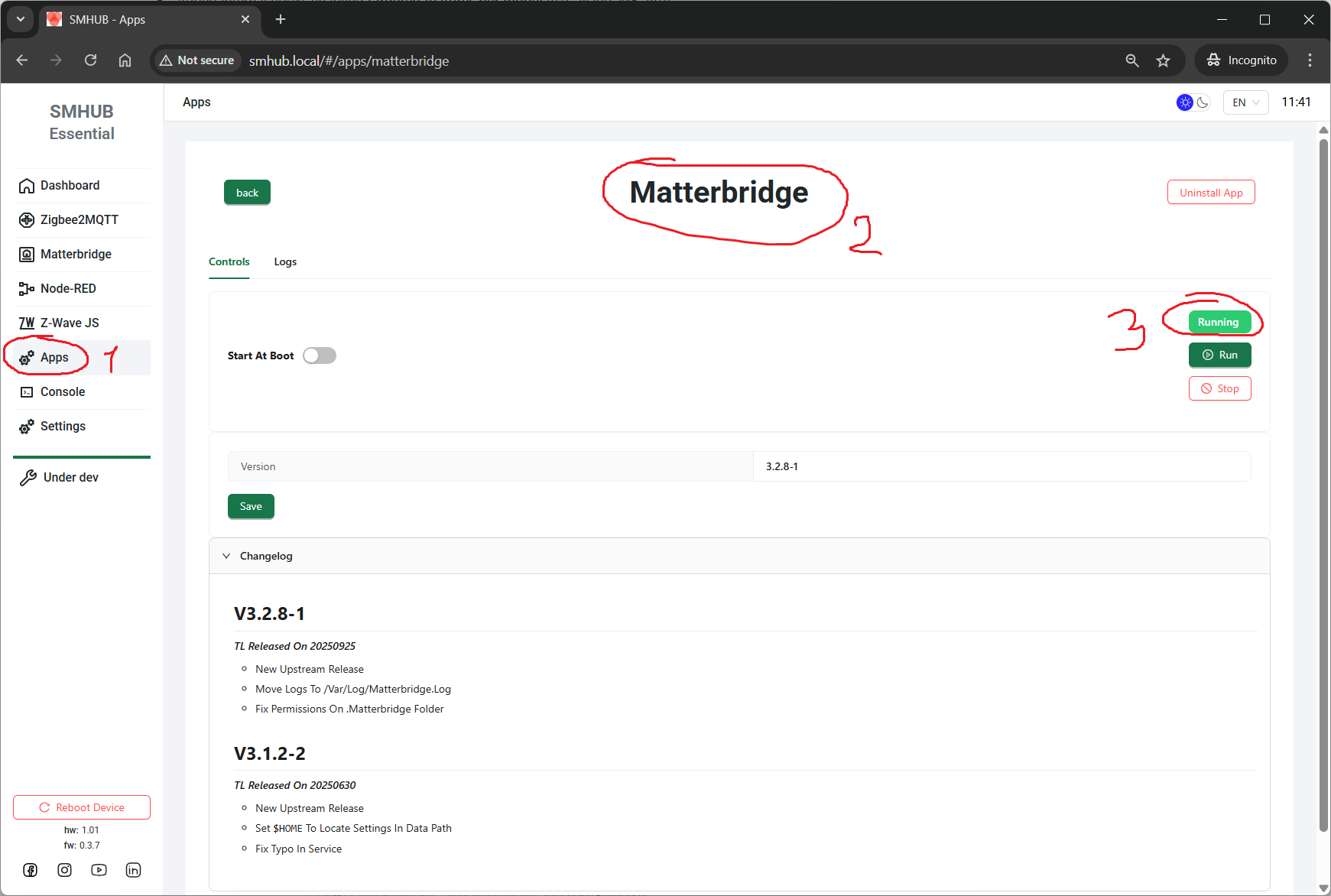
                                                                                                        image.png

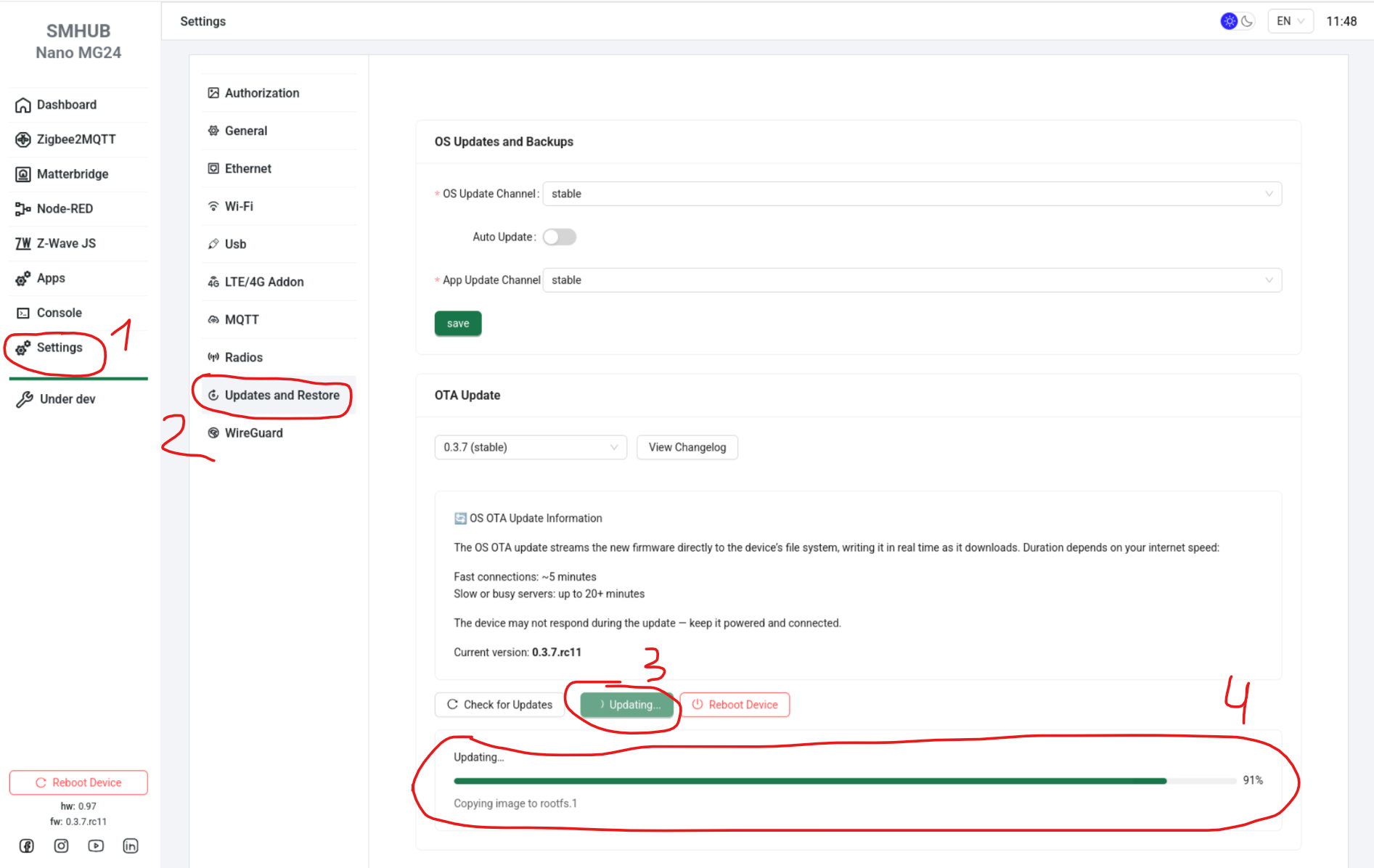
                                                                                                        Progress bar for OS updates added.

                                                                                                        image.png

                                                                                                        OS changelogs now appear in UI before updating.
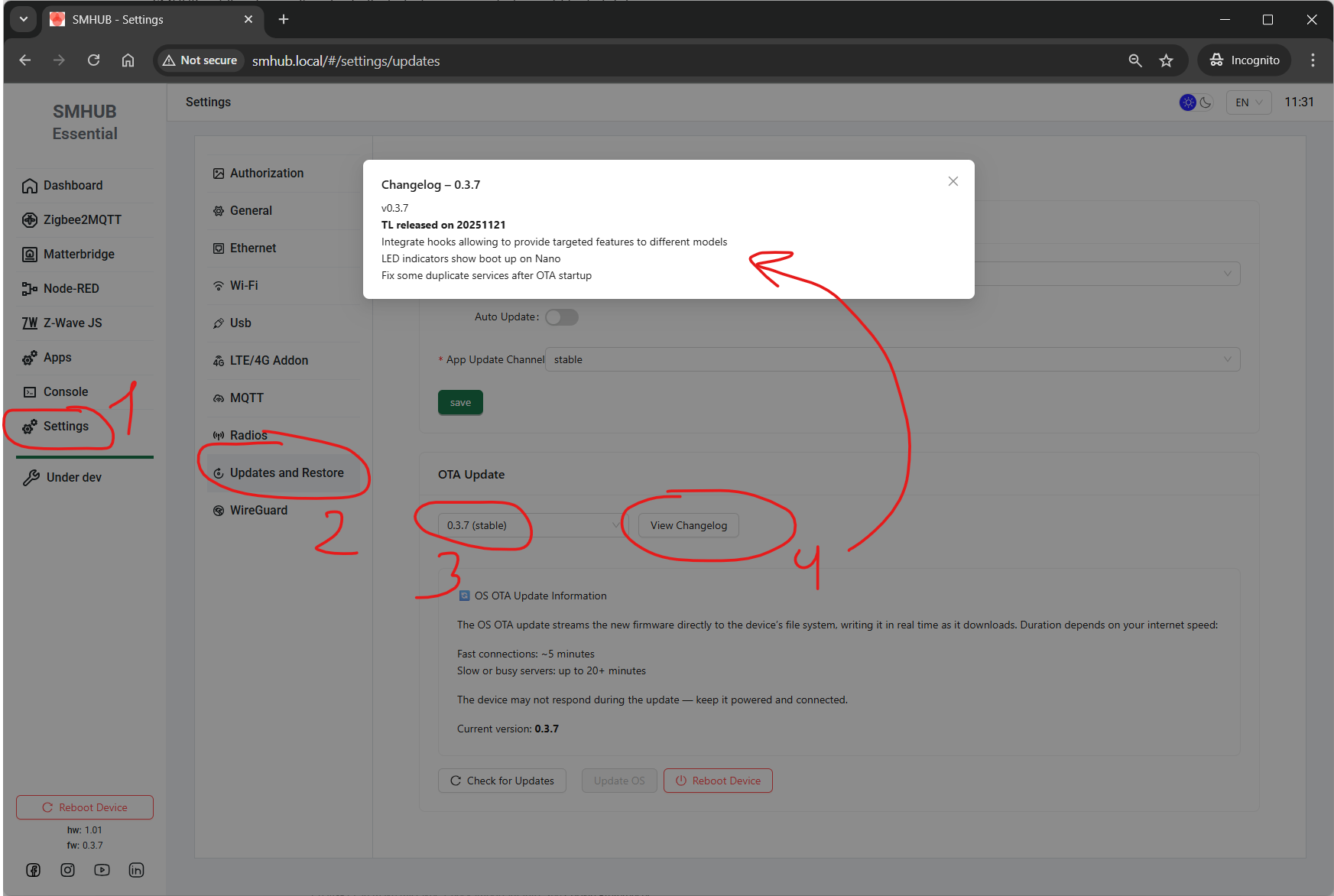
                                                                                                        image.png


                                                                                                        OS Enhancements - smhub-os v0.3.7

                                                                                                          Added internal hooks enabling targeted features per model (e.g., Nano, Essentials etc).

                                                                                                          LED indicators now display boot sequence on Nano devices.

                                                                                                          Fixed duplicated services that sometimes appeared after OTA updates.
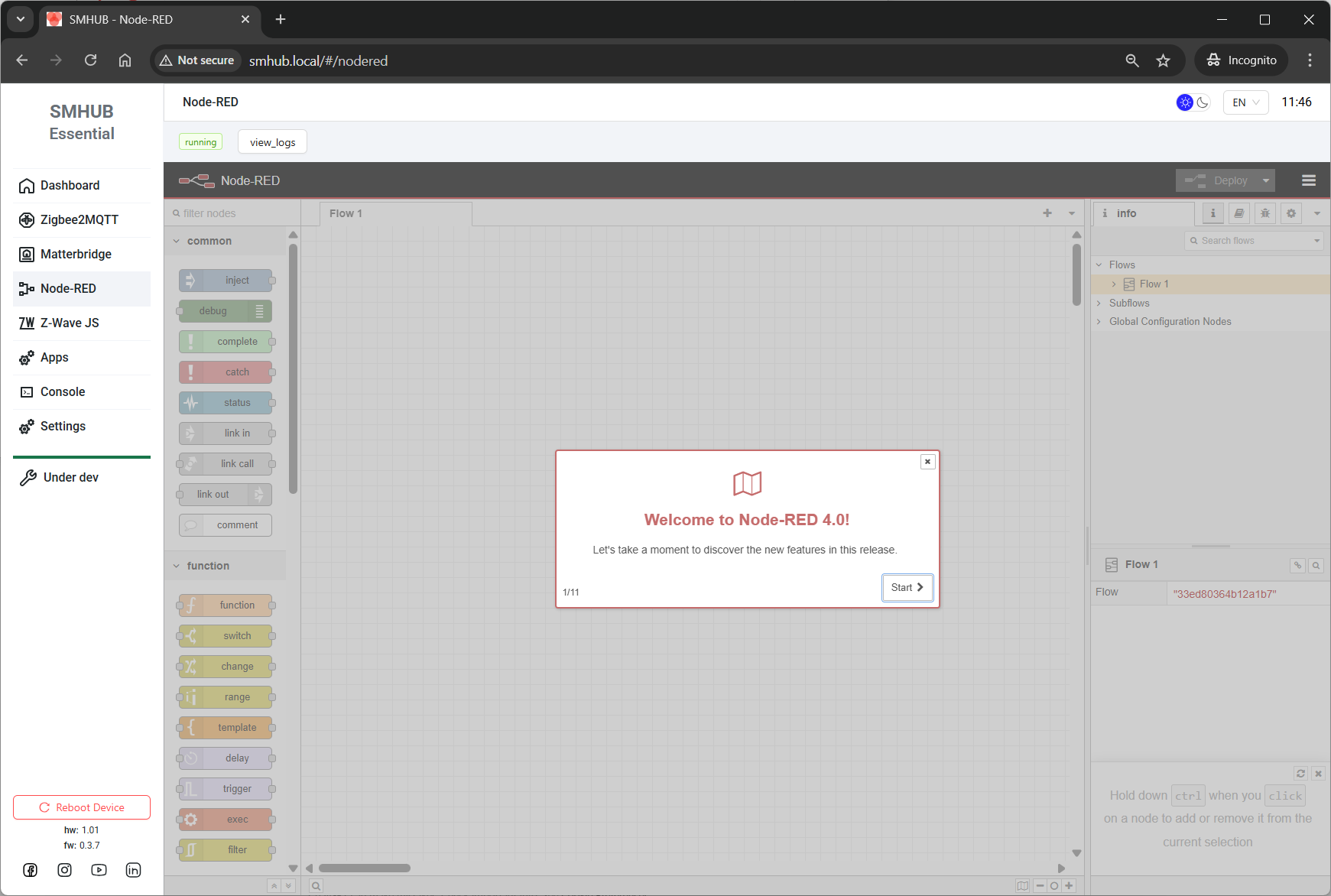
                                                                                                          image.png


                                                                                                          ⚙️ Update Instructions

                                                                                                            OS: Setting -> Update and Restore -> Update -web and -services apps: UI update or Console update: 
                                                                                                              UI (smhub-services restart after update can take up to 4 minutes): 
                                                                                                              Web  → Apps → Refresh → smhub-services/smhub-web → Upgrade Console (smhub-services restart after update can take up to 4 minutes):
                                                                                                              sudo opkg update
                                                                                                              sudo opkg upgrade

                                                                                                              2025-Nov-22:

                                                                                                              smhub-services 0.2.1, smhub-web 0.2.15, OS 0.3.6 Released


                                                                                                              🚀 Key Highlight

                                                                                                                CC Radio Flashing Added
                                                                                                                SMHUB now supports flashing Texas Instruments CC26xx/CC13xx radios directly from the Web UI.
                                                                                                                No external tools or scripts required - everything is handled via the integrated flasher inside the Radio page.
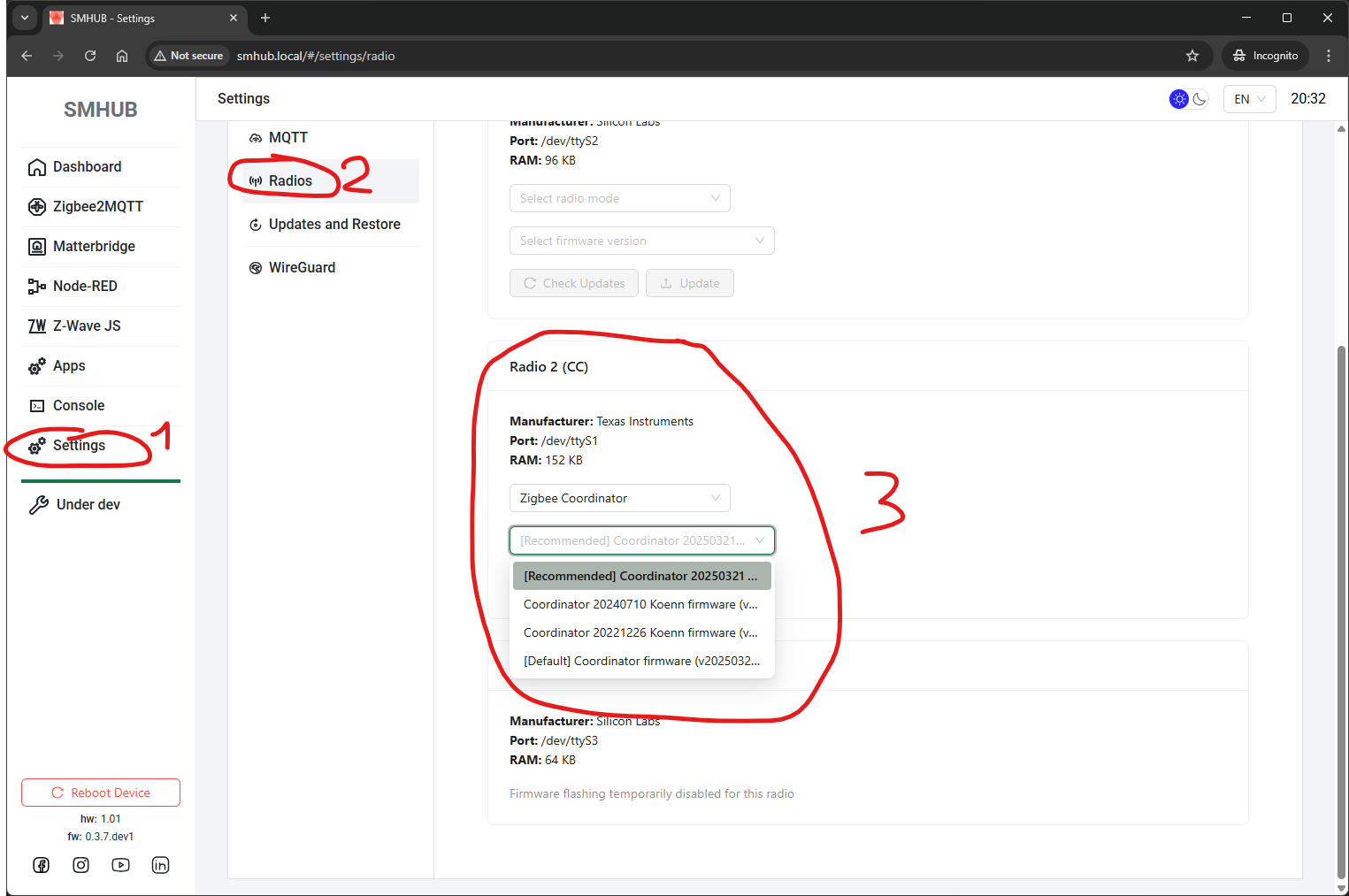
                                                                                                                image.png


                                                                                                                Improved Flashing UX

                                                                                                                Flashers for both CC and EFR32 radios now provide:

                                                                                                                  smoother and more accurate progress bar updates

                                                                                                                  clearer and more detailed error messages

                                                                                                                  improved reliability during flashing operations
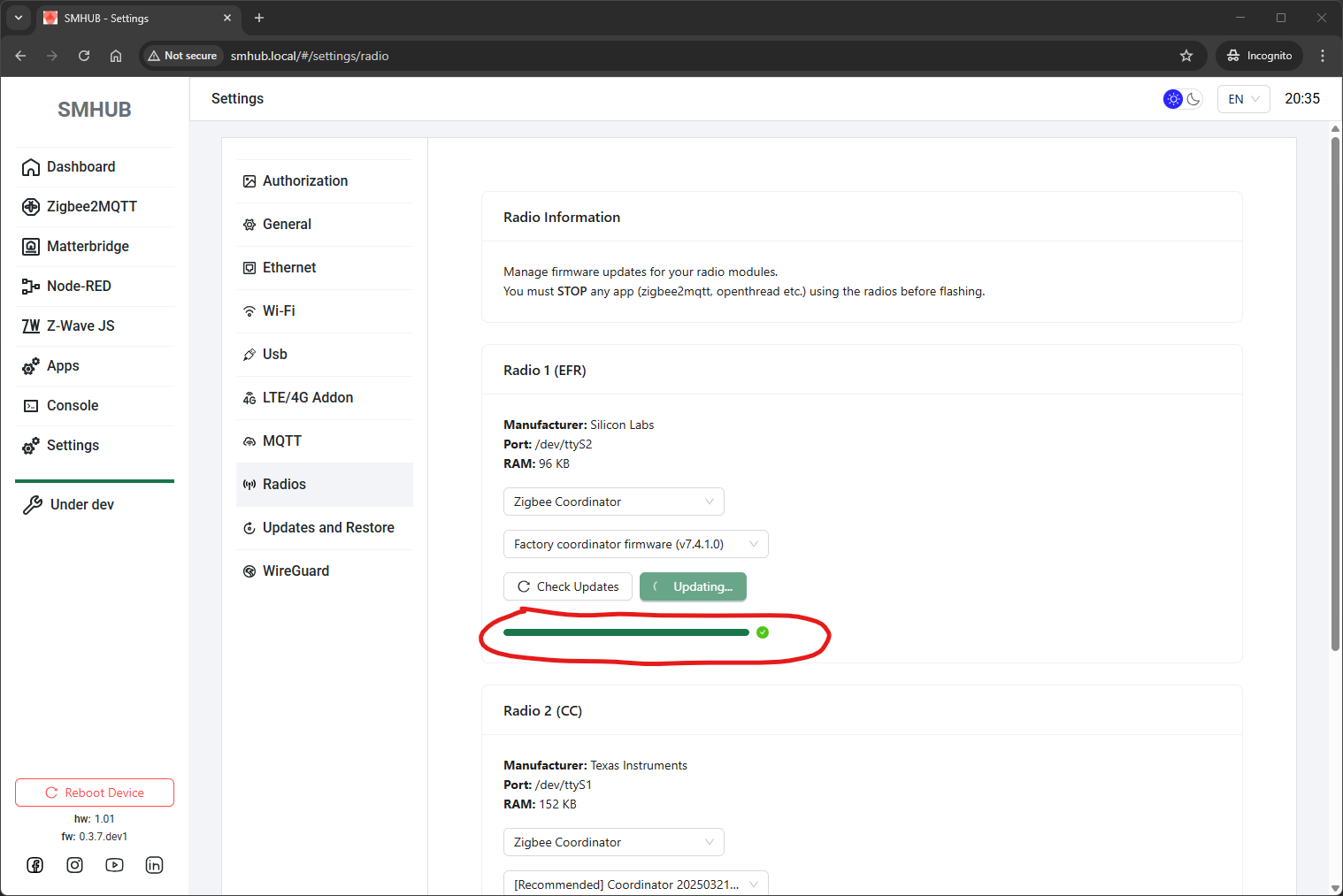
                                                                                                                  image.png


                                                                                                                  App Logs + Restart Buttons

                                                                                                                  The Web UI now includes:

                                                                                                                    App Logs (accessible directly inside the app iframe)

                                                                                                                    Restart buttons for supported apps
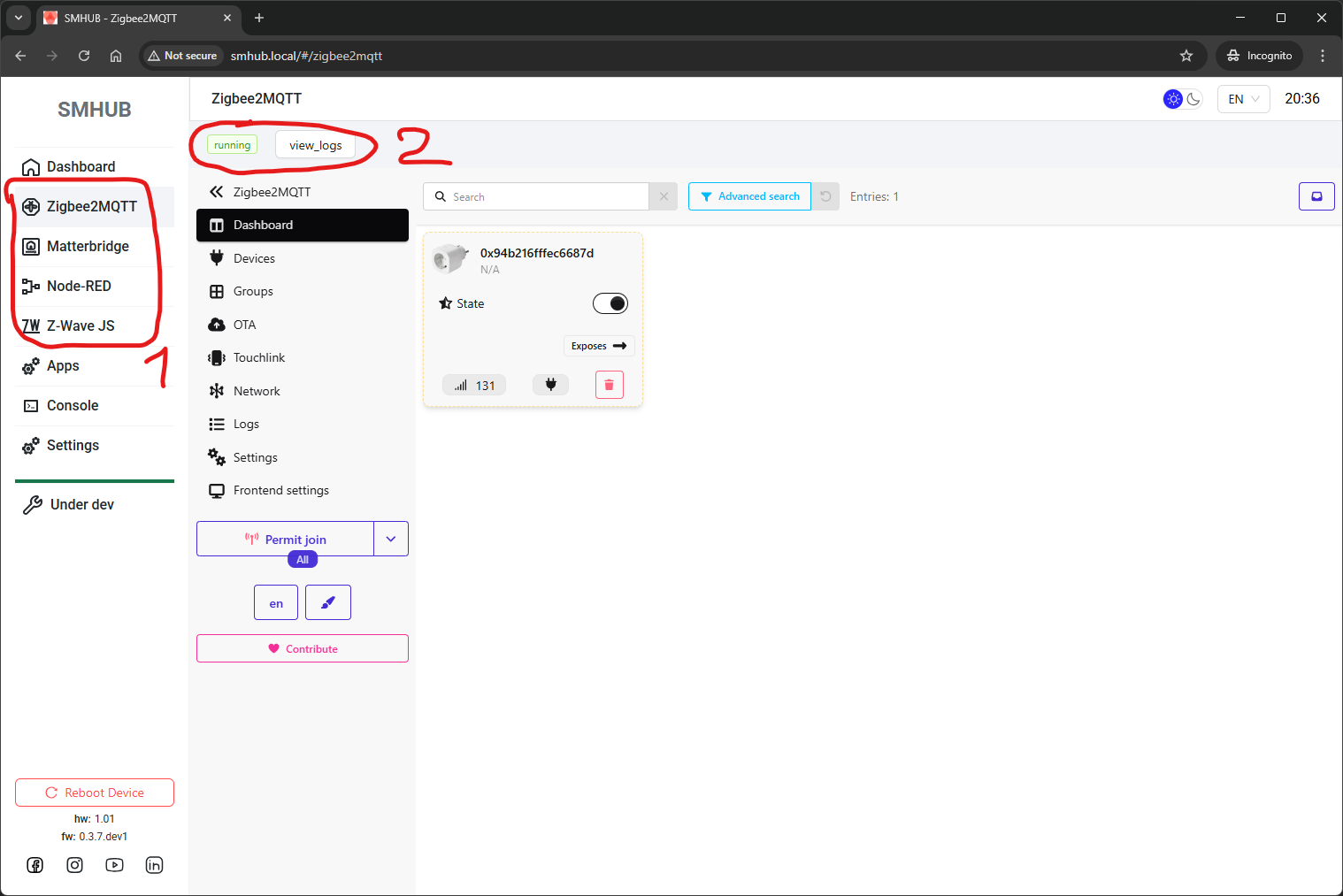
                                                                                                                    image.png

                                                                                                                    These make debugging and managing apps significantly easier, without leaving the Web UI.


                                                                                                                    Run/Stop App Control Fixes
                                                                                                                    Run/Stop buttons have been refined to work more consistently across all app types.
                                                                                                                    A more user-friendly and reliable experience when managing your apps.

                                                                                                                    Log Formatting Fix
                                                                                                                    Resolved the issue where logs were incorrectly displayed in Title Case.
                                                                                                                    Logs now appear in their original formatting for easier reading and debugging.
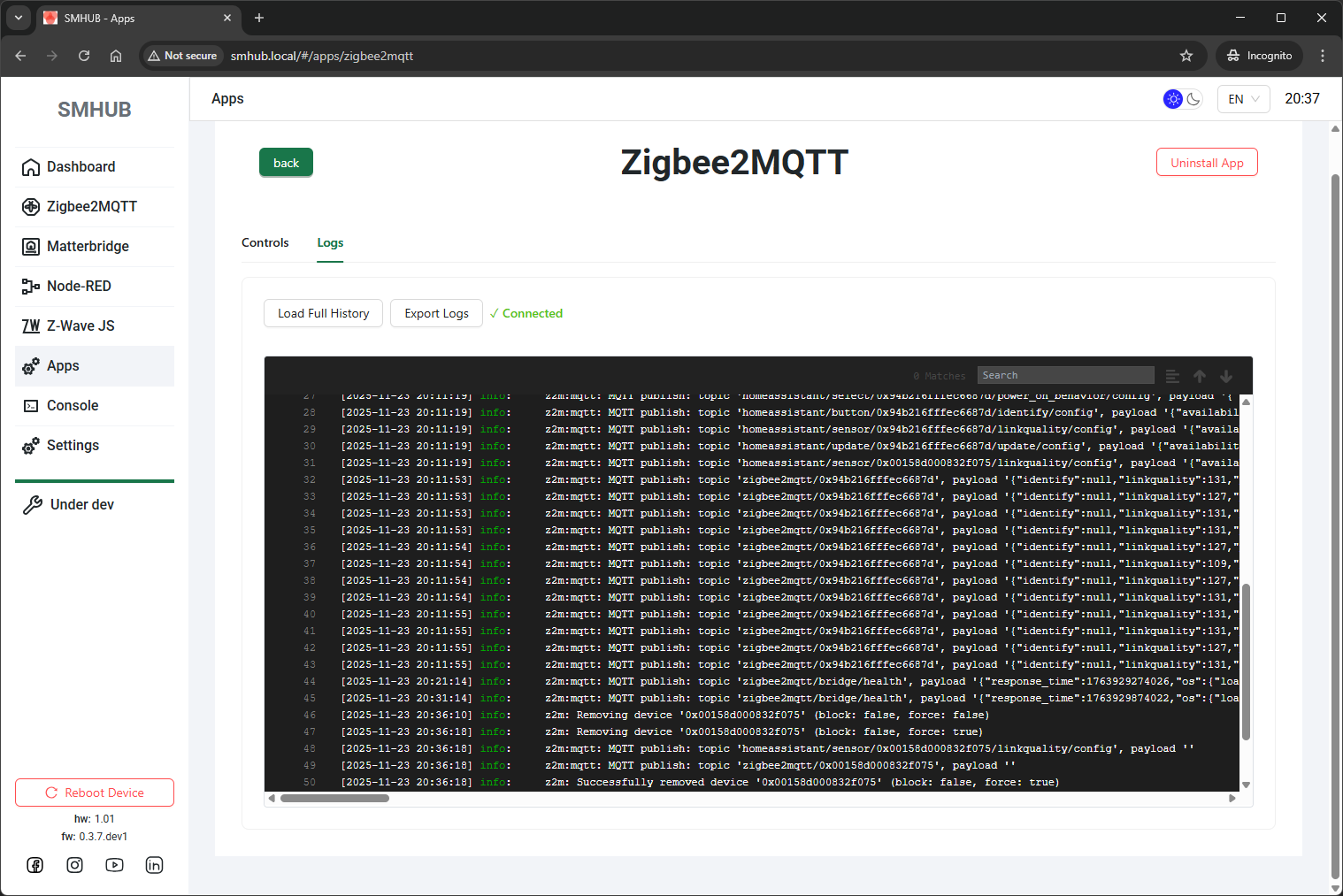
                                                                                                                    image.png


                                                                                                                    Backend Updates (smhub-services)

                                                                                                                      Added smlight-cc-flasher with full integration for CC radio flashing

                                                                                                                      Corrected Zigbee2MQTT default values shown in the Web UI

                                                                                                                      Fixed Node-RED logs not being displayed properly

                                                                                                                        OS Updates (v0.3.6)

                                                                                                                        Configured correct system paths for:

                                                                                                                          smlight_cc_flasher

                                                                                                                          universal-silabs-flasher

                                                                                                                          Upgraded the base OS image to Buildroot v2025.08.1 for improved stability and future compatibility.

                                                                                                                          ⚙️ Update Instructions

                                                                                                                            UI update or Console update: 
                                                                                                                              UI (smhub-services restart after update can take up to 4 minutes): 
                                                                                                                              Web  → Apps → Refresh → smhub-services/smhub-web → Upgrade Console (smhub-services restart after update can take up to 4 minutes):
                                                                                                                              sudo opkg update
                                                                                                                              sudo opkg upgrade

                                                                                                                              2025-Nov-09:

                                                                                                                              smhub-os 0.3.4 Released


                                                                                                                              🚀 Key Highlight

                                                                                                                                Set default apps channel to “stable”
                                                                                                                                All devices now default to the stable application update channel. This guarantees that future OTA updates for core apps (Web, Services, etc.) are synchronized and verified before deployment. Fixed SMHUB-OS OTA issues for firmware v0.3.2 / v0.3.3
                                                                                                                                Some users experienced incomplete or failed OTA updates to OS v0.3.3 due to variations in installed app sets. The update logic has been reworked - upgrading to v0.3.4 now works seamlessly for all installations, regardless of configuration. Fixed UART baud rate handling above 115200
                                                                                                                                Resolved communication issues affecting high-speed UART configurations. The serial subsystem now correctly supports and maintains baud rates higher than 115200 bps.

                                                                                                                                ⚙️ Update Instructions

                                                                                                                                  OS: Setting -> Update and Restore -> Update

                                                                                                                                  2025-Nov-16:

                                                                                                                                  smhub-service 0.2.0, smhub-web 0.2.14 Released


                                                                                                                                  🚀 Key Highlight

                                                                                                                                    Radio Page Added
                                                                                                                                    A dedicated Radio page is now available in the Web UI for managing and monitoring connected radios (so far - EFR32).
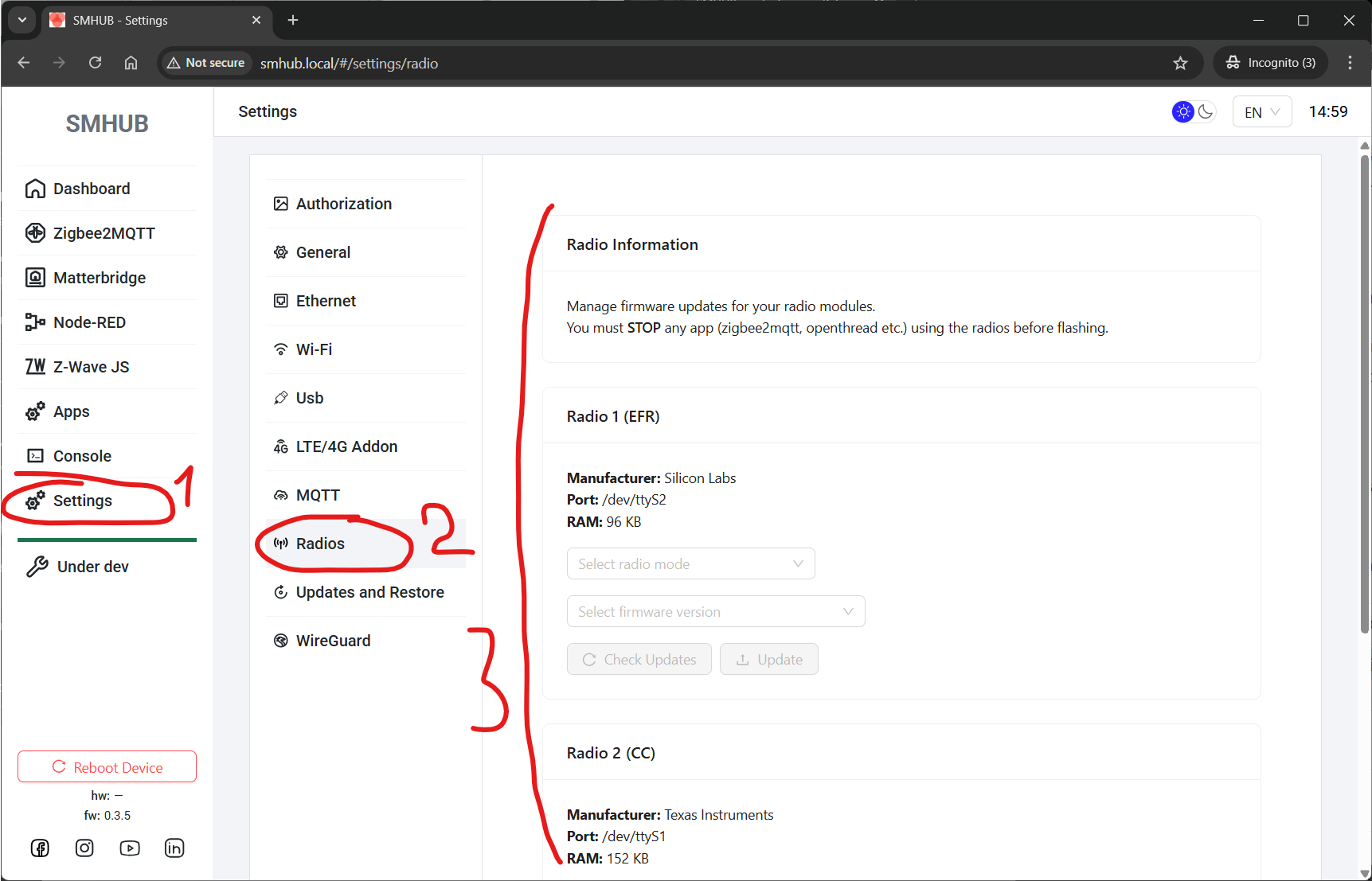
                                                                                                                                    image.png

                                                                                                                                    EFR32 Firmware Flashing
                                                                                                                                    Added built-in support for flashing EFR32 radio firmware directly from the SMHUB interface.
                                                                                                                                    No external tools or manual commands needed - handled via the new integrated flasher.
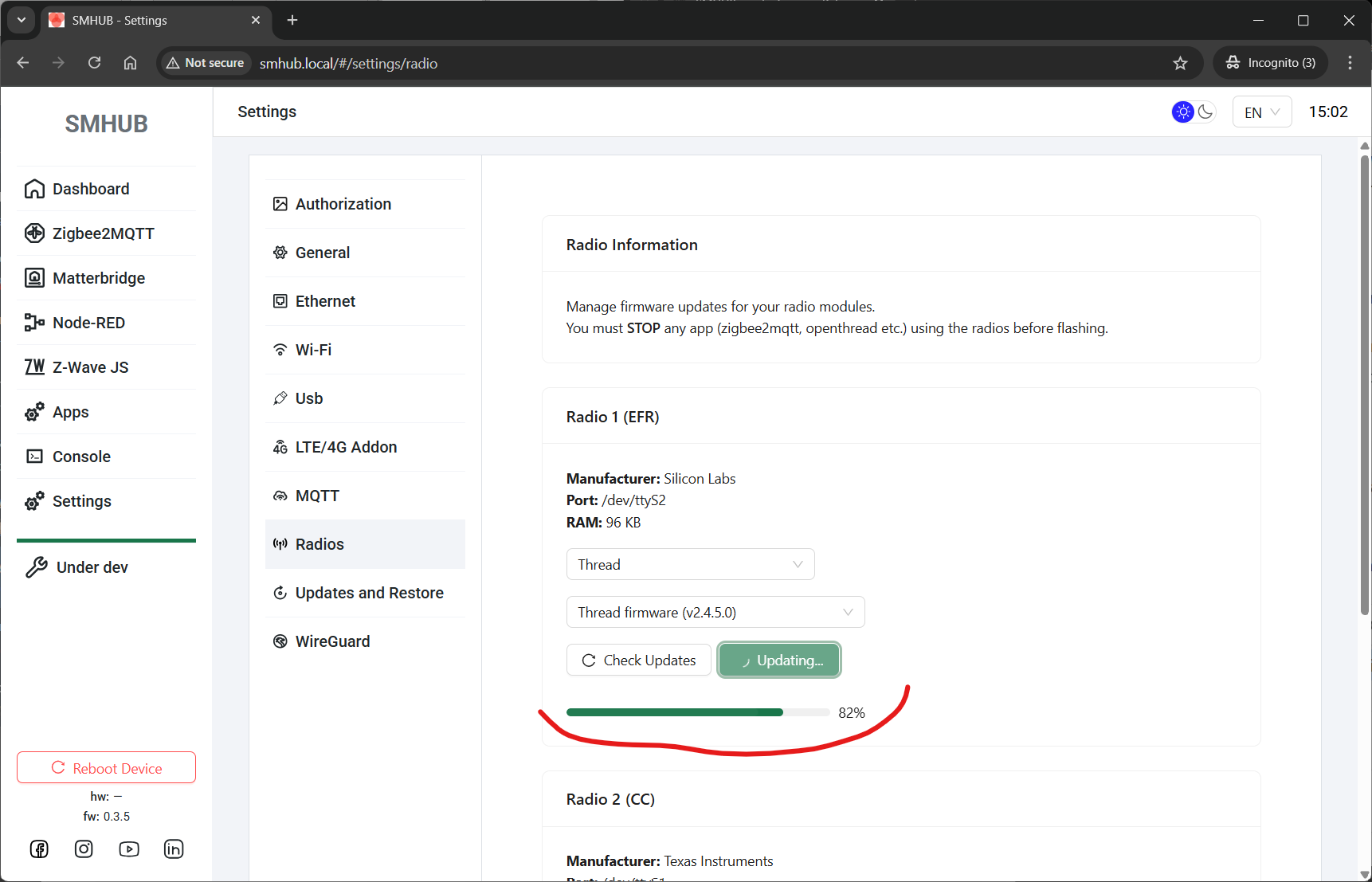
                                                                                                                                    image.png


                                                                                                                                    Firmware Look-up Utility
                                                                                                                                    A new backend utility has been added to enable fast and proper firmware look-up for further updating and flashing.
                                                                                                                                    App Control Buttons
                                                                                                                                    New Run and Stop buttons allow you to start or stop apps directly from the Apps section - more user friendly and no console access required.
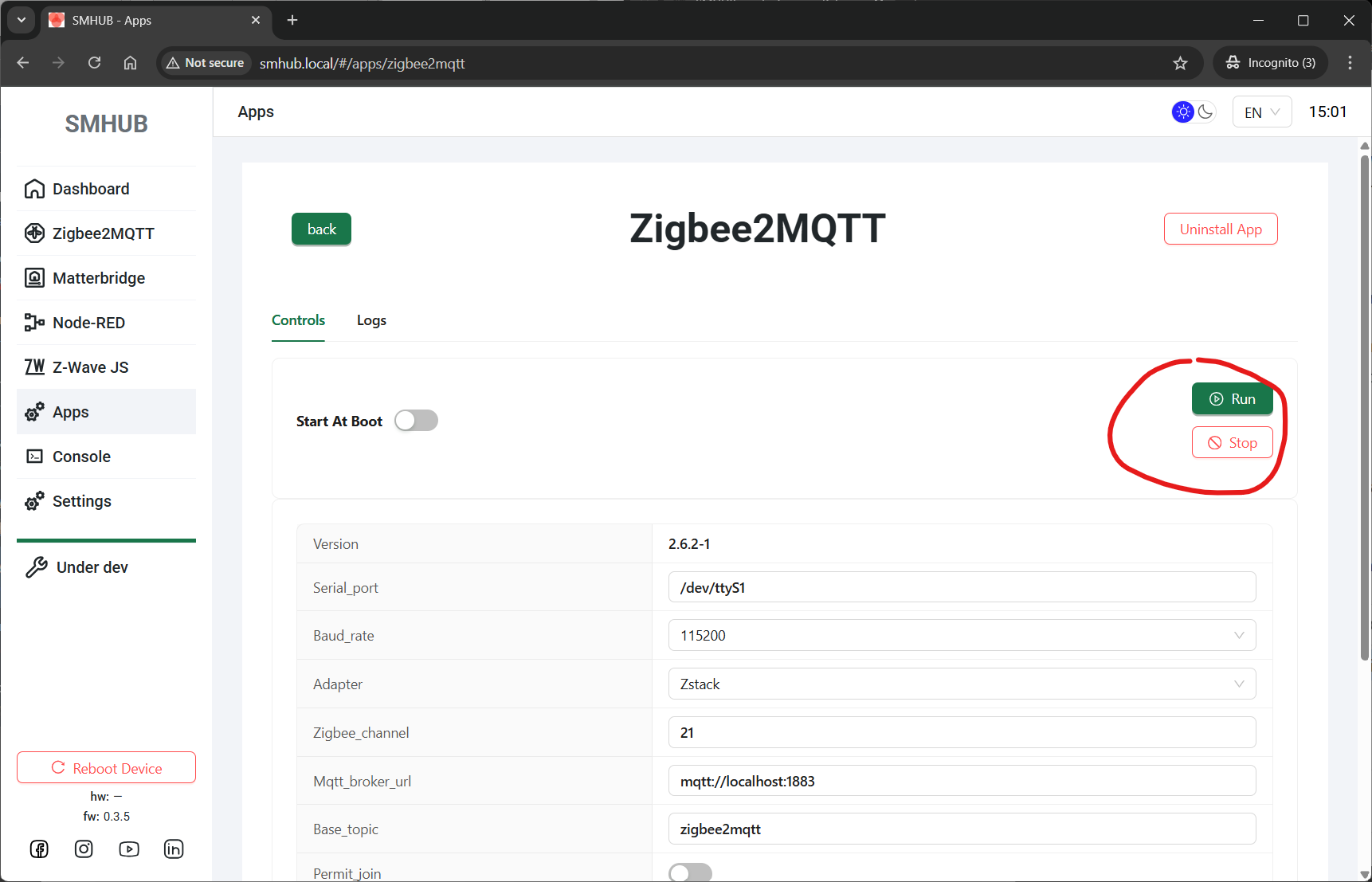
                                                                                                                                    image.png


                                                                                                                                    OpenThread App Added
                                                                                                                                    SMHUB can now be configured as an OpenThread Border Router directly through the UI.
                                                                                                                                    The system handles:

                                                                                                                                      flashing the required EFR32 Thread firmware,

                                                                                                                                      installing the OpenThread app,

                                                                                                                                      launching and managing it.
                                                                                                                                      No manual/console setup needed - all actions are available from the Web UI now.
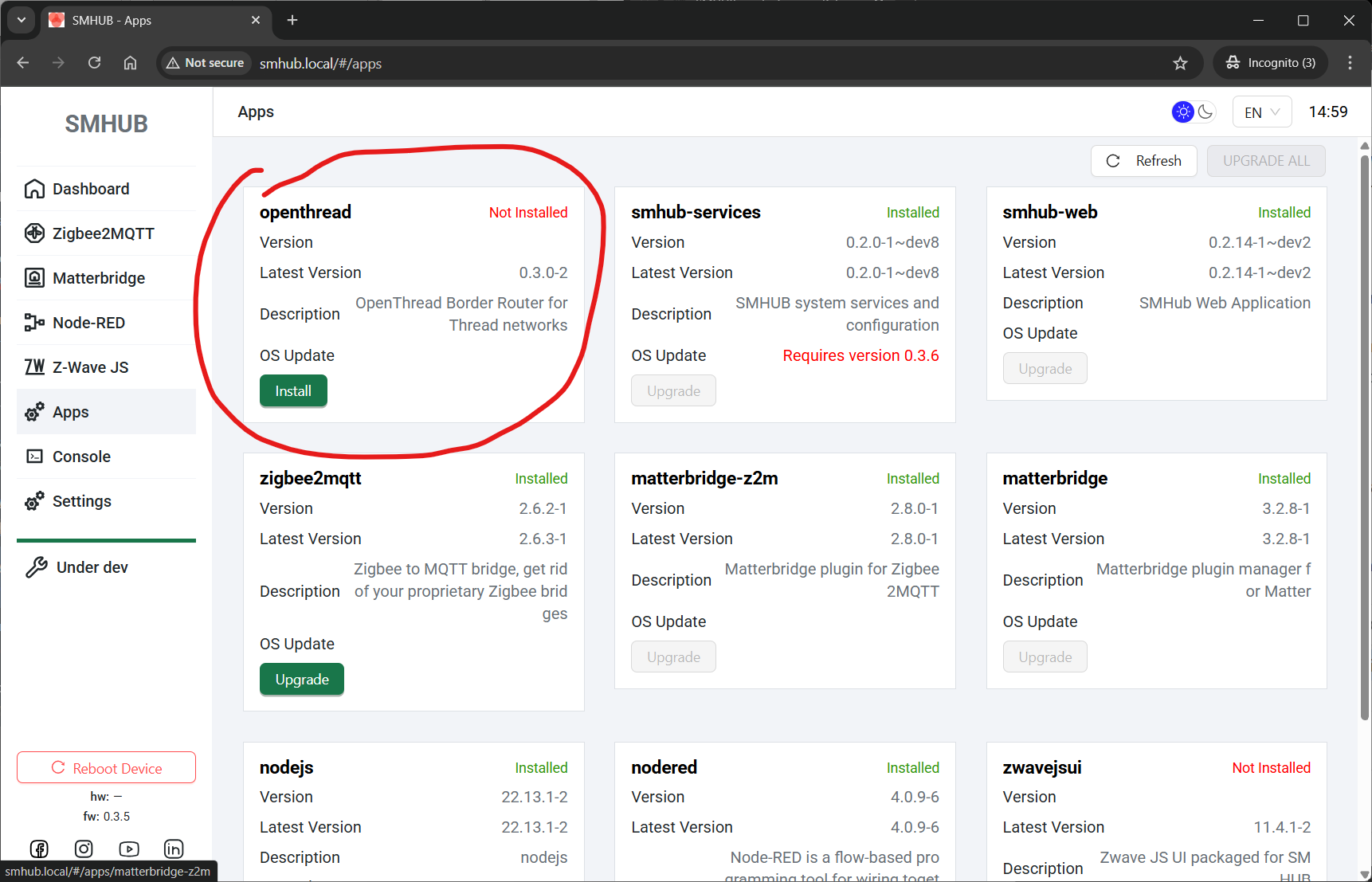
                                                                                                                                      image.png

                                                                                                                                      ⚙️ Update Instructions

                                                                                                                                        UI update or Console update: 
                                                                                                                                          UI (smhub-services restart after update can take up to 4 minutes): 
                                                                                                                                          Web  → Apps → Refresh → smhub-services/smhub-web → Upgrade Console (smhub-services restart after update can take up to 4 minutes):
                                                                                                                                          sudo opkg update
                                                                                                                                          sudo opkg upgrade

                                                                                                                                          2025-Nov-09:

                                                                                                                                          smhub-os 0.3.4 Released


                                                                                                                                          🚀 Key Highlight

                                                                                                                                            Set default apps channel to “stable”
                                                                                                                                            All devices now default to the stable application update channel. This guarantees that future OTA updates for core apps (Web, Services, etc.) are synchronized and verified before deployment. Fixed SMHUB-OS OTA issues for firmware v0.3.2 / v0.3.3
                                                                                                                                            Some users experienced incomplete or failed OTA updates to OS v0.3.3 due to variations in installed app sets. The update logic has been reworked - upgrading to v0.3.4 now works seamlessly for all installations, regardless of configuration. Fixed UART baud rate handling above 115200
                                                                                                                                            Resolved communication issues affecting high-speed UART configurations. The serial subsystem now correctly supports and maintains baud rates higher than 115200 bps.

                                                                                                                                            ⚙️ Update Instructions

                                                                                                                                              OS: Setting -> Update and Restore -> Update

                                                                                                                                              2025-Nov-07:

                                                                                                                                              smhub-service 0.1.19, smhub-web 0.2.12 Released


                                                                                                                                              For those, who can't update, please flash 0.3.3 via Type-C or SD-Card and than update smhub-web and smhub-services. Here is the source for smhub-os 0.3.3: https://updates.smlight.tech/firmware/smhub/os/smhub_os_v0.3.3.zip 

                                                                                                                                              This release focuses on localization, system transparency, and stability improvements — adding timezone management, EEPROM hardware data access, and UI refinements across 4G/LTE and Z-Wave JS UI pages.

                                                                                                                                              🚀 Key Highlight
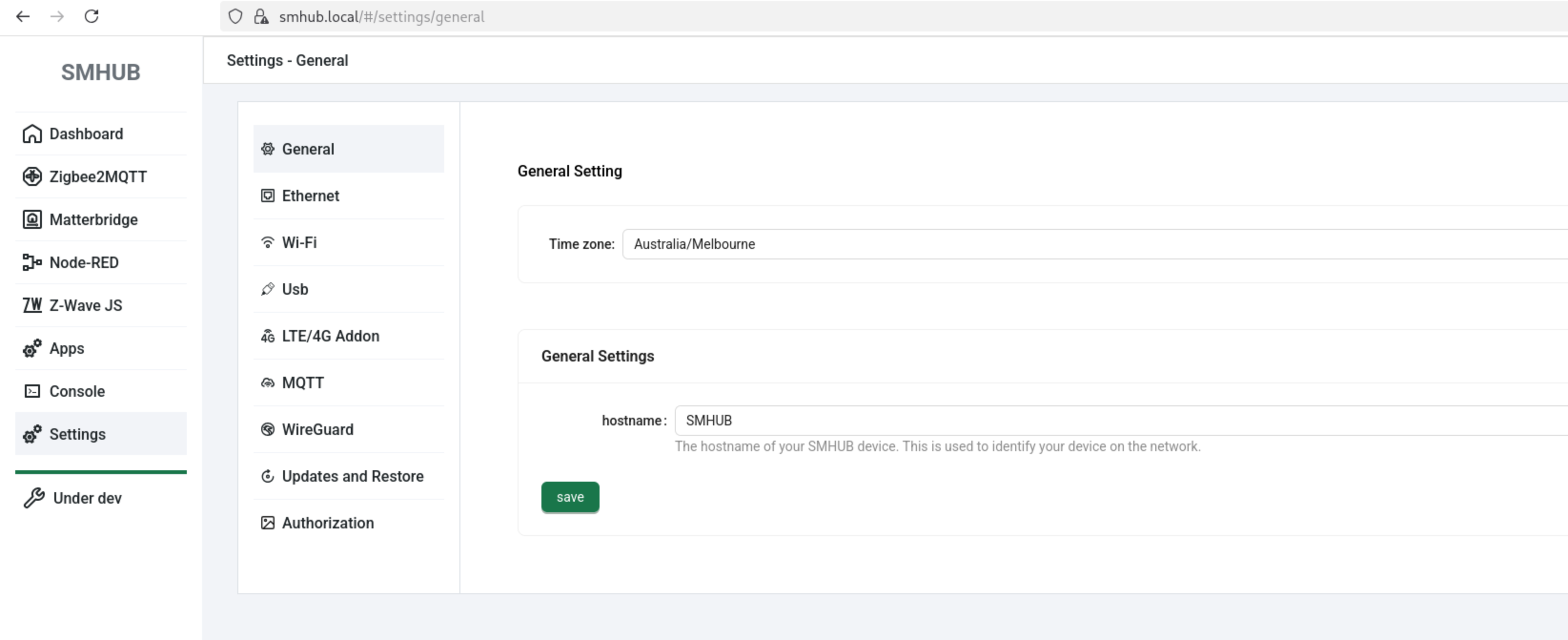
                                                                                                                                                Added timezone selector in General Settings

                                                                                                                                                image.png


                                                                                                                                                Added support for listing and setting timezone
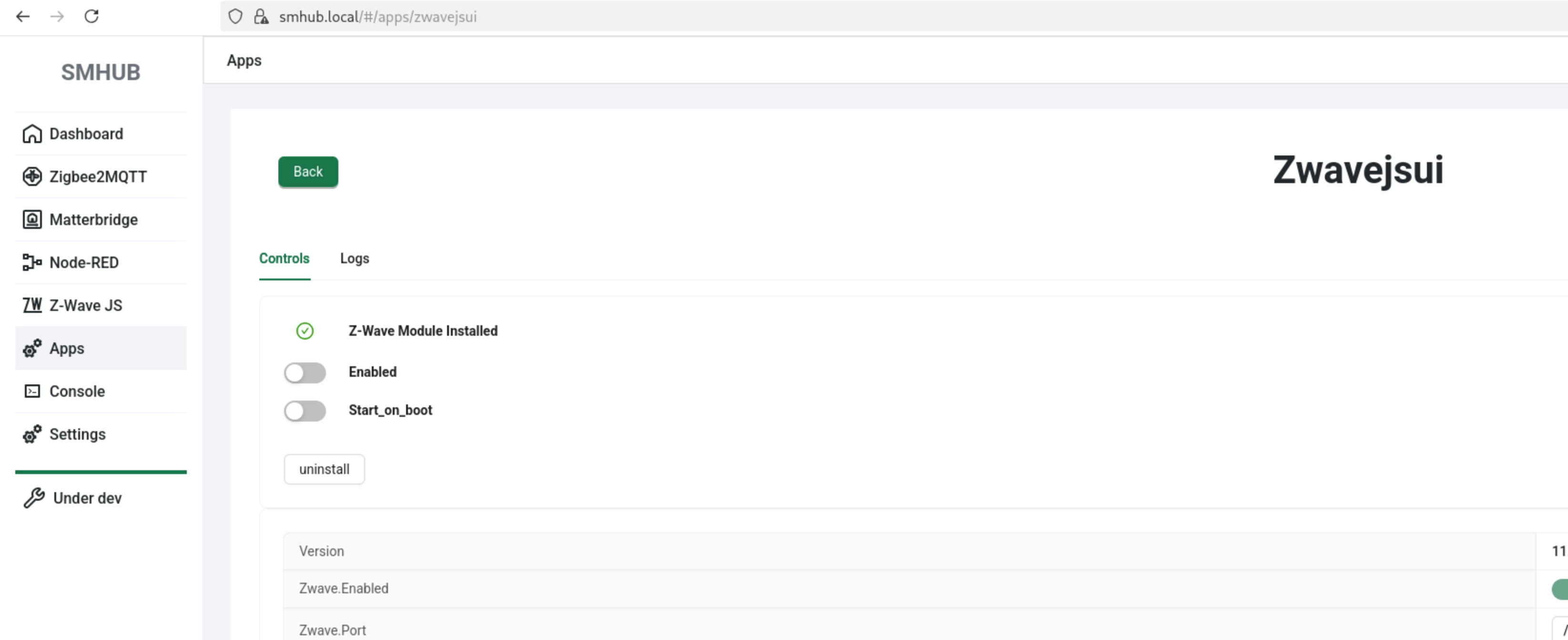
                                                                                                                                                Z-Wave JS settings page now shows if addon (hardware) is installed

                                                                                                                                                image.png


                                                                                                                                                Added support to read product data from EEPROM

                                                                                                                                                Fixed status display issues on 4G/LTE pages

                                                                                                                                                Fixed version comparison and update channel logic for apps - become broken with previous release (please update with sudo opkg update and sudo opkg upgrade.

                                                                                                                                                Fixed version comparison bug on apps tile page

                                                                                                                                                ⚙️ Update Instructions

                                                                                                                                                  UI update or Console update: 
                                                                                                                                                    UI (smhub-services restart after update can take up to 4 minutes): 
                                                                                                                                                    Web  → Apps → Refresh → smhub-services/smhub-web → Upgrade Console (smhub-services restart after update can take up to 4 minutes):
                                                                                                                                                    sudo opkg update
                                                                                                                                                    sudo opkg upgrade


                                                                                                                                                    2025-Nov-04:

                                                                                                                                                    smhub-os 0.3.3, smhub-service 0.1.17, smhub-web 0.2.10 Released


                                                                                                                                                    🚀 Key Highlight

                                                                                                                                                      Added Ethernet configuration page — manage wired network settings directly from the Web UI.
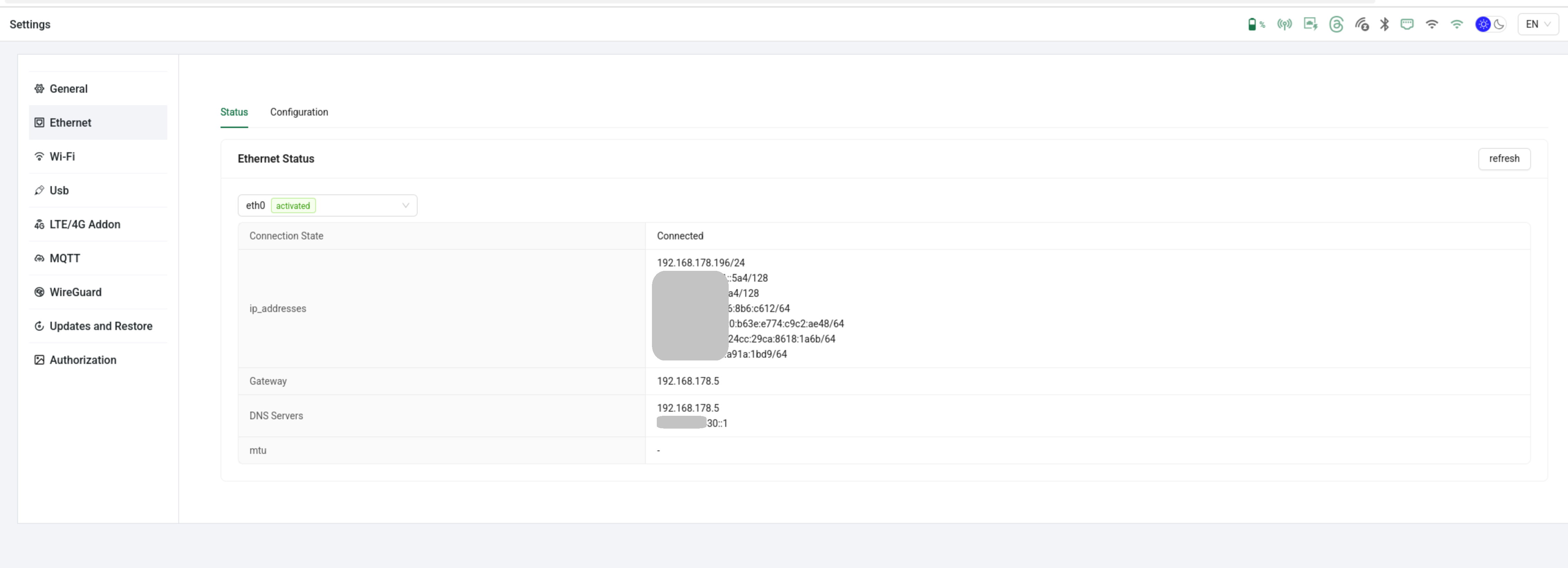
                                                                                                                                                      image.png


                                                                                                                                                      Added 4G/LTE support - added modem integration across the system.
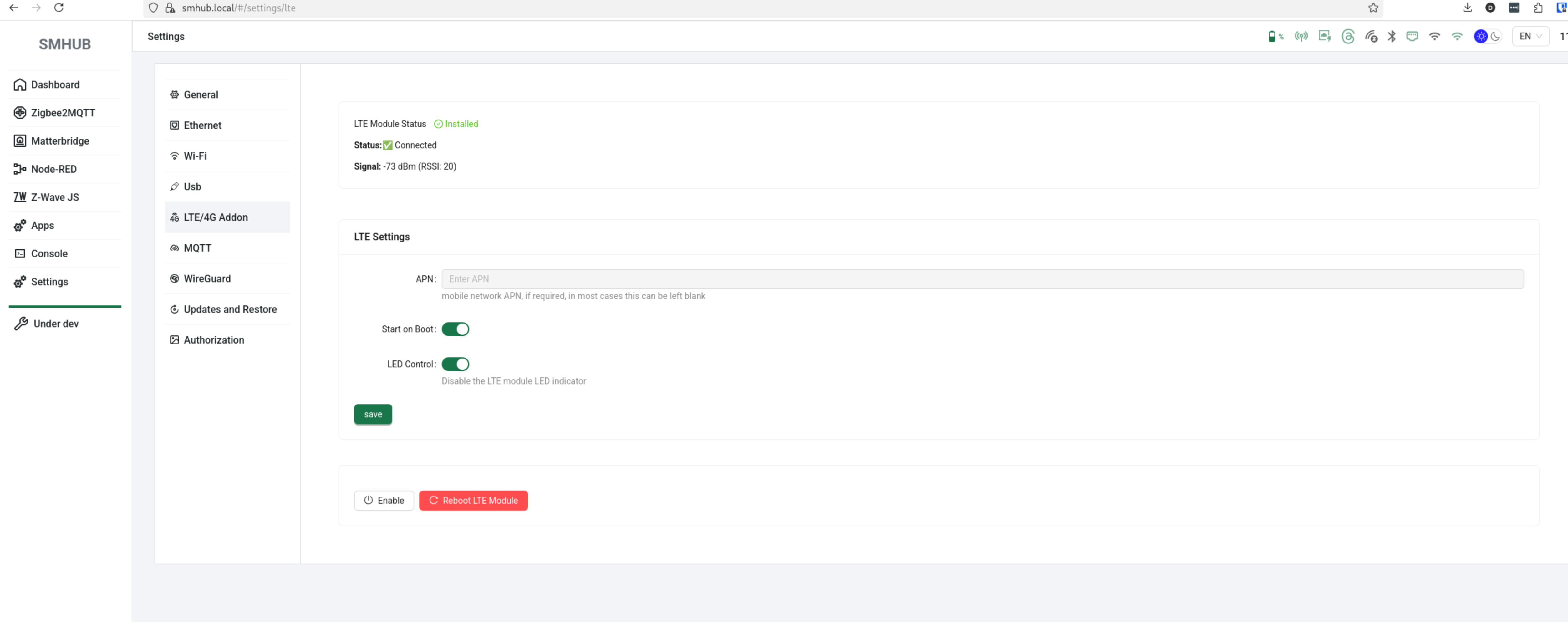
                                                                                                                                                      image.png


                                                                                                                                                      Peripherals backend added - foundation for future hardware and peripheral control

                                                                                                                                                      Timezone data added to the OS/backend system (UI integration coming soon)

                                                                                                                                                      ⚙️ Update Instructions

                                                                                                                                                        OS: Setting -> Update and Restore -> Update UI update or Console update: 
                                                                                                                                                          UI (smhub-services restart after update can take up to 4 minutes): 
                                                                                                                                                          Web  → Apps → Refresh → smhub-services/smhub-web → Upgrade Console (smhub-services restart after update can take up to 4 minutes):
                                                                                                                                                          sudo opkg update
                                                                                                                                                          sudo opkg upgrade


                                                                                                                                                          2025-Oct-28:

                                                                                                                                                          smhub-service 0.1.17, smhub-web 0.2.10 Released


                                                                                                                                                          🚀 Key Highlight

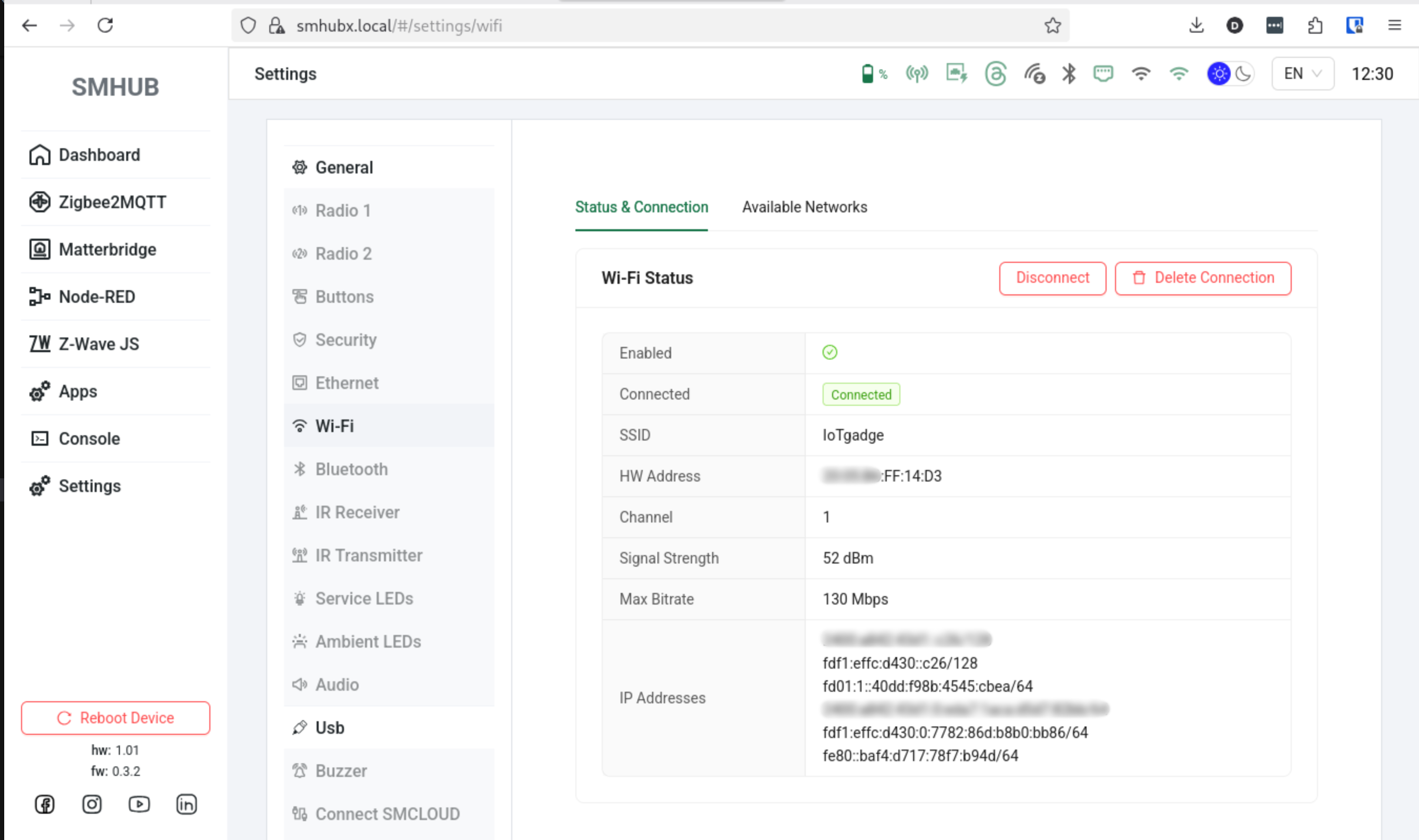
                                                                                                                                                            Added Wi-Fi settings to the UI – scan 2.4 GHz/5 GHz networks and connect to listed or hidden ones.
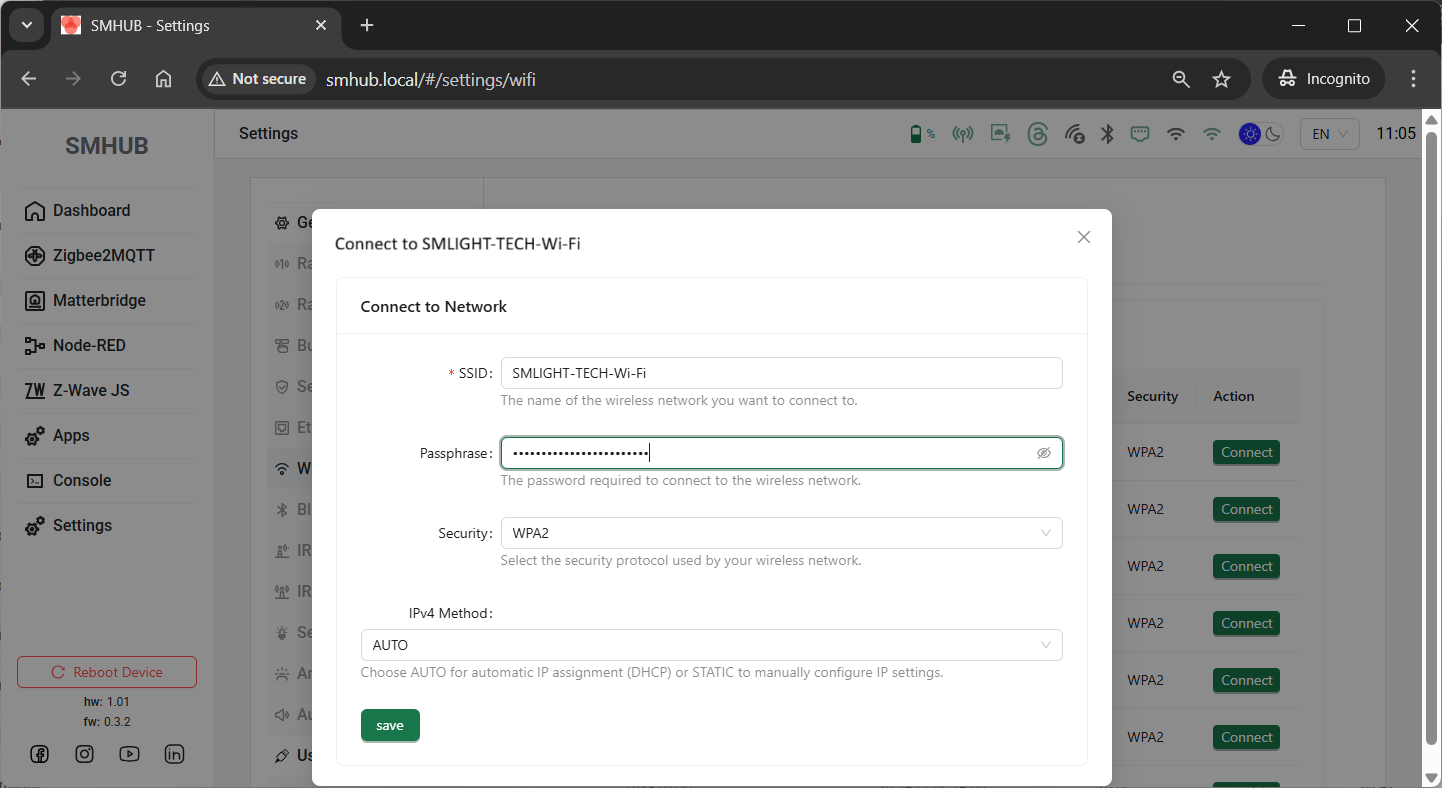
                                                                                                                                                            image.png

                                                                                                                                                            image.png

                                                                                                                                                            Added USB Device/Host mode selector in USB settings (requires reboot).

                                                                                                                                                            Added USB device list for Host mode.
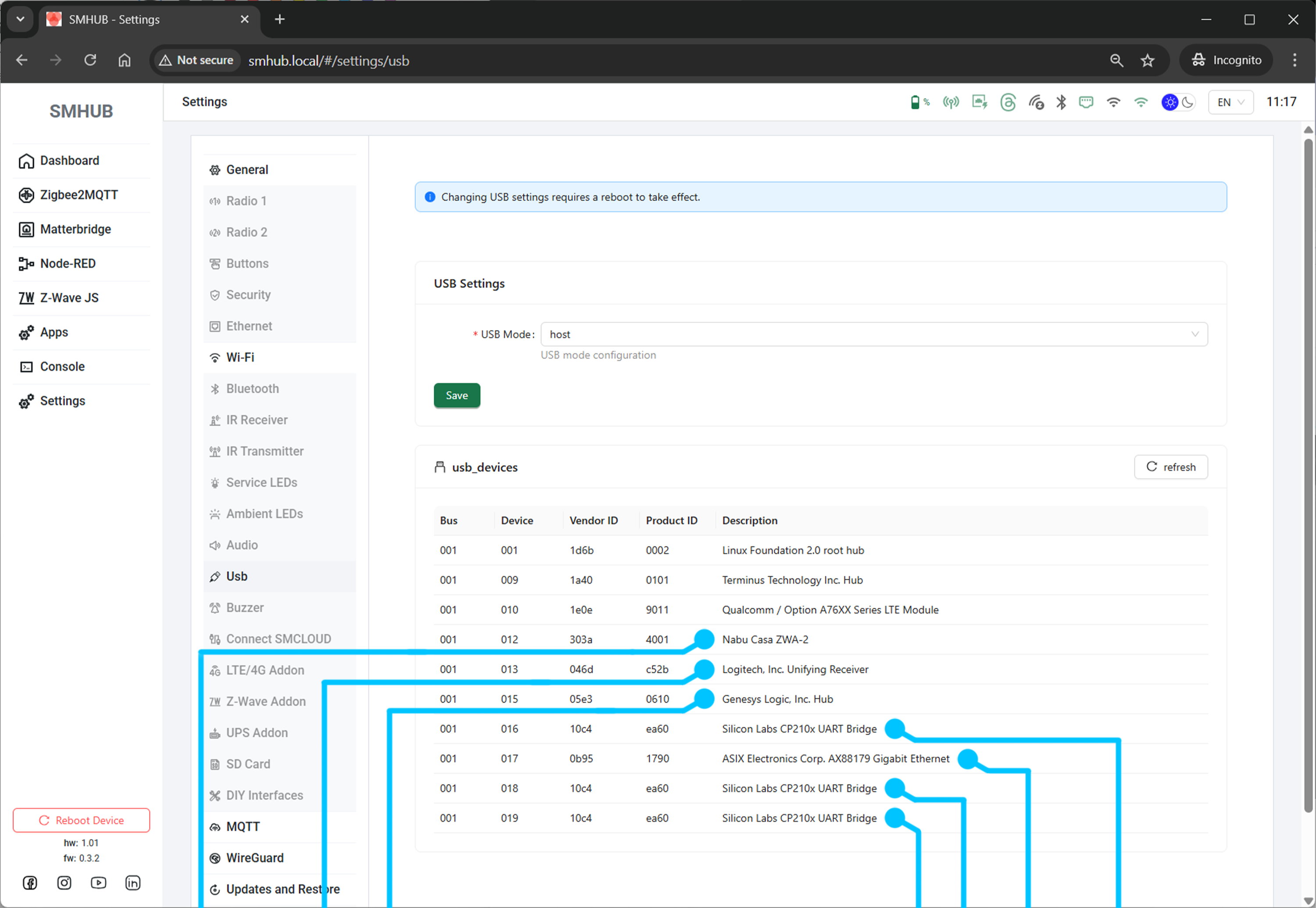
                                                                                                                                                            image.png

                                                                                                                                                            image.png

                                                                                                                                                            Added ability to change the device hostname on the local network.
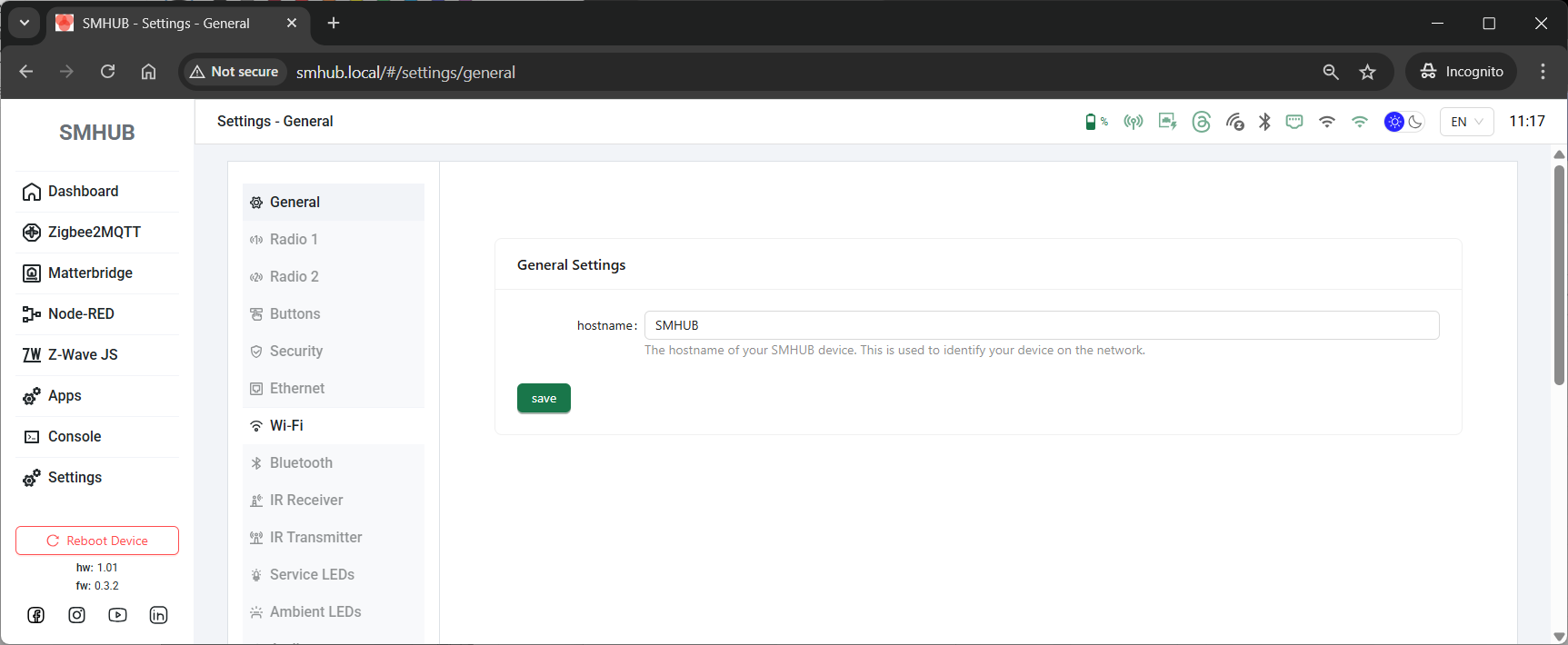
                                                                                                                                                            image.png

                                                                                                                                                            WireGuard now supports hostnames.

                                                                                                                                                            WireGuard now supports both IPv4 and IPv6.
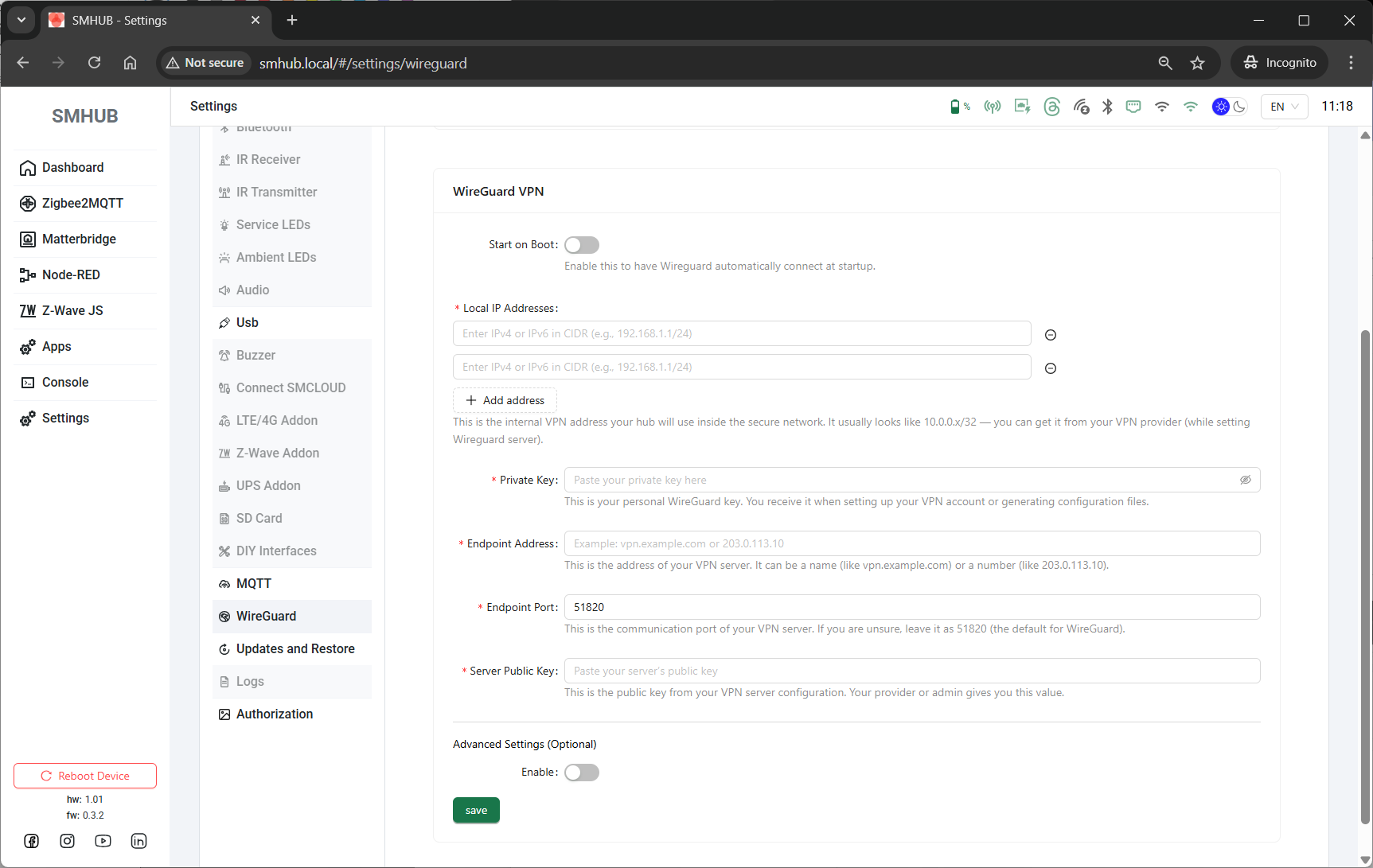
                                                                                                                                                            image.png

                                                                                                                                                            ⚙️ Update Instructions

                                                                                                                                                              UI update or Console update: 
                                                                                                                                                                UI (smhub-services restart after update can take up to 4 minutes): 
                                                                                                                                                                Web  → Apps → Refresh → smhub-services/smhub-web → Upgrade Console (smhub-services restart after update can take up to 4 minutes):
                                                                                                                                                                sudo opkg update
                                                                                                                                                                sudo opkg upgrade


                                                                                                                                                                2025-Oct-26:

                                                                                                                                                                SMHUB-OS v0.3.2 Released


                                                                                                                                                                🚀 Key Highlight (0.3.0 -> 0.3.2)

                                                                                                                                                                  Fix Type-C or SD-Card flashing from the "brick" state. Add script to realign U-Boot partition on existing installs. Reset U-Boot env when type-c or SD-Card flashing. Add scripts to install new bootloader after OTA (if required, ie, new version). Wi-Fi fix to ensure a constant MAC address across reboots. Installed gpiod utils. LED indicators (Blue LED) when flashing Type-c/SD. smhub-services and smhub-web are preinstalled with the latest versions as of today.

                                                                                                                                                                  ⚙️ Update Instructions

                                                                                                                                                                  Files for Type-C or SD-Card updates: https://updates.smlight.tech/firmware/smhub/os/smhub_os_v0.3.2.zip

                                                                                                                                                                    Type-C flashing manual: https://smlight.tech/support/manuals/books/smhub/page/updaterestore-using-type-c  SD-Card flashing manual: https://smlight.tech/support/manuals/books/smhub/page/updaterestore-using-sd-card  UI update: Web  → Interface Settings → Upgrades and Restore.

                                                                                                                                                                    2025-Oct-24:

                                                                                                                                                                    SMHUB-Services v0.1.16 &
                                                                                                                                                                    SMHUB-Web v0.2.9 Released


                                                                                                                                                                    PLEASE UPDATE smhub-services and smhub-web via SSH (either Console in the web interface or external SSH client - SSH manual is here) - please do not use webUI button for this. 

                                                                                                                                                                    If you have updated via Web UI and SMHUB hangs after the update of smhub-services, please connect to SMHUB via SSH and run these two commands manually (this overrides the UI update process and makes it 100% correct):

                                                                                                                                                                    sudo opkg update
                                                                                                                                                                    sudo opkg upgrade

                                                                                                                                                                    🚀 Key Highlight - Wireguard seting page

                                                                                                                                                                    New Wireguard client page added under Settings → Wireguard.
                                                                                                                                                                    You can now configure SMHUB’s built-in Wireguard client directly from the interface.

                                                                                                                                                                    You can find it under:
                                                                                                                                                                    Main menu → Settings → Wireguard
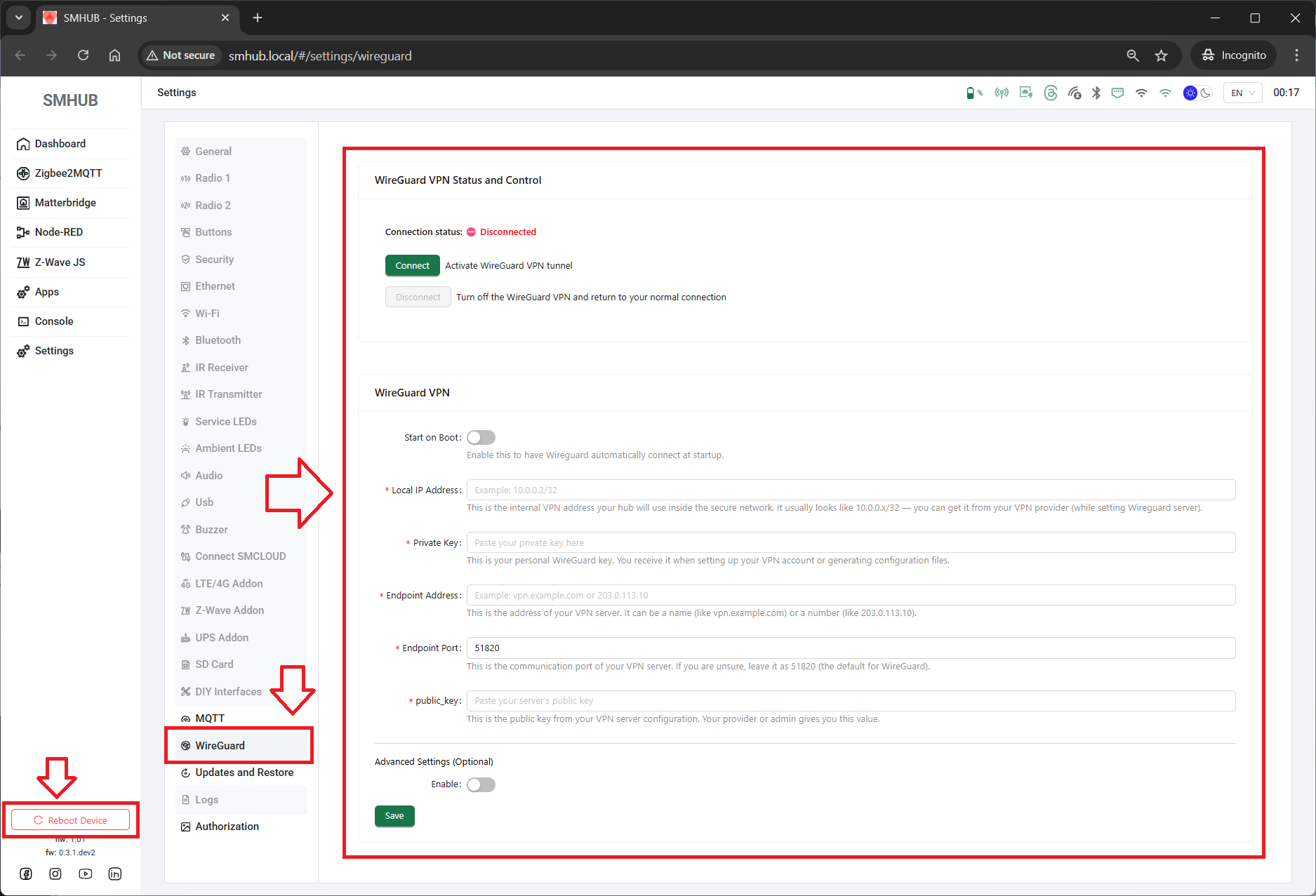
                                                                                                                                                                    image.png

                                                                                                                                                                    ⚙️ Update Instructions

                                                                                                                                                                    You can update both packages directly from the Web Interface via
                                                                                                                                                                    Apps → Upgrade specific app.

                                                                                                                                                                    If your device becomes unresponsive or the Web UI hangs during update,
                                                                                                                                                                    please connect via SSH and run these two commands manually:

                                                                                                                                                                    sudo opkg update
                                                                                                                                                                    sudo opkg upgrade


                                                                                                                                                                    2025-Oct-18:

                                                                                                                                                                    🧩 SMHUB 0.3.0 Release

                                                                                                                                                                    Includes:

                                                                                                                                                                      OS: 0.3.0

                                                                                                                                                                      smhub-services: 0.1.13

                                                                                                                                                                      smhub-web: 0.2.8

                                                                                                                                                                      ⚙️ Update Instructions

                                                                                                                                                                      PLEASE UPDATE smhub-services and smhub-web via SSH (either Console in the web interface or external SSH client - SSH manual is here) - please do not use webUI button for this. OS is updatable via `Settings` - `Update and Restore`

                                                                                                                                                                      If you have updated via Web UI and SMHUB hangs after the update of smhub-services, please connect to SMHUB via SSH and run these two commands manually (this overrides the UI update process and makes it 100% correct):

                                                                                                                                                                      sudo opkg update
                                                                                                                                                                      sudo opkg upgrade

                                                                                                                                                                      🔑 Highlights

                                                                                                                                                                      🧠 MQTT Broker Settings

                                                                                                                                                                      New MQTT page added under Settings → Mqtt.
                                                                                                                                                                      You can now configure SMHUB’s built-in MQTT broker directly from the interface — or connect it to an external one in bridge mode.

                                                                                                                                                                      MQTT is the communication layer used by apps like Zigbee2MQTT, Node-RED and MatterBridge.
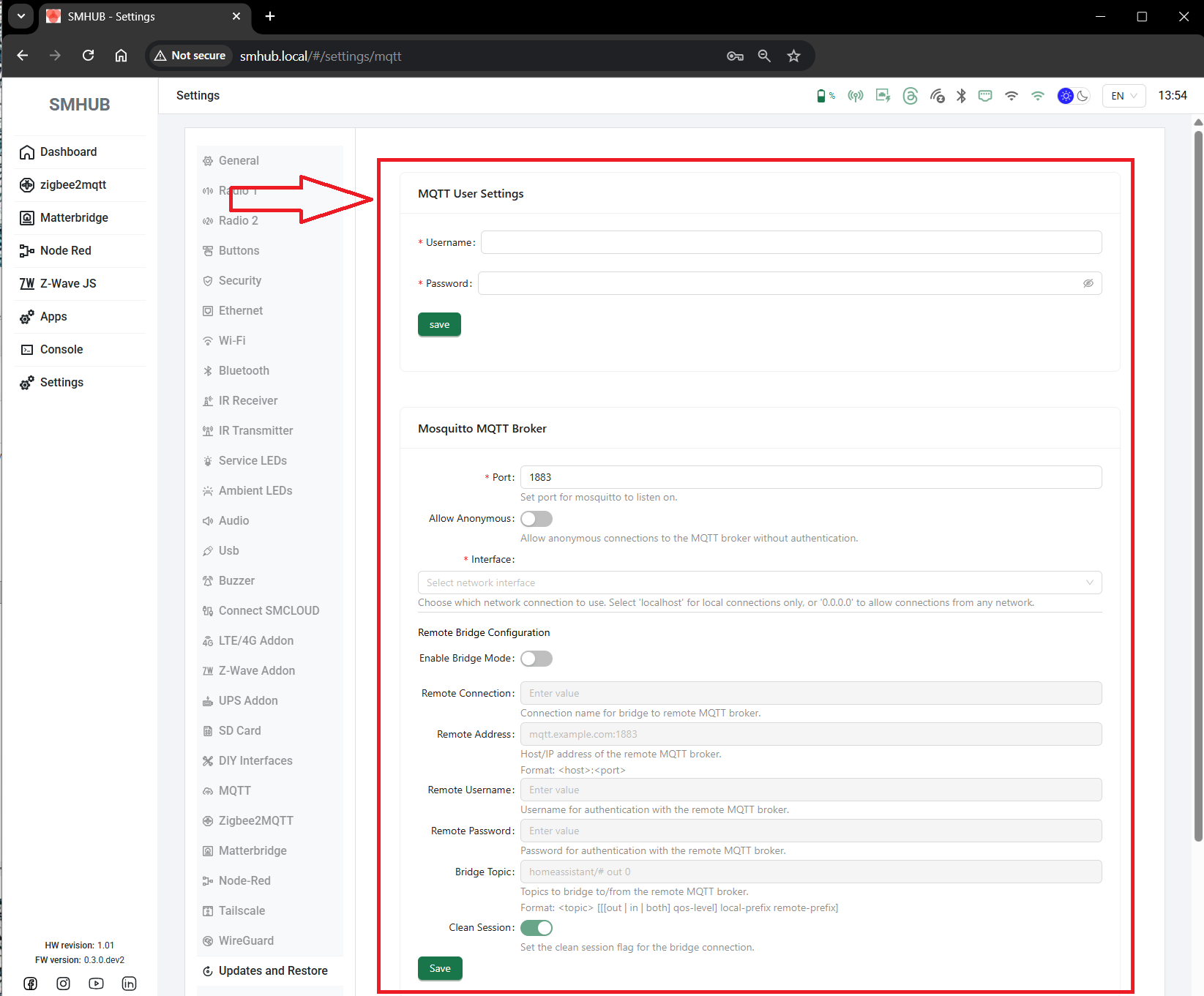
                                                                                                                                                                      image.png


                                                                                                                                                                      🧩 Fixes & Improvements

                                                                                                                                                                      💻 Web Interface

                                                                                                                                                                        Added the new MQTT settings page.

                                                                                                                                                                        Fixed saving of MQTT user accounts (credentials now stored correctly).

                                                                                                                                                                        Fixed occasional errors during web update.

                                                                                                                                                                        Improved form texts and translations.

                                                                                                                                                                        Settings are now saved properly (reading back will be added later).

                                                                                                                                                                        ⚙️ Services & System

                                                                                                                                                                          Better stability and reliability across all background services.

                                                                                                                                                                          Backend support for the new MQTT configuration.

                                                                                                                                                                          🧠 OS Core

                                                                                                                                                                            The system is now read-only by default for improved safety.

                                                                                                                                                                            Configuration changes are stored separately so they survive updates.

                                                                                                                                                                            A factory reset can now easily restore defaults if needed.


                                                                                                                                                                            🔄 How to Update

                                                                                                                                                                            From Web Interface

                                                                                                                                                                              OS: Settings → Updates and Restore → SLZB-OS v0.3.0

                                                                                                                                                                              Services / Web: Apps → smhub-services / smhub-web → Upgrade or Upgrade all

                                                                                                                                                                              From Console / SSH

                                                                                                                                                                              sudo opkg update

                                                                                                                                                                              sudo opkg upgrade


                                                                                                                                                                              2025-Oct-13:

                                                                                                                                                                              SMHUB Services v0.1.9 & SMHUB Web v0.2.5 Released


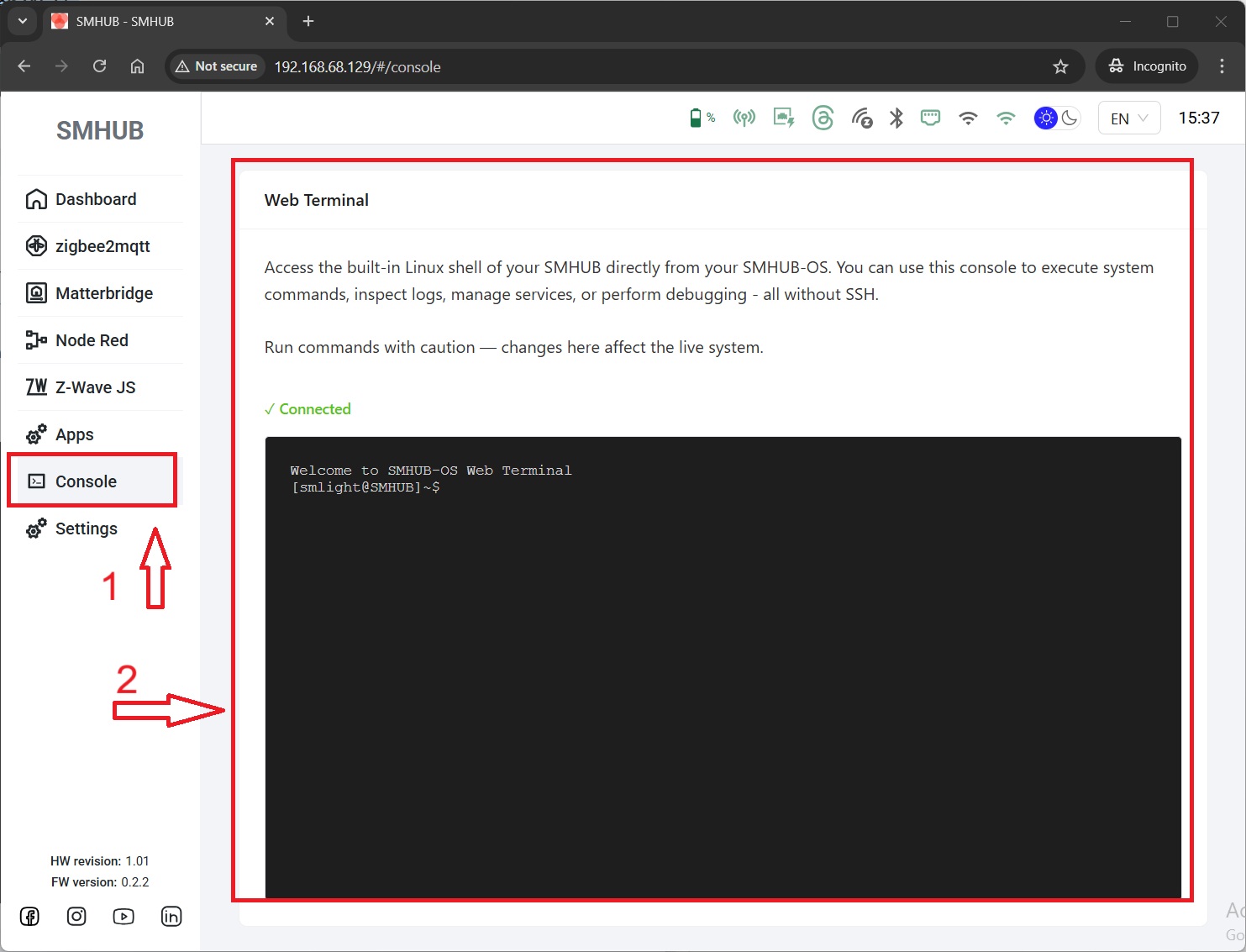
                                                                                                                                                                              🚀 Key Highlight - Web Console is Here

                                                                                                                                                                              The SMHUB Web Interface now includes a built-in Console, allowing you to execute Linux commands directly from the browser.
                                                                                                                                                                              This feature brings full terminal access to your device without SSH, making it easier to troubleshoot, manage packages, and perform advanced configuration tasks.

                                                                                                                                                                              You can find it under:
                                                                                                                                                                              Main menu → Console
                                                                                                                                                                              smhub-ui-console.jpg


                                                                                                                                                                              🧩 smhub-services v0.1.9

                                                                                                                                                                                🖥 Added backend for the web terminal

                                                                                                                                                                                🧾 Fixed application logs for Web and Z-Wave apps

                                                                                                                                                                                ⚙️ Fixed installation hang of smhub-services via Web UI

                                                                                                                                                                                🛠 Fixed 401 error on HEAD requests (previously filling logs)

                                                                                                                                                                                🔄 Added API endpoint for opkg update

                                                                                                                                                                                👤 Web terminal now logs in as user smlight

                                                                                                                                                                                🌈 Ensured color output for terminal commands


                                                                                                                                                                                🌐 smhub-web v0.2.5

                                                                                                                                                                                  🧠 Added Web Terminal (Console) accessible directly from the UI


                                                                                                                                                                                  ⚙️ Update Instructions

                                                                                                                                                                                  You can update both packages directly from the Web Interface via
                                                                                                                                                                                  Settings → Updates and Backup.

                                                                                                                                                                                  If your device becomes unresponsive or the Web UI hangs during update,
                                                                                                                                                                                  please connect via SSH and run these two commands manually:

                                                                                                                                                                                  sudo opkg update
                                                                                                                                                                                  sudo opkg upgrade

                                                                                                                                                                                  🧱 Summary

                                                                                                                                                                                  This release brings the first fully functional web console to SMHUB,
                                                                                                                                                                                  turning the browser into your direct control point for diagnostics and management.
                                                                                                                                                                                  It also refines app logging, service handling, and system-level package management —
                                                                                                                                                                                  paving the way for deeper interaction and future maintenance tools.

                                                                                                                                                                                  2025-Oct-12:

                                                                                                                                                                                  smhub-os v0.2.2 + 
                                                                                                                                                                                  smhub-service 0.1.7-1+
                                                                                                                                                                                  smhub-web v0.2.3-1

                                                                                                                                                                                  Today’s release marks a big step forward in the SMHUB platform — a major shift in how updates are delivered and managed.
                                                                                                                                                                                  While the visible feature list may seem short, this release is fundamentally important: it establishes the core OTA infrastructure that will power all future SMHUB updates.

                                                                                                                                                                                  From now on, SMHUB updates will happen entirely via the web interface, without the need for Type-C flashing or manual intervention.


                                                                                                                                                                                  🧩 SMHUB System Architecture

                                                                                                                                                                                  SMHUB is built as a modular software stack with three key subsystems working together:

                                                                                                                                                                                  Subsystem Description smhub-os Core Linux system — provides the kernel, drivers, and low-level environment. smhub-services Backend layer handling configuration, networking, and communication between OS and the web interface. smhub-web Front-end web interface for interacting with the device, viewing system state, and adjusting settings.

                                                                                                                                                                                  This modular structure enables safe, incremental updates and future scalability — we can now push new kernel, backend, or UI updates independently.


                                                                                                                                                                                  🆕 Latest Versions (as of 12 Oct 2025)

                                                                                                                                                                                  Component Version Description smhub-os 0.2.2 Updated kernel and file system with full OTA kernel flashing support. smhub-services 0.1.7-1 Improved backend management of configuration and processes. smhub-web 0.2.3-1 Updated UI with new dashboard and refined settings layout.

                                                                                                                                                                                  🔧 What’s New

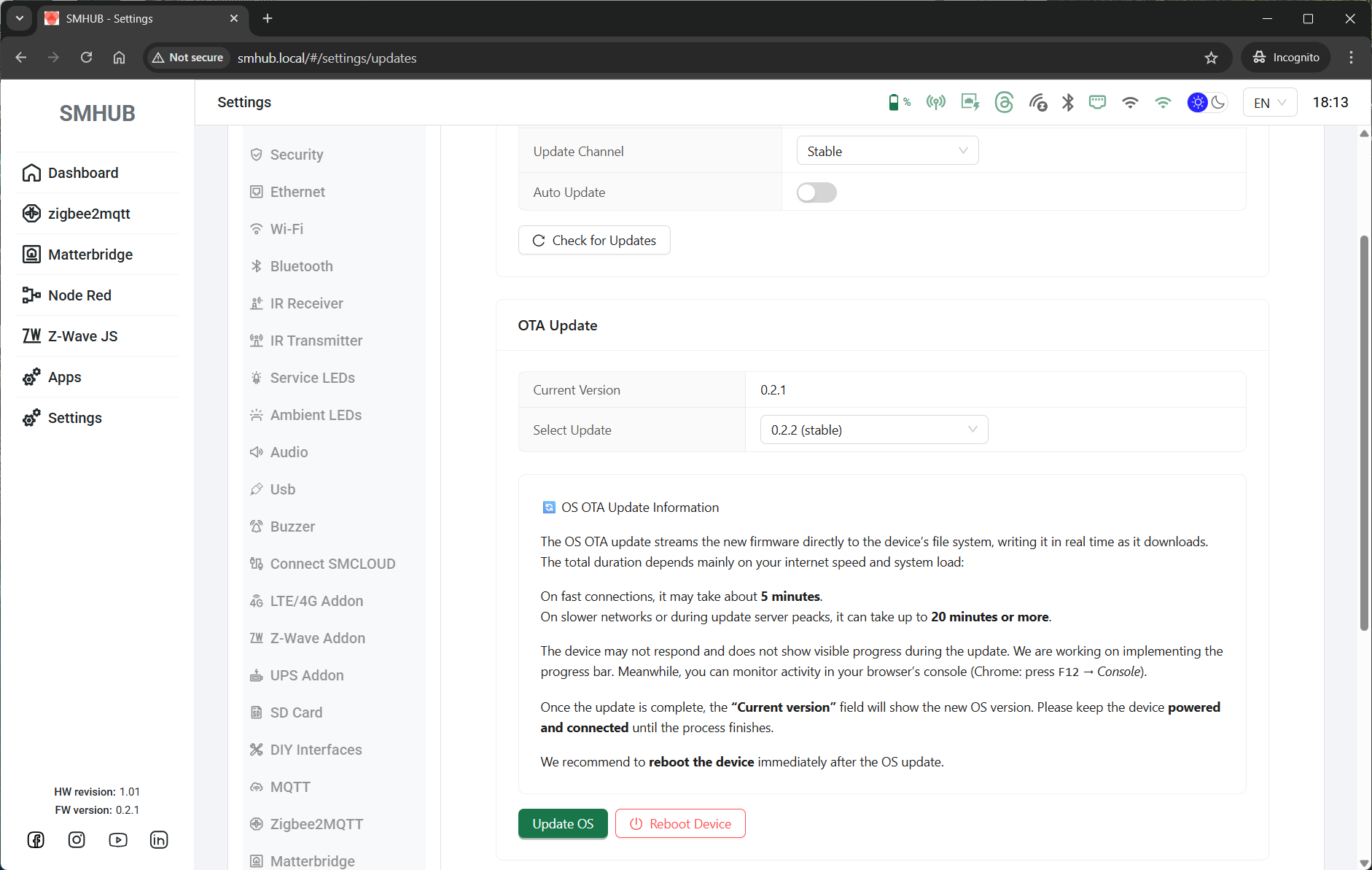
                                                                                                                                                                                    ✅ Full Kernel OTA Support
                                                                                                                                                                                    The Linux kernel and base OS can now be updated directly from the web interface — no Type-C connection required.
                                                                                                                                                                                    smhub-updates.png

                                                                                                                                                                                    🌀 Z-Wave JS Boot Fix
                                                                                                                                                                                    Fixed an issue that prevented Z-Wave JS from starting automatically at boot.

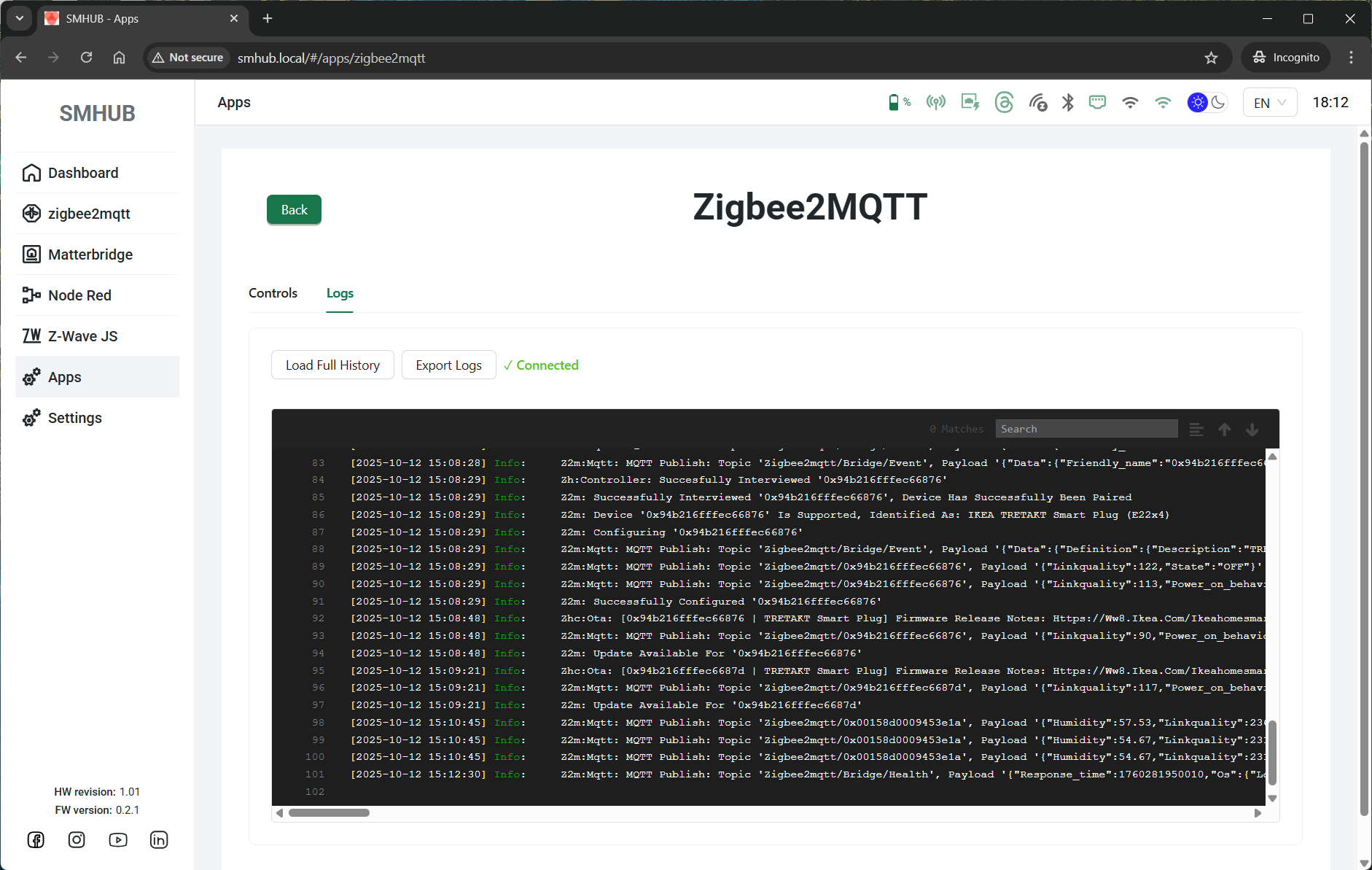
                                                                                                                                                                                    🧾 New Application Log Viewer
                                                                                                                                                                                    Many apps (including Zigbee2MQTT) now include a Logs tab directly in the Web UI.
                                                                                                                                                                                    To view logs: open the app page → click Logs → logs will appear in real time.
                                                                                                                                                                                    smhub-logs.png

                                                                                                                                                                                    🏠 Updated Dashboard Notes
                                                                                                                                                                                    Added helpful contextual information about the current development stage and upcoming feature rollout.

                                                                                                                                                                                    🔒 Unavailable Settings Pages Refinement
                                                                                                                                                                                    Incomplete or not-yet-implemented settings pages are now visually blocked for a clearer experience.

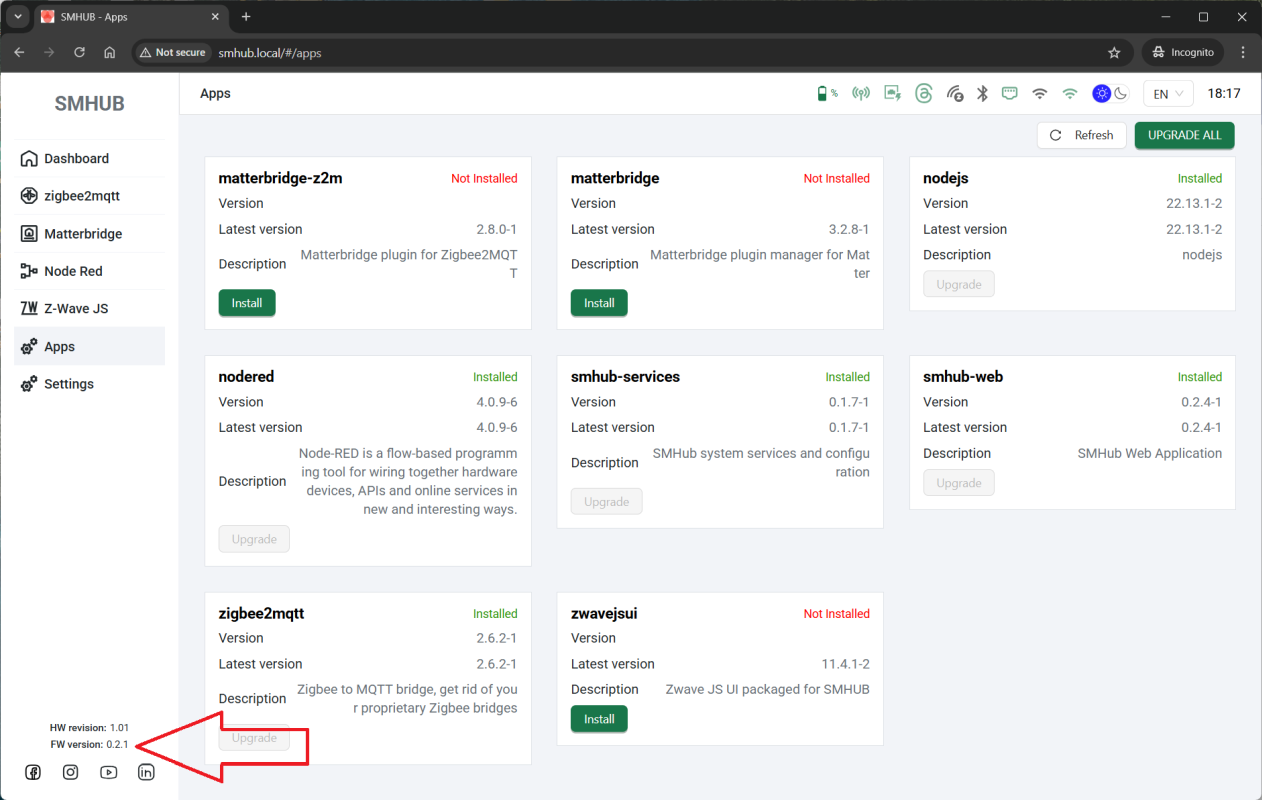
                                                                                                                                                                                    🆔 Firmware Version Display
                                                                                                                                                                                    Firmware version is now visible in the bottom-left corner of the web interface.
                                                                                                                                                                                    smhub-fw-version.png

                                                                                                                                                                                    💻 (Coming Soon) Web Console 
                                                                                                                                                                                    We’re working on enabling direct Linux console access from the web interface under
                                                                                                                                                                                    Settings → Console. This will allow executing shell commands right from UI.

                                                                                                                                                                                    ⚙️ Required Update Sequence

                                                                                                                                                                                    Before updating to SMHUB OS 0.2.2, please follow this exact sequence:

                                                                                                                                                                                      If you are running SMHUB-OS 0.2.1c - go to step 5. Otherwise, please update your SMHUB to SMHUB-OS v0.2.1c per this manual: https://smlight.tech/support/manuals/books/smhub/page/smhub-early-adopter-quick-start-guide#bkmrk-updating-smhub-firmw 

                                                                                                                                                                                      Go to the terminal SSH (details here) and execute two commands:

                                                                                                                                                                                        sudo opkg update

                                                                                                                                                                                        sudo opkg upgrade

                                                                                                                                                                                        Go to "Apps" and verify that both apps are updated to:

                                                                                                                                                                                          smhub-services to the latest (0.1.7-1)

                                                                                                                                                                                          smhub-web to the latest (0.2.3-1)

                                                                                                                                                                                          Once all updates are applied, open “Settings → Update and Backup” again - OS 0.2.2 will appear there as the next available update. Please click "Update" and reboot after successful flashing Please note, later, to update, one more (and only one) time you will need to to SSH command. All the further updates will be available via buttons in the UI.

                                                                                                                                                                                          Following this sequence ensures that the new OTA kernel update mechanism installs correctly.


                                                                                                                                                                                          ⚙️ Why This Release Matters

                                                                                                                                                                                          This update may not look flashy, but it’s a core infrastructure milestone.
                                                                                                                                                                                          Until now, OTA covered only the web interface and backend — now, the entire OS stack (including kernel) can be updated seamlessly.

                                                                                                                                                                                          Our recent focus has been on building a reliable OTA foundation.
                                                                                                                                                                                          With that in place, the next releases will shift toward new features, integrations, and automation capabilities, all distributed via this new update system.


                                                                                                                                                                                          ⚙️ I did an update of smhub-services to 
                                                                                                                                                                                          0.1.7-1 via UI button, but my device hangs/freezes

                                                                                                                                                                                          If you do update of smhub-services via the web-interface button rather than via SSH commands as described here, your device will hand.

                                                                                                                                                                                          To unfreeze it, please execute step 2, namely these commands:

                                                                                                                                                                                            Go to the terminal SSH (details here) and execute two commands:

                                                                                                                                                                                              sudo opkg update

                                                                                                                                                                                              sudo opkg upgrade